New AI Course: Microsoft Copilot Studio SkillsFuture Credits & SFEC Grants Eligible
Mastering Copilot Studio

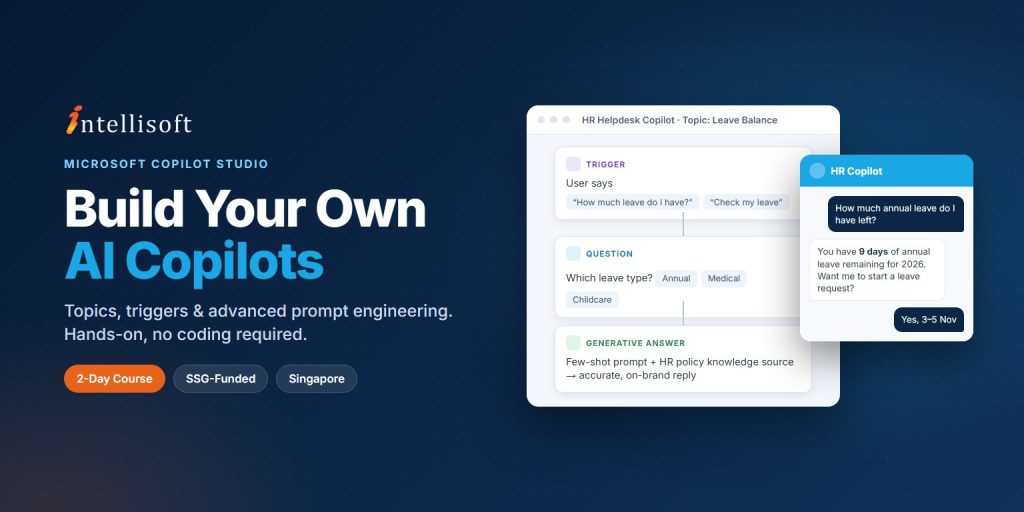
Build Custom AI Copilots with Microsoft Copilot Studio

23+
Years
120+
Courses
3,460+
Corporate Clients
45,000+
People Trained
Mastering Copilot Studio course in Singapore at Intellisoft – build custom AI copilots
Trusted by
SSG-Approved Course · Intellisoft
Next Available Date
📅 Next Class Contact us for dates
Course Details
⏰ Duration 2 Days
📍 Venue Fortune Centre, Singapore
👥 Class Size Up to 20 Pax
🎓 Certificate ✓ Certificate of Completion
From S$585.00 after SSG Grant*
Full fee: S$1,635.00 incl. 9% GST  ·  See grant table →
🏛️ SSG & SkillsFuture funding available — view full grant breakdown →
✓ 100% satisfaction guarantee · Respond within 2 hours
🏛 Up to 70% SSG Grant  ·  Pay from S$585.00 after funding
SSG Funded SkillsFuture SFEC Learn more ↓
About This Course

About This Microsoft Copilot Studio Course

As organisations adopt AI to lift productivity, automate work and improve customer engagement, the ability to design and deploy customised AI copilots has become a valuable workplace skill. This 2-day Microsoft Copilot Studio course gives you the knowledge and hands-on practice to build intelligent AI-powered copilots within the Microsoft 365 and Power Platform ecosystem.

You will design, configure and deploy custom copilot solutions for real business needs. The course covers prompt engineering, copilot configuration, conversation design, topic creation, trigger management and conversation flow development. You will also apply advanced prompting techniques — zero-shot prompting, few-shot prompting and chain-of-thought reasoning — to improve the quality, accuracy and effectiveness of AI-generated responses.

Through practical exercises and guided activities, you will learn to create business-ready copilots that automate repetitive tasks, improve customer interactions and support decision-making. Designed for beginner to intermediate learners, no prior programming experience is required.

As AI adoption grows across finance, healthcare, retail, education and professional services, organisations are looking for people who can turn AI into practical solutions. The skills from this course are immediately applicable at work and support progression into business automation, digital transformation and AI-enabled solution roles.

Go beyond using AI — design, configure and deploy your own copilots that automate work and answer questions for your team.
🖥️
Learn By Doing
Hands-on exercises on real Singapore business datasets from the very first module.
👥
Small Class Sizes
10–25 participants for personal attention.
📧
Post-Training Support
We provide email support for our participants. Simply email us your questions.
What You'll Walk Away With
🤖 Build a working custom copilot in Microsoft Copilot Studio — no coding required.
💬 Configure topics, triggers and conversation nodes for a real business use case.
🧠 Apply zero-shot, few-shot and chain-of-thought prompting to sharpen copilot answers.
🔗 See how Copilot Studio fits with Microsoft 365, Teams and the Power Platform.
What You Will Learn

What You Will Learn in Copilot Studio

🧭

Navigate Copilot Studio

Explain the purpose, key components and use cases of Copilot Studio within Microsoft 365 and the Power Platform.

✍️

Design Effective Prompts

Use prompt structure, context and the right methodology to shape how a copilot responds.

🛠️

Build Custom Copilots

Create a functional copilot with topics, triggers and conversation nodes for a business use case.

🎯

Define Copilot Behaviour

Set the tone, behaviour and conversation flow so the copilot serves its users reliably.

🧠

Apply Advanced Prompting

Use zero-shot, few-shot and chain-of-thought techniques to raise response quality.

🔄

Refine and Optimise

Evaluate prompt variations and iterate to improve copilot accuracy and relevance.

By the end of this course, learners will be able to:

  • Explain the purpose, key components and use cases of Microsoft Copilot Studio within the Microsoft 365 and Power Platform ecosystem.
  • Differentiate between prompt methodologies and explain how structure and context influence AI-powered copilot responses within Copilot Studio.
  • Develop a functional custom copilot in Copilot Studio by configuring topics, triggers and conversation nodes aligned to a business use case.
  • Apply advanced prompt engineering methodologies, including zero-shot, few-shot and chain-of-thought techniques, to optimise copilot response quality.
Is This For You?

Who Should Attend This Copilot Studio Course?

📊

Business Analysts

You translate business requirements into solutions and want to prototype AI assistants without waiting on developers.

⚙️

Operations & Project Managers

Your team loses hours to repetitive questions and manual workflows that a copilot could handle.

🖥️

IT & System Administrators

Your organisation has Copilot Studio licences and needs someone who can build and govern useful copilots.

🚀

Digital Transformation Leads

You need practical, low-code AI use cases that show measurable productivity gains.

This course is suitable for:

  • Business analysts and process improvement specialists
  • Operations managers and project managers
  • IT personnel, system administrators and solution architects
  • Digital transformation leads
  • Microsoft 365 and Power Platform power users in HR, finance, customer service and supply chain teams
Before You Attend

Pre-Requisites for Mastering Copilot Studio

No prior programming experience is required. Learners should be comfortable using a computer and Microsoft 365 applications. Familiarity with Microsoft Teams, SharePoint or Power Automate is helpful but not essential.

🏛️  SSG funding up to 70%, plus SkillsFuture Credit and SFEC support.

Curriculum

Copilot Studio Course Outline & Curriculum

Module 1

Introduction to Microsoft Copilot Studio

  • Microsoft Copilot Studio capabilities and applications
  • Copilot Studio environment and core components
  • Productivity and workflow automation use cases
  • Microsoft 365 and Power Platform integration
Module 2

Fundamentals of Prompt Design for Copilots

  • Principles of effective prompt design for AI-powered copilots
  • How prompt structure and context influence AI model responses
  • Prompt methodologies applicable within Copilot Studio
  • Basic vs nuanced prompt formulations and their outputs
Module 3

Building and Configuring Custom Copilots (Part 1)

  • Creating and configuring custom copilots
  • Topics, triggers and conversation nodes
Module 1

Building and Configuring Custom Copilots (Part 2)

  • Defining copilot behaviour and interactions
  • Business use case implementation with copilots
Module 2

Advanced Prompt Engineering Strategies

  • Zero-shot, few-shot and chain-of-thought prompting
  • Strategic prompt design techniques
  • Evaluating copilot response quality and accuracy
  • Iterative prompt refinement and optimisation
Module 3

Assessment

  • Written Assessment – Short Answer Questions (60 min)
  • Practical Performance Assessment (60 min)

T1: Introduction to Microsoft Copilot Studio

  • Microsoft Copilot Studio capabilities and applications
  • Copilot Studio environment and core components
  • Productivity and workflow automation use cases
  • Microsoft 365 and Power Platform integration

T2: Fundamentals of Prompt Design for Copilots

  • Principles of effective prompt design for AI-powered copilots
  • How prompt structure and context influence AI model responses
  • Prompt methodologies applicable within Copilot Studio
  • Basic vs nuanced prompt formulations and their outputs

T3: Building and Configuring Custom Copilots

  • Creating and configuring custom copilots
  • Topics, triggers and conversation nodes
  • Defining copilot behaviour and interactions
  • Business use case implementation with copilots

T4: Advanced Prompt Engineering Strategies

  • Zero-shot, few-shot and chain-of-thought prompting
  • Strategic prompt design techniques
  • Evaluating copilot response quality and accuracy
  • Iterative prompt refinement and optimisation

Assessment

  • Written Assessment – Short Answer Questions (60 min)
  • Practical Performance Assessment (60 min)
Your Trainer
👤
Your Trainer

Vinai Prakash

MBA Microsoft Certified Trainer 35+ Years Experience

Vinai Prakash is a technology trainer, consultant, author, and the Founder of Intellisoft Systems. With 35+ years of experience in information technology, business analytics, automation, artificial intelligence, and digital transformation, he has trained over 45,000 professionals from government agencies, MNCs, financial, educational institutions, and SMEs across Singapore and the region. Vinai specializes in helping organizations leverage data, automation, and emerging technologies to improve productivity, enhance decision-making, and accelerate business transformation. He is the author of the Amazon bestselling book *Excel Crash Course* and has contributed articles on technology, business intelligence, and data analytics to The Straits Times and other leading business publications. His expertise spans Data Analytics with Excel and Power BI, SQL, Python, Microsoft Power Platform, Microsoft 365 Copilot, Agentic AI, Claude Code, OpenAI Codex, n8n Automation, Project Management, and Digital Productivity Solutions. He is widely recognized for his ability to simplify complex technical concepts and translate them into practical, real-world solutions that participants can immediately apply in their work.

Trusted by professionals from 500+ organisations
Canon CPF Board OCBC NTU NUS Mindef HDB JTC ExxonMobil Sembcorp
AXA Epson NTUC Health DSO Toyota Asia Pacific BNY Mellon Ritz-Carlton Standard Chartered Singapore Police Force Tan Tock Seng Hospital

Training Course Fees & Funding

Full course fee: S$1,500.00 (before GST & government funding)

Highest Funding
70% Grant

70% SSG Grant

Baseline + Enhanced Training Support

  • SG Citizens aged 40+ (Individual, SME or MNC)
  • SME-sponsored SG Citizens (21+)
  • SME-sponsored PRs (21+)
Course Fee S$1,500.00
SSG Funding (70%) − S$1,050.00
Nett Fee S$450.00
GST (9%) S$135.00
You Pay S$585.00
SSG Funded
50% Grant

50% SSG Grant

Baseline SSG Funding

  • SG Citizens aged 21–39 (Individual or MNC)
  • MNC company-sponsored PRs (21+)
  • Individual PRs (21+)
Course Fee S$1,500.00
SSG Funding (50%) − S$750.00
Nett Fee S$750.00
GST (9%) S$135.00
You Pay S$885.00
Foreigners & other pass holders: Government grants are not applicable. Full course fee of S$1,500.00 + 9% GST = S$1,635.00 applies. Contact us for more details.

Need help with funding applications? We'll guide you through the process.

* Terms & conditions apply. Funding subject to eligibility and approval by respective agencies. GST applies on full course fee before subsidy. Fee information is accurate as of Sep 2026.

Register

Register for Copilot Studio Training in Singapore

💬 Corporate / Group Enquiry

📅 Contact us for upcoming dates.

We run regular public classes and can schedule dedicated corporate runs for your team.

🏢 Running this for a group? Request a Custom Corporate Run →
Common Questions

Frequently Asked Questions

What is Microsoft Copilot Studio? ▾
Microsoft Copilot Studio is a low-code platform for building custom AI copilots (AI agents) that answer questions, guide conversations and automate tasks. It works within Microsoft 365 and the Power Platform, so copilots can be used in Teams, websites and other channels.
What are the course fees and funding options? ▾
The full course fee is S$1,500 before GST. As an SSG-approved (CASL) course, eligible Singapore Citizens and PRs receive 50% SSG funding, or up to 70% for Singapore Citizens aged 40 and above and SME-sponsored learners — bringing the payable amount to as low as S$585.00 including GST. SkillsFuture Credit and SFEC can be used to offset the balance, subject to eligibility.
Is this a WSQ course? ▾
No. Mastering Copilot Studio is an SSG-approved non-WSQ course under the CASL scheme. It is eligible for the same SSG course fee funding as WSQ courses, and you receive a Certificate of Completion after attending the course and passing the assessments.
Do I need programming experience? ▾
No. Copilot Studio is a low-code tool and the course is designed for beginner to intermediate learners. If you are comfortable with Microsoft 365 applications, you can follow along. Familiarity with Teams, SharePoint or Power Automate helps but is not required.
How long is the course and how is it assessed? ▾
It is a 2-day, 16-hour instructor-led course: 14 hours of training and 2 hours of assessment. Assessment consists of a 60-minute written short-answer test and a 60-minute practical performance assessment where you configure and refine a copilot.
What will I be able to build after the course? ▾
You will be able to build a functional custom copilot for a business use case — configuring topics, triggers and conversation nodes, defining its behaviour and tone, and refining its answers with zero-shot, few-shot and chain-of-thought prompting.
How is Copilot Studio different from Microsoft 365 Copilot? ▾
Microsoft 365 Copilot is an assistant you use inside Word, Excel, Outlook and Teams. Copilot Studio is the tool for building your own copilots — tailored to your organisation's processes, content and customers. If you want to use Copilot in Office apps, see our Microsoft 365 Copilot courses; if you want to build copilots, this is the course.
Can I use SkillsFuture Credit for this course? ▾
Yes. Singapore Citizens aged 25 and above can use their SkillsFuture Credit to offset the course fee balance after SSG funding. Companies can also use SkillsFuture Enterprise Credit (SFEC), subject to eligibility.
Ready to Get Started?

Upgrade Your Skills.
Seats Fill Quickly.

Join thousands of professionals who've trained with Intellisoft. With SSG funding, this is the most cost-effective way to upskill your team.

✉️ training@intellisoft.com.sg · We respond within 2 business hours

💬 Quick Enquiry

We respond within 2 business hours.

By submitting, you consent to Intellisoft collecting your data in accordance with Singapore's PDPA.

✅ Thank you! We'll be in touch shortly.
Course Brochure
Mastering Copilot Studio

Enter your details and we'll send the full course brochure — complete outline, funding details, and registration instructions.

Free Tips, Tutorials & Training Grants Info

Learn from expert tips, tricks and resources for Excel, PowerPoint, Photoshop, Python, Power BI, Project Management, IT, Soft Skills & more with our Email Newsletter.
Plus get the latest news on Grants. Join Today!

Found What You Were
Looking For?

Just Tell us...

We're Here To Help You!