Create Agentic AI Automations Without Coding – TEMP

N8N Course Singapore at Intellisoft. SkillsFuture N8N LangFlow Singapore Course Intellisoft.
Create Agentic AI Automations Without Coding SkillsFuture Credits Eligible in Singapore.

Course Overview: Build Agentic AI Automations Without Writing Code

This practical, hands on Agentic AI automation development without any code is offered to companies and individuals. The course follows a very systematic, step by step approach to guide you on the path to begin building Agentic AI automations without writing code.


Section 1: Introduction to AI Agents and Workflows

Build AI Agents with No Code at Intellisoft Systems Singapore - SkillsFuture Eligible Course in Singapore
Build AI Agents with No Code at Intellisoft Systems Singapore – SkillsFuture Eligible Course in Singapore

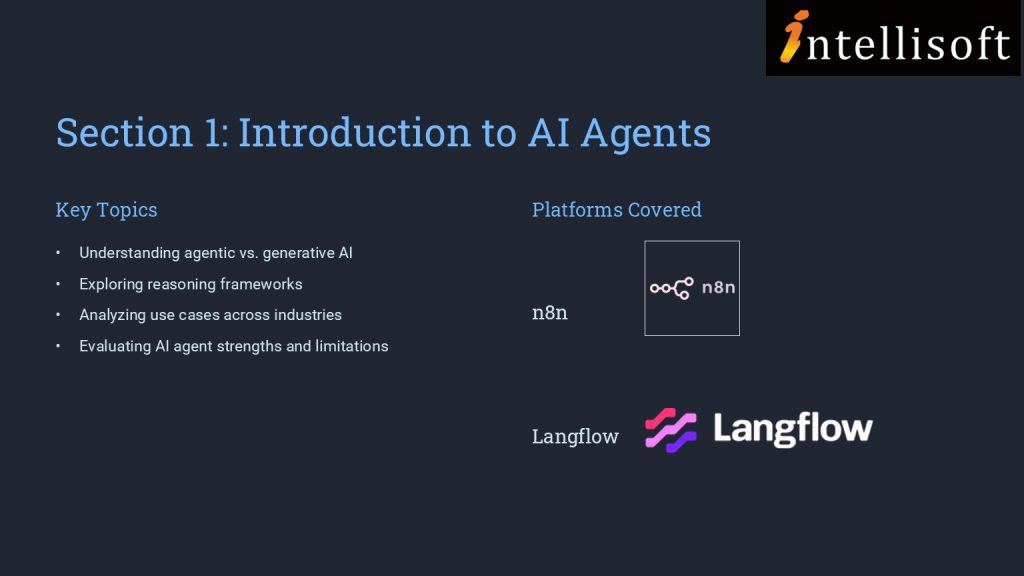
In section 1, we establish the foundational knowledge by introducing you to AI agents and agentic AI workflows. This section covers the basics of AI agents, differentiating between agentic and generative AI, and explores reasoning frameworks and use cases.

You are also introduced to agentic AI platforms like n8n and Langflow, setting the stage for creating AI agents. This foundational knowledge is crucial for analyzing AI agents’ algorithms and identifying their strengths and limitations, addressing the initial performance gap.

Section 2: Developing AI Chatbots

Building on the foundational knowledge, Section 2 delves into the practical aspects of developing AI chatbots on no-code platforms. You are introduced to platforms such as Agentx, Promptly, and Flowise, and engage in creating AI chatbots and digital human avatars.

This section enhances your ability to correlate AI agents’ algorithm design with efficiency and assess improvements in AI applications.

 Implementing RAG Applications

Section 3 moves to a higher level of complexity where you will explore the development of Retrieval Augmented Generation (RAG) applications on no-code platforms. This section covers the overview of RAG, creation of agentic RAG applications, and introduces agentic search and deep research.

You will also engage with Microsoft Copilot Studio to create AI agents and RAG applications.

This section equips you with the skills to evaluate AI application effectiveness and assess feasibility for product and maintenance processes.

More information about Creating AI Agentic Automations Without Writing Code

In the fast-evolving world of AI, understanding how to design and deploy intelligent agents—without writing a single line of code—is becoming an essential skill. This course on Agentic AI provides a practical, step-by-step journey into the world of AI agents, empowering learners to conceptualize, build, and deploy AI workflows using non-coding platforms.

Designed for professionals and enthusiasts in product management, technology, and innovation roles, this course demystifies the concepts of agentic AI, chatbot development, and Retrieval Augmented Generation (RAG). Learners will explore no-code tools like n8n, Langflow, Agentx, Flowise, HeyGen, and Microsoft Copilot Studio, gaining hands-on experience to rapidly prototype and deploy AI applications.

By the end of the course, you’ll not only understand the difference between generative and agentic AI, but also be able to create functional AI agents that solve real-world problems—boosting efficiency, user engagement, and business innovation.

If you are new to generative AI, you can join our WSQ Funded course on Digital Transformation with AI Tools.

The Key objectives of Building a Good Employee Recruitment Process are:

  • Defining recruitment.
  • Understanding the selection process.
  • Recognizing the GROW model and how to set goals.
  • Preparing for the interview and question process.
  • Identifying and avoiding bias when making offers.
  • Discovering ways to retain talent and measure growth.

Go To Top

Best suited for HR Employees, Managers, as well as companies involved in Recruitment Business.

Managers & HR in all companies, who are recruiting employees must know the process well.


Go To Top

Module One: Getting Started

Module Two: Introduction to Recruitment

Module Three: The Selection Process

Module Four: Goal Setting

Module Five: The Interview

Module Six: Types of Interview Questions

Module Seven: Avoiding Bias in Your Selection

Module Eight: The Background Check

Module Nine: Making Your Offer

Module Ten: Orientation and Retention

Module Eleven: Measuring the Results

Module Twelve: Wrapping Up


Go To Top

Anyone can attend who wants to improve the skills to hire Employee in the company. No specific skills or pre -requisites.

You must have basic knowledge of English and be interested in the Recruitment process.

Go To Top

Post-Course Support

  • We provide free consultation related to the subject matter after the course.
  • Please email your queries to training@intellisoft.com.sg and we will forward your queries to the subject matter experts.

Venue:

All courses are conducted at:

190 Middle Road, 10-08 Fortune Centre, Singapore 188979.  5 mins walk from Bencoolen MRT station. Bugis, Rochor, Bras Basah MRT are nearby, within walking distance.

The venue is disabled-friendly.

SkillsFuture Ready

Singaporeans can use $500 SkillsFuture Credits for this training to offset the course fees.

Contact us for advise on how to go about claiming your SkillsFuture.

Get Started Today!

Learn By Doing

You learn best when you Do It Yourself.

We teach you, step by step, how you can learn new skills, build your knowledge and enhance your career prospects quickly & easily, with Practical Tips & Tricks!

Do You Have Any Questions or Need a Quotation?

Simple. Just tell us what you need. We’ll be glad to help you!

Some of the companies that experienced our trainings

"What I love about this training is that the trainers make sure we learn the steps and are able to do it on our own. This is a real advantage and I will definitely come back for more practical training"
Michele Martin
HR Manager
“The training was everything I hoped for, and more. Intellisoft Systems really makes a difference, I would have never discovered the hidden features of the sotftware on my own. Thanks a lot Intellisoft !"
Joy Tan
Project Engineer

How To Register

Register for the 2 Days Create Agentic AI Automation Without Coding Training in Singapore today.

Click on the chosen Create Agentic AI Automations Without Coding course dates available at the top of this page.

Need Help in Registering for Create Agentic AI Automations Without Coding Course?

Call us at +65 6250-3575, WhatsApp: +65 9066-9991 

If you have any questions about your target audience, pre-requisites for this course or want to arrange a corporate training for your company, do let us know. Email to training@intellisoft.com.sg

Create Agentic AI Automations Without Coding Corporate Training Program in Singapore (Physical Class or Virtual Classroom using Zoom or Microsoft Teams)

Request a Course Brochure here or enquire about any questions regarding Agentic AI training. We offer Corporate Training for your company too.

If you are looking to train your entire team, we can arrange to conduct the Agentic AI  training at your office location too. Just contact us for the quotation and suitable dates for the training.

Accelerate Your Career With the Most Effective & Practical Training.

Training Course Fees & Funding

Full course fee: S$1,000.00 (before GST & government funding) TGS: TGS-2025054773

Highest Funding
70% Grant

70% SSG Grant

Baseline + Enhanced Training Support

  • SG Citizens aged 40+ (Individual, SME or MNC)
  • SME-sponsored SG Citizens (21+)
  • SME-sponsored PRs (21+)
Course Fee S$1,000.00
SSG Funding (70%) − S$700.00
Nett Fee S$300.00
GST (9%) S$90.00
You Pay S$390.00
SSG Funded
50% Grant

50% SSG Grant

Baseline WSQ Funding

  • SG Citizens aged 21–39 (Individual or MNC)
  • MNC company-sponsored PRs (21+)
  • Individual PRs (21+)
Course Fee S$1,000.00
SSG Funding (50%) − S$500.00
Nett Fee S$500.00
GST (9%) S$90.00
You Pay S$590.00
Foreigners & other pass holders: Government grants are not applicable. Full course fee of S$1,000.00 + 9% GST = S$1,090.00 applies. Contact us for more details.

Need help with funding applications? We'll guide you through the process.

* Terms & conditions apply. Funding subject to eligibility and approval by respective agencies. GST applies on full course fee before subsidy. Fee information is accurate as of Apr 2026.

N8N Course Singapore at Intellisoft. SkillsFuture N8N LangFlow Singapore Course Intellisoft.

Digital Transformation with AI Tools (WSQ) – TEMP

Digital Transformation With AI Tools in Singapore at Intellisoft Systems
Intellisoft offers WSQ funded, UTAP supported SkillsFuture Credits Eligible Courses in Singapore

Learn ChatGPT, Gemini, CoPilot & Other AI Tools
for Content Generation, Digital Marketing
& Transformation of Process

AI Tools Training at Intellisoft Systems Singapore

Our Best & Most Useful AI Tools Course in Singapore

Best AI ChatBot for SEOThe “Digital Transformation with AI Tools” course employs a step-by-step framework to ensure you develop a comprehensive understanding of how AI tools can drive digital transformation within your business.

The course begins by introducing fundamental concepts like artificial intelligence and generative AI, and advances to topics such as various AI tools such as ChatGPT, Gemini, Claude, Copilot etc. and Feasibility analysis.

You will explore How to Implement the Latest AI Tools like ChatGPT to your business scenarios.

Use ChatGPT or Gemini or Copilot for Creating Marketing Newsletters, Social Media Posts, Tweets, LinkedIn Posts, Facebook Posts easily.


The Key objectives of Building a Good Employee Recruitment Process are:

  • Defining recruitment.
  • Understanding the selection process.
  • Recognizing the GROW model and how to set goals.
  • Preparing for the interview and question process.
  • Identifying and avoiding bias when making offers.
  • Discovering ways to retain talent and measure growth.

Go To Top

Best suited for HR Employees, Managers, as well as companies involved in Recruitment Business.

Managers & HR in all companies, who are recruiting employees must know the process well.


Go To Top

Module One: Getting Started

Module Two: Introduction to Recruitment

Module Three: The Selection Process

Module Four: Goal Setting

Module Five: The Interview

Module Six: Types of Interview Questions

Module Seven: Avoiding Bias in Your Selection

Module Eight: The Background Check

Module Nine: Making Your Offer

Module Ten: Orientation and Retention

Module Eleven: Measuring the Results

Module Twelve: Wrapping Up


Go To Top

Anyone can attend who wants to improve the skills to hire Employee in the company. No specific skills or pre -requisites.

You must have basic knowledge of English and be interested in the Recruitment process.

Go To Top

Post-Course Support

  • We provide free consultation related to the subject matter after the course.
  • Please email your queries to training@intellisoft.com.sg and we will forward your queries to the subject matter experts.

Venue:

All courses are conducted at:

190 Middle Road, 10-08 Fortune Centre, Singapore 188979.  5 mins walk from Bencoolen MRT station. Bugis, Rochor, Bras Basah MRT are nearby, within walking distance.

The venue is disabled-friendly.

SkillsFuture Ready

Singaporeans can use $500 SkillsFuture Credits for this training to offset the course fees.

Contact us for advise on how to go about claiming your SkillsFuture.

Get Started Today!

Learn By Doing

You learn best when you Do It Yourself.

We teach you, step by step, how you can learn new skills, build your knowledge and enhance your career prospects quickly & easily, with Practical Tips & Tricks!

Do You Have Any Questions or Need a Quotation?

Simple. Just tell us what you need. We’ll be glad to help you!

Some of the companies that experienced our trainings

"What I love about this training is that the trainers make sure we learn the steps and are able to do it on our own. This is a real advantage and I will definitely come back for more practical training"
Michele Martin
HR Manager
“The training was everything I hoped for, and more. Intellisoft Systems really makes a difference, I would have never discovered the hidden features of the sotftware on my own. Thanks a lot Intellisoft !"
Joy Tan
Project Engineer

How To Register

To register for this 2-day course on Chat GPT and Generative AI Tools & Technologies at Intellisoft Systems, you can visit our office or simply register on the website.

The Registration form allows you to directly register the participants.

Additionally, you can reach us by phone at +65 6250-3575 for more information or to register directly.
How to use chatgpt to Create Social Media Content

Accelerate Your Career With the Most Effective & Practical Training.


Upto 70% WSQ Funding* from SkillsFuture Singapore

Training Course Fees & Funding

Full course fee: S$750.00 (before GST & government funding) TGS: TGS-2024043430

Highest Funding
70% Grant

70% SSG Grant

Baseline + Enhanced Training Support

  • SG Citizens aged 40+ (Individual, SME or MNC)
  • SME-sponsored SG Citizens (21+)
  • SME-sponsored PRs (21+)
Course Fee S$750.00
SSG Funding (70%) − S$525.00
Nett Fee S$225.00
GST (9%) S$67.50
You Pay S$292.50
SSG Funded
50% Grant

50% SSG Grant

Baseline WSQ Funding

  • SG Citizens aged 21–39 (Individual or MNC)
  • MNC company-sponsored PRs (21+)
  • Individual PRs (21+)
Course Fee S$750.00
SSG Funding (50%) − S$375.00
Nett Fee S$375.00
GST (9%) S$67.50
You Pay S$442.50
Foreigners & other pass holders: Government grants are not applicable. Full course fee of S$750.00 + 9% GST = S$817.50 applies. Contact us for more details.

Need help with funding applications? We'll guide you through the process.

* Terms & conditions apply. Funding subject to eligibility and approval by respective agencies. GST applies on full course fee before subsidy. Fee information is accurate as of Apr 2026.

Excel for HR Professionals – TEMP

Excel for HR course in Singapore at Intellisoft with SkillsFuture Credits Eligibility

Microsoft Excel training at Intellisoft

Up to 70% WSQ Funding & SkillsFuture Credits Eligible Course on Excel Analytics for HR Professionals in Singapore

Course Duration for Microsoft Excel for HR Training: 2 days

Where: Intellisoft Training Room @FortuneCentre
Using: Microsoft Excel 365.   Call +65 6250-3575 for Details.
Excel for HR course in Singapore at Intellisoft with SkillsFuture Credits Eligibility

Unlock the power of data-driven decision-making with Excel for HR Professionals, a comprehensive 2-day hands-on workshop designed specifically for Human Resource executives, managers, and analysts.

In today’s fast-paced, metrics-driven workplace, HR teams must go beyond spreadsheets and truly analyze their workforce data to provide strategic insights. This workshop equips you with the tools, techniques, and confidence to clean, manage, analyze, and visualize HR data using Microsoft Excel.

You’ll learn how to calculate HR metrics, build interactive dashboards, use PivotTables for workforce analysis, and even perform hypothesis testing to validate HR strategies. From understanding employee turnover trends to visualizing recruitment funnels, this course will help you deliver clear, data-backed insights to management.HR Analytics Course Singapore

Led by a senior HR analytics expert, this course blends real-world HR scenarios with Excel’s practical capabilities, making it an essential upskilling program for modern HR professionals.

Learn Excel at Intellisoft Singapore

By the end of this 2-day workshop, participants will be able to:

  • Understand key HR metrics and their role in data-driven decision-making

  • Clean and prepare HR data for analysis using Excel

  • Apply essential Excel formulas like IF, XLOOKUP, COUNTIF, and SUMIFS

  • Perform basic descriptive statistics to summarize HR data

  • Use PivotTables with grouping, binning, and slicers for HR reporting

  • Create charts and dashboards to visualize workforce trends

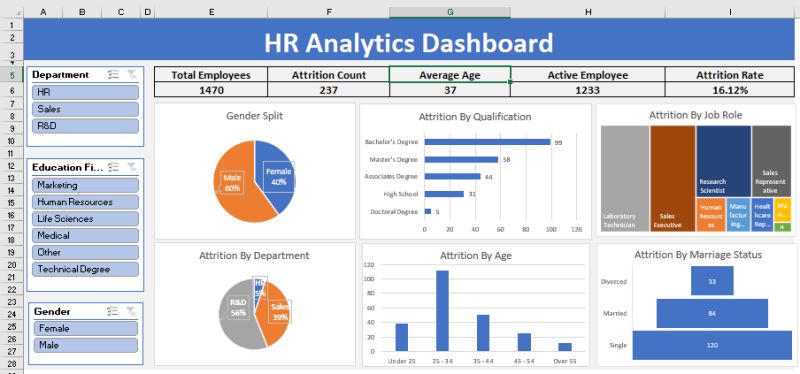
  • Build interactive HR dashboards with KPIs and slicers
  • Apply data validation and protection for secure HR reporting

  • Translate HR data into actionable insights for management

In just 2 days, HR Professionals will learn the tips that save hours to resolve the difficulties they face on a daily basis in doing employee compensations, salary, leave, benefits etc.

In this practical training, participants will learn formatting techniques to convert data from different sources,  and how to make the best use of most important formulas for HR.Using Excel for Beginners in HR Analytics - 2 Day classroom in Singapore

What will you get:

  • Quality training is delivered by Microsoft Certified Trainers from the industry.
  • Participants get the easy to read and understand manual specially designed for this course to take back for practice and future reference.
  • All formulas and functions from these files could be directly used at workplace.
  • Ability to ask questions on the spot and maximize your learning.

You can register online for the Advanced Excel for HR Training.

If you want to join our other Excel course in Singapore & improve your skills, we have multiple courses – Basic Excel for Analytics, Advanced Excel Courses in Singapore & VBA Macro Programming Courses.

Go To Top

This course is targeted towards HR Executives, HR Analysts, Talent Acquisition Specialists, and HR Business Partners who want to enhance their Excel skills for real-world HR use. If you have some HR background, or work in any function in HR, this practical and hands-on course on HR Analytics with Advanced Excel skills will be of great use to you and your organization.

After completion of the Advanced Excel for HR Analytics Training, you will be able to do the following easily:

  1. Calculate the tax deductible  amount based on the different salary range.
  2. Display first name, last name with prefix in one single column from three different columns.
  3. Find years of service of employees.
  4. Find the total salary expenses in different regions, different departments.
  5. Total  number of employees in the company  in different departments.
  6. Find the total salary given to employees of a particular department or designation in a particular month.
  7. Find number of employees joined on particular date/month in any department in any country.
  8. Calculate the bonus based on overall performance of an employee.
  9. Find the number of leaves taken by any employee, find the designation of an employee from his salary.
  10. Count number of directors or any designation in a company.
  11. Display the records according to department, by hire date, by salary etc.
  12. Calculate the total overtime hours for employees for any month.
  13. View summarized salary for all the different countries in different departments.
  14. Set the status, department of an employee through data validation.
  15. Validate the hire date upon data entry.
  16. Calculate salary based on overtime hours.
  17. Calculate the net pay of an employee from his/her daily pay and leaves taken.
  18. Consolidate overtime hours and rate for two employees
  19. Compare employee’s involvement in department from the working hours using charts.
  20. Find total number of employees working in specific department from specific dates, and much more in this 2 day HR focused Microsoft Excel 365 workshop.

Register today!

Go To Top

Excel Training @Intellisoft

Excel for HR Professionals: 2-Day Practical Workshop – Course Outline

Empower HR decisions with Data-Driven Insights Using Microsoft Excel

Excel for HR course in Singapore at Intellisoft with SkillsFuture Credits Eligibility

Day 1: Foundations of Excel for HR Analytics

Module 1: Introduction to HR Analytics with Excel

  • The role of HR analytics in modern workforce planning and decision-making.
  • Overview of key HR metrics: turnover, absenteeism, training ROI, cost per hire, etc.
  • How Excel supports people analytics in daily HR operations.

Module 2: Excel Basics Refresher for HR Teams

  • Navigating Excel’s interface and layout.
  • Best practices for entering, editing, and formatting HR data.
  • Time-saving shortcuts and tricks tailored for HR scenarios.

Module 3: Managing & Cleaning HR Data

  • Data formatting essentials: text, numbers, dates, currencies.
  • Cleaning messy HR data using Text Functions in Excel like TRIM, PROPER, UPPER/LOWER, and SUBSTITUTE.
  • Removing duplicates, fixing blank records, and using Flash Fill for smart entries.

Module 4: Sorting, Filtering & Conditional Formatting in HR

  • Sorting multi-column HR data (e.g. tenure within departments).
  • Advanced filters: finding employees with specific certifications or expiring contracts.
  • Highlighting absenteeism, birthdays, or contract expiry using conditional formatting.

Module 5: Key Statistics and Descriptive Analytics for HR

  • Understanding key statistical indicators: average, median, mode, min, max, standard deviation.
  • Using built-in functions for Analysis using Average, Median, Mode, Standard Deviation: AVERAGE(), MEDIAN(), MODE.SNGL(), STDEV.P().
  • Applying statistics to HR use cases: average age, training hours, salaries.

Module 6: Useful Formulas for HR Analysis

  • Using IF, COUNTIF, SUMIF, AVERAGEIF for common HR calculations.
  • XLOOKUP vs VLOOKUP: when and how to use each to fetch employee details.
  • Introduction to trend analysis & forecasting in HR Data

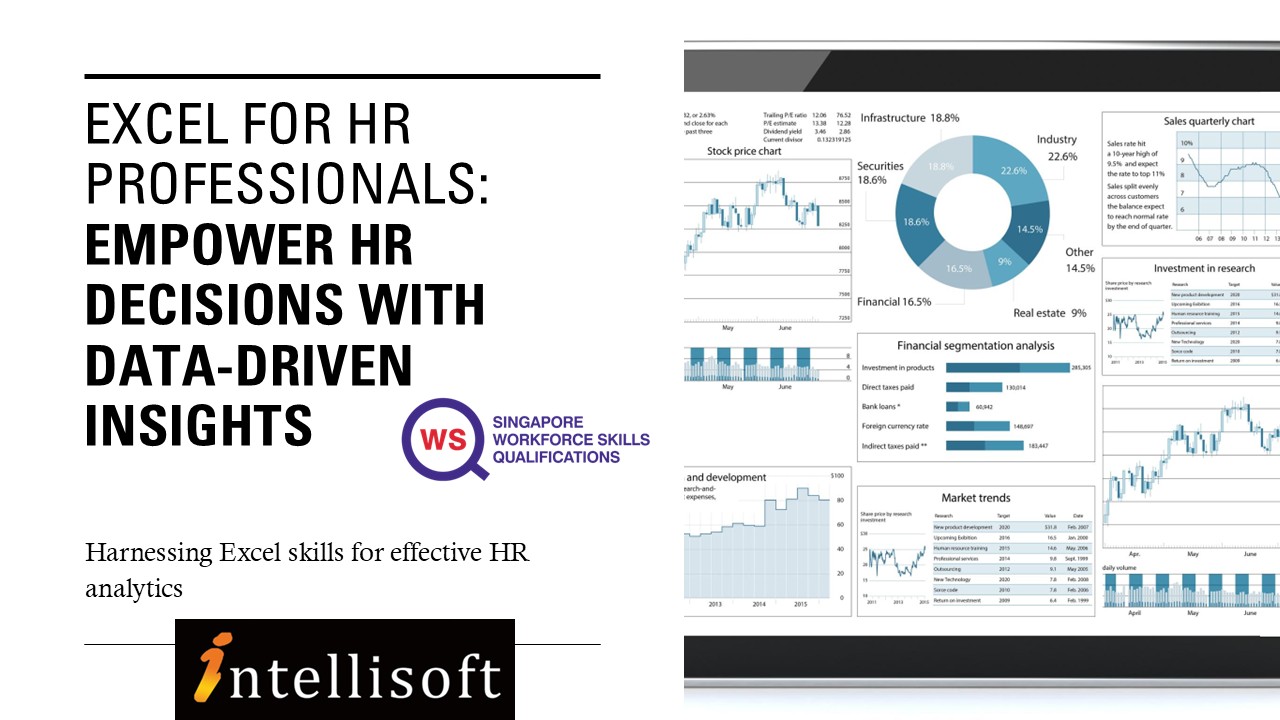
HR Dashboard for Analytics in Excel at Intellisoft Systems Singapore

Day 2: Advanced HR Analytics, Reporting & Dashboards

Module 7: Pivot Tables for HR Reporting & Analysis

  • Creating PivotTables to analyze headcount, turnover, attendance.
  • Grouping and binning by age, years of service, and salary ranges.
  • Calculating % of total, count of hires by department, and more.
  • Adding slicers for filtering by department, gender, or employment type.
  • Hypothesis Testing in HR data

Module 8: HR Data Visualization with Excel Charts

  • Choosing the right chart type for HR reports.
  • Creating trend charts for attrition, headcount growth, or training hours.
  • Combining multiple data series (e.g. budget vs actual training spend).

Module 9: Building HR Dashboards in Excel

  • Elements of a good HR dashboard: KPIs, interactivity, simplicity.
  • Creating interactive dashboards using slicers, PivotTables, and PivotCharts.
  • Designing dashboards for recruitment, employee engagement, or manpower planning.
  • Incorporating Excel form controls (drop-downs, checkboxes) to enhance dashboards.

Module 10: Working with Protected & Shared HR Data

  • Locking specific cells, sheets, or workbooks to protect sensitive data.
  • Using data validation for dropdowns in HR forms (e.g. job roles, departments).

Module 11: Real-World Case Studies & Practice

  • Case 1: Employee turnover analysis and exit trend identification.
  • Case 2: Performance appraisal summary using VLOOKUP & PivotTables.
  • Case 3: Recruitment dashboard using slicers to filter by job level or location.


Target Audience

HR Executives, HR Analysts, Talent Acquisition Specialists, and HR Business Partners who want to enhance their Excel skills for real-world HR use.

Learning Outcomes

By the end of the course, participants will be able to:

  • Organize, clean, and analyze HR data using Excel formulas and tools.
  • Create PivotTables with binning and slicers to gain deeper insights.
  • Apply descriptive statistics to identify patterns in workforce data.
  • Build dashboards to communicate HR metrics and support strategic decisions.

Full of  Practical, Hands on Exercises based on HR work. A Laptop for doing the exercises is provided in the class room for all participants. What are you waiting for? Register for Excel for HR Executives.

Go To Top

This course is designed for: New and Experienced HR professionals from:

  •     Admin Professionals
  •     Compensation and Benefits Professionals
  •     HR Reward and Payroll Professionals
  •     HR Managers
  •     Anyone who perform HR functions in their organizations on daily basis

This course is extremely practical with multitude of hands on exercises that HR Executives will learn to apply in routine HR work and present meaningful information to the management. You can attend the HR workshop on Excel at Intellisoft Systems.

You must know the basics of using computer, and using elementary usage of Microsoft Excel.

Go To Top

Post-Course Support

  • We provide free consultation related to the subject matter after the course.
  • Please email your queries to training@intellisoft.com.sg and we will forward your queries to the subject matter experts.
Microsoft Training at Intellisoft

Learn Practical Skills

Companies sponsoring their staff for this Excel training will benefit from increased employee productivity.

Your team will learn the most useful formulas, shortcuts, tips & tricks to become good at using Excel at a Expert level.

Excel Dashboard Training Participants

2 Days Workshop

Enhance your team's efficiency and effectiveness with key Excel Skills

Contact us for advise on how to go about how to get started in learning Key Excel Skills for HR.

Get Started Today!

Learn By Doing

You learn best when you Do It Yourself.

We teach you, step by step, how you can learn new skills, build your knowledge and enhance your career prospects quickly & easily, with Practical Tips & Tricks!

Do You Have Any Questions or Need a Quotation?

Simple. Just tell us what you need. We’ll be glad to help you!

Some of the companies that experienced our trainings

How To Register

Register for the 2 Days of Excel for HR training today by simply clicking on the chosen course date available at the top of this page. Need Help?

  1. Call us at +65 6250-3575, SMS / WhatsApp: +65 9066 – 9991
  2. Send an email  to  training@intellisoft.com.sg  OR
  3. Submit an online enquiry if you have  any questions regarding Excel for HR training.

We also offer Corporate Trainings for Advanced Excel 365 version. If you have a group of people, we can arrange to conduct the Advanced  Excel for HR   training at your office location too. Just contact us for details.

Master Excel
&
Enhance Your Productivity

Training Course Fees & Funding

Full course fee: S$1,000.00 (before GST & government funding) TGS: TGS-2025055079

Highest Funding
70% Grant

70% SSG Grant

Baseline + Enhanced Training Support

  • SG Citizens aged 40+ (Individual, SME or MNC)
  • SME-sponsored SG Citizens (21+)
  • SME-sponsored PRs (21+)
Course Fee S$1,000.00
SSG Funding (70%) − S$700.00
Nett Fee S$300.00
GST (9%) S$90.00
You Pay S$390.00
SSG Funded
50% Grant

50% SSG Grant

Baseline WSQ Funding

  • SG Citizens aged 21–39 (Individual or MNC)
  • MNC company-sponsored PRs (21+)
  • Individual PRs (21+)
Course Fee S$1,000.00
SSG Funding (50%) − S$500.00
Nett Fee S$500.00
GST (9%) S$90.00
You Pay S$590.00
Foreigners & other pass holders: Government grants are not applicable. Full course fee of S$1,000.00 + 9% GST = S$1,090.00 applies. Contact us for more details.

Need help with funding applications? We'll guide you through the process.

* Terms & conditions apply. Funding subject to eligibility and approval by respective agencies. GST applies on full course fee before subsidy. Fee information is accurate as of Apr 2026.

Microsoft Excel, Word, PowerPoint Combined 3 Day Training With CoPilot – TEMP

Microsoft 365 Excel, PowerPoint, Word & Copilot Training course at Intellisoft Singaporeu

Microsoft 365 Excel, PowerPoint, Word & Copilot Training course at Intellisoft Singapore

Microsoft Word, Excel, and PowerPoint  Training Workshop in Singapore – Combined Class

Word,PowerPoint,Excel 2010 Training @Intellisoft Singapore
Word, PowerPoint, Excel with Copilot in Microsoft 365Training @Intellisoft Singapore

Improve your PowerPoint Presentation skills, Work better with Numbers and Data in Excel  Microsoft 365, and create stunning documents in Microsoft Word by attending a short, 3 day, Hands-on & Practical workshop on Microsoft Office in Singapore.

Course Duration : 3 days is available to Singapore Companies (For company sponsored candidates). Call +65 6250-3575 for Details.

If you want to join our dedicated Excel course in Singapore & improve your skills, we have multiple courses – Basic Excel for Analytics, Advanced Excel Courses in Singapore & VBA Macro Programming Courses.

Learn Microsoft Word,PowerPoint,Excel2010 at Intellisoft
Learn Microsoft 365 Word, PowerPoint, Excel at Intellisoft with Copilot

Microsoft Office (Word, Excel & PowerPoint) for Basic to Intermediate Level is best suited for people who want to get more out of Microsoft Office Suite and make the best use of the software in their day-to-day use.

Learn Office 365 tips and techniques that will make your work you work faster, efficiently, and you will be able to do complex tasks in a short time.

Excel, Word & PowerPoint are simple office productivity tools from Microsoft, and are very easy to pick up, once you follow our step-by-step, practical and useful approach to learning the software to maximize your efficiency and effectiveness with the use of these popular software packages.

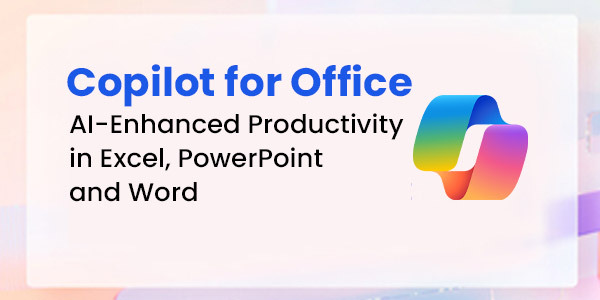
Learn Copilot for Office 365 - Word, Excel, PowerPoint
Learn Copilot for Office 365 – Word, Excel, PowerPoint

Go To Top

This program is highly recommended for those who want to understand the concepts of Documents, Spreadsheets and Presentations, and want to demonstrate the ability to expertly use these applications on a personal computer.

Beginner users and People who know the basics, but want to learn the Intermediate features of Microsoft Excel, Word & PowerPoint will find this program extremely useful.

Go To Top


Day 1: Microsoft Excel 

Section 1: Formulas and Functions 

Entering Formulas
Excel Arithmetic Operators
Using AutoFill Options
Commonly Used Functions

Section 2: Organizing Worksheet and Table Data

Create and Modify Tables
Sort and Filtering Data
Get Summary Information in a Table

Section 3: Working with Charts

Summarizing Data Using Charts
Customizing Chart Data
Format Chart Legend and Titles
Creating a Pie Chart

Section 4: Working with Graphics

Add Pictures into a Worksheet
Customize Pictures and Objects
Add Drawing Objects
Add SmartArt

Section 5: Managing Large Workbook

Manage Large Workbook Printing
Worksheets Setting
Page Setup Options

Section 6: Customizing & Enhancing Workbooks

Customizing Excel to Your Work
Creating Hyperlinks
Customizing Quick Access Toolbar

Section 7: Analyze and transform data with Microsoft 365 Copilot in Excel

Analyze your data
Transform your data
Add Tables
Add Charts
Sort & Filter Data

Day 2: Microsoft Word 

Section 1: Manage documents

Format documents
Save and share documents
Insert text and paragraphs
Format text and paragraphs
Create and configure document sections

Section 2: Manage tables and lists

Create tables
Modify tables
Create and modify lists

Section 3: Create and manage references

Create and manage reference elements
Create and manage reference tables

Section 4: Insert and format graphic elements

Insert illustrations and text boxes
Insert shapes
Insert pictures
Insert SmartArt graphics
Insert screenshots and clips
Insert text boxes
Format illustrations & text boxes
Add text to graphic elements

Section 5: Manage document collaboration

Add and manage comments
Manage change tracking

Section 6: Maximize the AI features using Copilot in Microsoft Word
Draft a new document
Use the Copilot pane to chat with Copilot in Word
Linking files in Copilot in Word
Facilitate Collaboration using real-time coauthoring

Day 3: Microsoft PowerPoint 

Section 1: Working With Text 

Using an Outline Adding Text Using Bullets and Numbering Formatting Text & Paragraphs Using Text Boxes Setting Tabs

Section 2: Adding Multimedia Elements

Using Multimedia Elements Working With Pictures Applying Styles & Effects Modifying Hyperlinks Working With SmartArt

Section 3: Enhancing Presentations

Adding Audio & Video Media
Using Animation
Managing Multiple Transitions
Changing Animation Order
Using Slide Transitions

Section 4:  Preparing The Slide Show

Reviewing The Presentation Customizing the Presentation Proofing the Presentation Setting up a Slide Show Using Presentation Tools
Using Presenter View Rehearsing a Presentation Presenting The Slide Show

Section 5: Design captivating presentations with Microsoft 365 Copilot in PowerPoint

Create a new presentation
Transform written documents into presentations
Adjust layouts, reformat text, and time animations

Microsoft 365 Course in Singapore with Excel, Word, PowerPoint & Copilot - With WSQ Funding, UTAP, SkillsFuture, SFEC Grants & Absentee Payroll
Microsoft 365 Course in Singapore with Excel, Word, PowerPoint & Copilot – With WSQ Funding, UTAP, SkillsFuture, SFEC Grants & Absentee Payroll

Go To Top

Basic knowledge of computers, using the keyboard, mouse and Windows is required. This is an Intermediate level program, so we will teach you all about Microsoft Office and then how to get the most of it for day to day use at your office or home.

Go To Top

Post-Course Support

  • We provide free consultation related to the subject matter after the course.
  • Please email your queries to training@intellisoft.com.sg and we will forward your queries to the subject matter experts.
Microsoft Training at Intellisoft

Learn Practical Skills

Companies sponsoring their staff for this Microsoft Excel, Word, PowerPoint training will benefit from increased employee productivity.

Your team will learning the fundamentals of Microsoft Office 365 easily.

Excel Dashboard Training Participants

3 Days Workshop

Enhance your team's efficiency and effectiveness with Microsoft Excel, Word, PowerPoint Combined 3 Day Training.

Contact us for advise on how to go about how to get started in learning the fundamentals of Microsoft Office 365 easily.

Get Started Today!

Learn By Doing

You learn best when you Do It Yourself.

We teach you, step by step, how you can learn new skills, build your knowledge and enhance your career prospects quickly & easily, with Practical Tips & Tricks!

Training Course Fees & Funding

Full course fee: S$980.00 (before GST & government funding) TGS: TGS-2025052673

Highest Funding
70% Grant

70% SSG Grant

Baseline + Enhanced Training Support

  • SG Citizens aged 40+ (Individual, SME or MNC)
  • SME-sponsored SG Citizens (21+)
  • SME-sponsored PRs (21+)
Course Fee S$980.00
SSG Funding (70%) − S$686.00
Nett Fee S$294.00
GST (9%) S$88.20
You Pay S$382.20
SSG Funded
50% Grant

50% SSG Grant

Baseline WSQ Funding

  • SG Citizens aged 21–39 (Individual or MNC)
  • MNC company-sponsored PRs (21+)
  • Individual PRs (21+)
Course Fee S$980.00
SSG Funding (50%) − S$490.00
Nett Fee S$490.00
GST (9%) S$88.20
You Pay S$578.20
Foreigners & other pass holders: Government grants are not applicable. Full course fee of S$980.00 + 9% GST = S$1,068.20 applies. Contact us for more details.

Need help with funding applications? We'll guide you through the process.

* Terms & conditions apply. Funding subject to eligibility and approval by respective agencies. GST applies on full course fee before subsidy. Fee information is accurate as of Apr 2026.

Do You Have Any Questions or Need a Quotation?

Simple. Just tell us what you need. We’ll be glad to help you!

Some of the companies that experienced our trainings

How To Register

Register for the 3 Days of Microsoft Office 365 with Copilot training today by simply clicking on the chosen course date available at the top of this page. Need Help?

  1. Call us at +65 6250-3575, SMS / WhatsApp: +65 9066–9991
  2. Send an email  to  training@intellisoft.com.sg  OR
  3. Submit an online enquiry if you have  any questions regarding Microsoft 365 Excel, Word and PowerPoint with Copilot training.

You can call us at +65  6250-3575 for your Customized Corporate training enquiry.

Learn Microsoft Office 365 With CoPILOT
&
Enhance Your Productivity

Microsoft Office Training in Singapore - Learn Word, Excel, PowerPoint in 3 days

Create Agentic AI Automations Without Coding

N8N Course Singapore at Intellisoft. SkillsFuture N8N LangFlow Singapore Course Intellisoft.
Create Agentic AI Automations Without Coding SkillsFuture Credits Eligible in Singapore.

Course Overview: Build Agentic AI Automations Without Writing Code

This practical, hands on Agentic AI automation development without any code is offered to companies and individuals. The course follows a very systematic, step by step approach to guide you on the path to begin building Agentic AI automations without writing code.

Section 1: Introduction to AI Agents and Workflows

Build AI Agents with No Code at Intellisoft Systems Singapore - SkillsFuture Eligible Course in Singapore
Build AI Agents with No Code at Intellisoft Systems Singapore – SkillsFuture Eligible Course in Singapore

In section 1, we establish the foundational knowledge by introducing you to AI agents and agentic AI workflows. This section covers the basics of AI agents, differentiating between agentic and generative AI, and explores reasoning frameworks and use cases.

You are also introduced to agentic AI platforms like n8n and Langflow, setting the stage for creating AI agents. This foundational knowledge is crucial for analyzing AI agents’ algorithms and identifying their strengths and limitations, addressing the initial performance gap.

Section 2: Developing AI Chatbots

Building on the foundational knowledge, Section 2 delves into the practical aspects of developing AI chatbots on no-code platforms. You are introduced to platforms such as Agentx, Promptly, and Flowise, and engage in creating AI chatbots and digital human avatars.

This section enhances your ability to correlate AI agents’ algorithm design with efficiency and assess improvements in AI applications.

 Implementing RAG Applications

Section 3 moves to a higher level of complexity where you will explore the development of Retrieval Augmented Generation (RAG) applications on no-code platforms. This section covers the overview of RAG, creation of agentic RAG applications, and introduces agentic search and deep research.

You will also engage with Microsoft Copilot Studio to create AI agents and RAG applications.

This section equips you with the skills to evaluate AI application effectiveness and assess feasibility for product and maintenance processes.

More information about Creating AI Agentic Automations Without Writing Code

In the fast-evolving world of AI, understanding how to design and deploy intelligent agents—without writing a single line of code—is becoming an essential skill. This course on Agentic AI provides a practical, step-by-step journey into the world of AI agents, empowering learners to conceptualize, build, and deploy AI workflows using non-coding platforms.

Designed for professionals and enthusiasts in product management, technology, and innovation roles, this course demystifies the concepts of agentic AI, chatbot development, and Retrieval Augmented Generation (RAG). Learners will explore no-code tools like n8n, Langflow, Agentx, Flowise, HeyGen, and Microsoft Copilot Studio, gaining hands-on experience to rapidly prototype and deploy AI applications.

By the end of the course, you’ll not only understand the difference between generative and agentic AI, but also be able to create functional AI agents that solve real-world problems—boosting efficiency, user engagement, and business innovation.

If you are new to generative AI, you can join our WSQ Funded course on Digital Transformation with AI Tools.

The Key objectives of Building a Good Employee Recruitment Process are:

  • Defining recruitment.
  • Understanding the selection process.
  • Recognizing the GROW model and how to set goals.
  • Preparing for the interview and question process.
  • Identifying and avoiding bias when making offers.
  • Discovering ways to retain talent and measure growth.

Go To Top

Best suited for HR Employees, Managers, as well as companies involved in Recruitment Business.

Managers & HR in all companies, who are recruiting employees must know the process well.


Go To Top

Module One: Getting Started

Module Two: Introduction to Recruitment

Module Three: The Selection Process

Module Four: Goal Setting

Module Five: The Interview

Module Six: Types of Interview Questions

Module Seven: Avoiding Bias in Your Selection

Module Eight: The Background Check

Module Nine: Making Your Offer

Module Ten: Orientation and Retention

Module Eleven: Measuring the Results

Module Twelve: Wrapping Up


Go To Top

Anyone can attend who wants to improve the skills to hire Employee in the company. No specific skills or pre -requisites.

You must have basic knowledge of English and be interested in the Recruitment process.

Go To Top

Post-Course Support

  • We provide free consultation related to the subject matter after the course.
  • Please email your queries to training@intellisoft.com.sg and we will forward your queries to the subject matter experts.

Venue:

All courses are conducted at:

190 Middle Road, 10-08 Fortune Centre, Singapore 188979.  5 mins walk from Bencoolen MRT station. Bugis, Rochor, Bras Basah MRT are nearby, within walking distance.

The venue is disabled-friendly.

SkillsFuture Ready

Singaporeans can use $500 SkillsFuture Credits for this training to offset the course fees.

Contact us for advise on how to go about claiming your SkillsFuture.

Get Started Today!

Learn By Doing

You learn best when you Do It Yourself.

We teach you, step by step, how you can learn new skills, build your knowledge and enhance your career prospects quickly & easily, with Practical Tips & Tricks!

Do You Have Any Questions or Need a Quotation?

Simple. Just tell us what you need. We’ll be glad to help you!

Some of the companies that experienced our trainings

"What I love about this training is that the trainers make sure we learn the steps and are able to do it on our own. This is a real advantage and I will definitely come back for more practical training"
Michele Martin
HR Manager
“The training was everything I hoped for, and more. Intellisoft Systems really makes a difference, I would have never discovered the hidden features of the sotftware on my own. Thanks a lot Intellisoft !"
Joy Tan
Project Engineer

How To Register

Register for the 2 Days Create Agentic AI Automation Without Coding Training in Singapore today.

Click on the chosen Create Agentic AI Automations Without Coding course dates available at the top of this page.

Need Help in Registering for Create Agentic AI Automations Without Coding Course?

Call us at +65 6250-3575, WhatsApp: +65 9066-9991 

If you have any questions about your target audience, pre-requisites for this course or want to arrange a corporate training for your company, do let us know. Email to training@intellisoft.com.sg

Create Agentic AI Automations Without Coding Corporate Training Program in Singapore (Physical Class or Virtual Classroom using Zoom or Microsoft Teams)

Request a Course Brochure here or enquire about any questions regarding Agentic AI training. We offer Corporate Training for your company too.

If you are looking to train your entire team, we can arrange to conduct the Agentic AI  training at your office location too. Just contact us for the quotation and suitable dates for the training.

Accelerate Your Career With the Most Effective & Practical Training.

Training Course Fees & Funding

Full course fee: S$1,000.00 (before GST & government funding) TGS: TGS-2025054773

Highest Funding
70% Grant

70% SSG Grant

Baseline + Enhanced Training Support

  • SG Citizens aged 40+ (Individual, SME or MNC)
  • SME-sponsored SG Citizens (21+)
  • SME-sponsored PRs (21+)
Course Fee S$1,000.00
SSG Funding (70%) − S$700.00
Nett Fee S$300.00
GST (9%) S$90.00
You Pay S$390.00
SSG Funded
50% Grant

50% SSG Grant

Baseline WSQ Funding

  • SG Citizens aged 21–39 (Individual or MNC)
  • MNC company-sponsored PRs (21+)
  • Individual PRs (21+)
Course Fee S$1,000.00
SSG Funding (50%) − S$500.00
Nett Fee S$500.00
GST (9%) S$90.00
You Pay S$590.00
Foreigners & other pass holders: Government grants are not applicable. Full course fee of S$1,000.00 + 9% GST = S$1,090.00 applies. Contact us for more details.

Need help with funding applications? We'll guide you through the process.

* Terms & conditions apply. Funding subject to eligibility and approval by respective agencies. GST applies on full course fee before subsidy. Fee information is accurate as of Apr 2026.

N8N Course Singapore at Intellisoft. SkillsFuture N8N LangFlow Singapore Course Intellisoft.

Microsoft Excel, Word, PowerPoint Combined 3 Day Training With CoPilot

Microsoft 365 Excel, PowerPoint, Word & Copilot Training course at Intellisoft Singaporeu

Microsoft 365 Excel, PowerPoint, Word & Copilot Training course at Intellisoft Singapore

Microsoft Word, Excel, and PowerPoint  Training Workshop in Singapore – Combined Class

Word,PowerPoint,Excel 2010 Training @Intellisoft Singapore
Word, PowerPoint, Excel with Copilot in Microsoft 365Training @Intellisoft Singapore

Improve your PowerPoint Presentation skills, Work better with Numbers and Data in Excel  Microsoft 365, and create stunning documents in Microsoft Word by attending a short, 3 day, Hands-on & Practical workshop on Microsoft Office in Singapore.

Course Duration : 3 days is available to Singapore Companies (For company sponsored candidates). Call +65 6250-3575 for Details.

If you want to join our dedicated Excel course in Singapore & improve your skills, we have multiple courses – Basic Excel for Analytics, Advanced Excel Courses in Singapore & VBA Macro Programming Courses.

Learn Microsoft Word,PowerPoint,Excel2010 at Intellisoft
Learn Microsoft 365 Word, PowerPoint, Excel at Intellisoft with Copilot

Microsoft Office (Word, Excel & PowerPoint) for Basic to Intermediate Level is best suited for people who want to get more out of Microsoft Office Suite and make the best use of the software in their day-to-day use.

Learn Office 365 tips and techniques that will make your work you work faster, efficiently, and you will be able to do complex tasks in a short time.

Excel, Word & PowerPoint are simple office productivity tools from Microsoft, and are very easy to pick up, once you follow our step-by-step, practical and useful approach to learning the software to maximize your efficiency and effectiveness with the use of these popular software packages.

Learn Copilot for Office 365 - Word, Excel, PowerPoint
Learn Copilot for Office 365 – Word, Excel, PowerPoint

Go To Top

This program is highly recommended for those who want to understand the concepts of Documents, Spreadsheets and Presentations, and want to demonstrate the ability to expertly use these applications on a personal computer.

Beginner users and People who know the basics, but want to learn the Intermediate features of Microsoft Excel, Word & PowerPoint will find this program extremely useful.

Go To Top


Day 1: Microsoft Excel 

Section 1: Formulas and Functions 

Entering Formulas
Excel Arithmetic Operators
Using AutoFill Options
Commonly Used Functions

Section 2: Organizing Worksheet and Table Data

Create and Modify Tables
Sort and Filtering Data
Get Summary Information in a Table

Section 3: Working with Charts

Summarizing Data Using Charts
Customizing Chart Data
Format Chart Legend and Titles
Creating a Pie Chart

Section 4: Working with Graphics

Add Pictures into a Worksheet
Customize Pictures and Objects
Add Drawing Objects
Add SmartArt

Section 5: Managing Large Workbook

Manage Large Workbook Printing
Worksheets Setting
Page Setup Options

Section 6: Customizing & Enhancing Workbooks

Customizing Excel to Your Work
Creating Hyperlinks
Customizing Quick Access Toolbar

Section 7: Analyze and transform data with Microsoft 365 Copilot in Excel

Analyze your data
Transform your data
Add Tables
Add Charts
Sort & Filter Data

Day 2: Microsoft Word 

Section 1: Manage documents

Format documents
Save and share documents
Insert text and paragraphs
Format text and paragraphs
Create and configure document sections

Section 2: Manage tables and lists

Create tables
Modify tables
Create and modify lists

Section 3: Create and manage references

Create and manage reference elements
Create and manage reference tables

Section 4: Insert and format graphic elements

Insert illustrations and text boxes
Insert shapes
Insert pictures
Insert SmartArt graphics
Insert screenshots and clips
Insert text boxes
Format illustrations & text boxes
Add text to graphic elements

Section 5: Manage document collaboration

Add and manage comments
Manage change tracking

Section 6: Maximize the AI features using Copilot in Microsoft Word
Draft a new document
Use the Copilot pane to chat with Copilot in Word
Linking files in Copilot in Word
Facilitate Collaboration using real-time coauthoring

Day 3: Microsoft PowerPoint 

Section 1: Working With Text 

Using an Outline Adding Text Using Bullets and Numbering Formatting Text & Paragraphs Using Text Boxes Setting Tabs

Section 2: Adding Multimedia Elements

Using Multimedia Elements Working With Pictures Applying Styles & Effects Modifying Hyperlinks Working With SmartArt

Section 3: Enhancing Presentations

Adding Audio & Video Media
Using Animation
Managing Multiple Transitions
Changing Animation Order
Using Slide Transitions

Section 4:  Preparing The Slide Show

Reviewing The Presentation Customizing the Presentation Proofing the Presentation Setting up a Slide Show Using Presentation Tools
Using Presenter View Rehearsing a Presentation Presenting The Slide Show

Section 5: Design captivating presentations with Microsoft 365 Copilot in PowerPoint

Create a new presentation
Transform written documents into presentations
Adjust layouts, reformat text, and time animations

Microsoft 365 Course in Singapore with Excel, Word, PowerPoint & Copilot - With WSQ Funding, UTAP, SkillsFuture, SFEC Grants & Absentee Payroll
Microsoft 365 Course in Singapore with Excel, Word, PowerPoint & Copilot – With WSQ Funding, UTAP, SkillsFuture, SFEC Grants & Absentee Payroll

Go To Top

Basic knowledge of computers, using the keyboard, mouse and Windows is required. This is an Intermediate level program, so we will teach you all about Microsoft Office and then how to get the most of it for day to day use at your office or home.

Go To Top

Post-Course Support

  • We provide free consultation related to the subject matter after the course.
  • Please email your queries to training@intellisoft.com.sg and we will forward your queries to the subject matter experts.
Microsoft Training at Intellisoft

Learn Practical Skills

Companies sponsoring their staff for this Microsoft Excel, Word, PowerPoint training will benefit from increased employee productivity.

Your team will learning the fundamentals of Microsoft Office 365 easily.

Excel Dashboard Training Participants

3 Days Workshop

Enhance your team's efficiency and effectiveness with Microsoft Excel, Word, PowerPoint Combined 3 Day Training.

Contact us for advise on how to go about how to get started in learning the fundamentals of Microsoft Office 365 easily.

Get Started Today!

Learn By Doing

You learn best when you Do It Yourself.

We teach you, step by step, how you can learn new skills, build your knowledge and enhance your career prospects quickly & easily, with Practical Tips & Tricks!

Training Course Fees & Funding

Full course fee: S$980.00 (before GST & government funding) TGS: TGS-2025052673

Highest Funding
70% Grant

70% SSG Grant

Baseline + Enhanced Training Support

  • SG Citizens aged 40+ (Individual, SME or MNC)
  • SME-sponsored SG Citizens (21+)
  • SME-sponsored PRs (21+)
Course Fee S$980.00
SSG Funding (70%) − S$686.00
Nett Fee S$294.00
GST (9%) S$88.20
You Pay S$382.20
SSG Funded
50% Grant

50% SSG Grant

Baseline WSQ Funding

  • SG Citizens aged 21–39 (Individual or MNC)
  • MNC company-sponsored PRs (21+)
  • Individual PRs (21+)
Course Fee S$980.00
SSG Funding (50%) − S$490.00
Nett Fee S$490.00
GST (9%) S$88.20
You Pay S$578.20
Foreigners & other pass holders: Government grants are not applicable. Full course fee of S$980.00 + 9% GST = S$1,068.20 applies. Contact us for more details.

Need help with funding applications? We'll guide you through the process.

* Terms & conditions apply. Funding subject to eligibility and approval by respective agencies. GST applies on full course fee before subsidy. Fee information is accurate as of Apr 2026.

Do You Have Any Questions or Need a Quotation?

Simple. Just tell us what you need. We’ll be glad to help you!

Some of the companies that experienced our trainings

How To Register

Register for the 3 Days of Microsoft Office 365 with Copilot training today by simply clicking on the chosen course date available at the top of this page. Need Help?

  1. Call us at +65 6250-3575, SMS / WhatsApp: +65 9066–9991
  2. Send an email  to  training@intellisoft.com.sg  OR
  3. Submit an online enquiry if you have  any questions regarding Microsoft 365 Excel, Word and PowerPoint with Copilot training.

You can call us at +65  6250-3575 for your Customized Corporate training enquiry.

Learn Microsoft Office 365 With CoPILOT
&
Enhance Your Productivity

Microsoft Office Training in Singapore - Learn Word, Excel, PowerPoint in 3 days

Free Tips, Tutorials & Training Grants Info

Learn from expert tips, tricks and resources for Excel, PowerPoint, Photoshop, Python, Power BI, Project Management, IT, Soft Skills & more with our Email Newsletter.
Plus get the latest news on Grants. Join Today!

Found What You Were
Looking For?

Just Tell us...

We're Here To Help You!