Advanced Data Analytics and Data Visualization with Excel

Data Analysis & Visualization through Infographics creation course in Singapore


Create Dynamic Dashboards in Excel
Quickly & Easily

The Advanced Data Analytics & Data Analytics with Excel will elevate your skills to Excel Mastery.

In this 2 Day Advanced Data Analytics course, you will learn how to do:

  • Statistical Analysis in Excel,
  • Forecasting with Excel,
  • Using Correlation & Regression for detecting underlying Trends,
  • Creating Dynamic Dashboards & Charts,
  • Advanced Pivot Table Technique for Management Reporting
  • How to combine data from multiple worksheets to do data analysis,
  • Creating self-updating charts, reports & dashboards,
  • Performing Scenario Analysis for multi-variate testing & forecasting,
  • PLUS, many more techniques to filter the noise, and visualize the data for Better Decision Making

You should know Excel well to join this course, and it will help you to get closer to Excel mastery.

Now, With up to 70% WSQ Grant*

Analyze & Visualize Data like a Pro
with Hidden Excel Features

Data Analysis & Visualization through Infographics creation course in Singapore

WSQ Grant of up to 50-70%

A good visualization tells a story, removing the noise from data and highlighting useful information, curating data into a form easier to understand, and highlighting the trends and outliers.

Advanced Data Analytics and Visualization course using Microsoft Excel, helps build complex models, making it easy to reach meaningful conclusions, and simplifies the decision-making process.

Companies can then use these insights to identify areas to improve upon and factors that influence customer satisfaction and make better predictions for sales and growth.

Data storytelling helps the data feel alive and ensures that the message it’s conveying is meaningful and relevant, by balancing logic and facts with the emotional impact of a story, companies can better engage their audiences and enhance interactions with their customer base during business events.

By the end of this practical business intelligence with Excel course, you will be able to apply advanced data analytics and data visualization techniques to identify underlying trends and patterns in data with Microsoft Excel.

Data Interpretation Analysis training at Intellisoft Singapore
Data Analysis & Visualization training at Intellisoft Singapore

Learning Data Science, Data Visualization & Data Analysis are critical skills in gaining a deeper understanding of your data and making better decisions. They help in analyzing the performance of the business & continuous improvement of processes.

This course covers a number of Statistical Data Analysis Techniques for Predictive Analytics, Data Mining, Advanced Data Visualization Techniques & much more… all using Microsoft Excel.  Each method is demonstrated with examples & exercises for your own business analytics.

Intellisoft offers WSQ funded, UTAP supported SkillsFuture Credits Ready Courses in Singapore

This is the highest level of Microsoft Excel MasterClass to learn advanced Data visualization & Business Analytics.

Classroom-based lectures with hands-on exercises on analyzing data using Microsoft Excel are used in this workshop to analyze & visualize data and find meaningful information. Data and business analytics provide valuable insights to management.

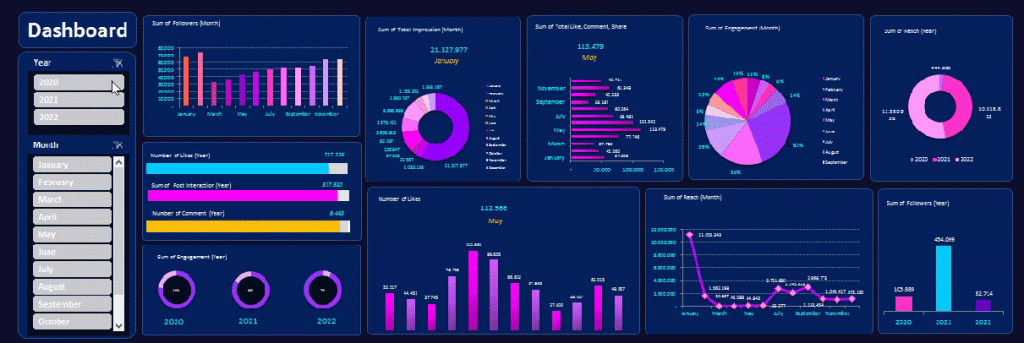
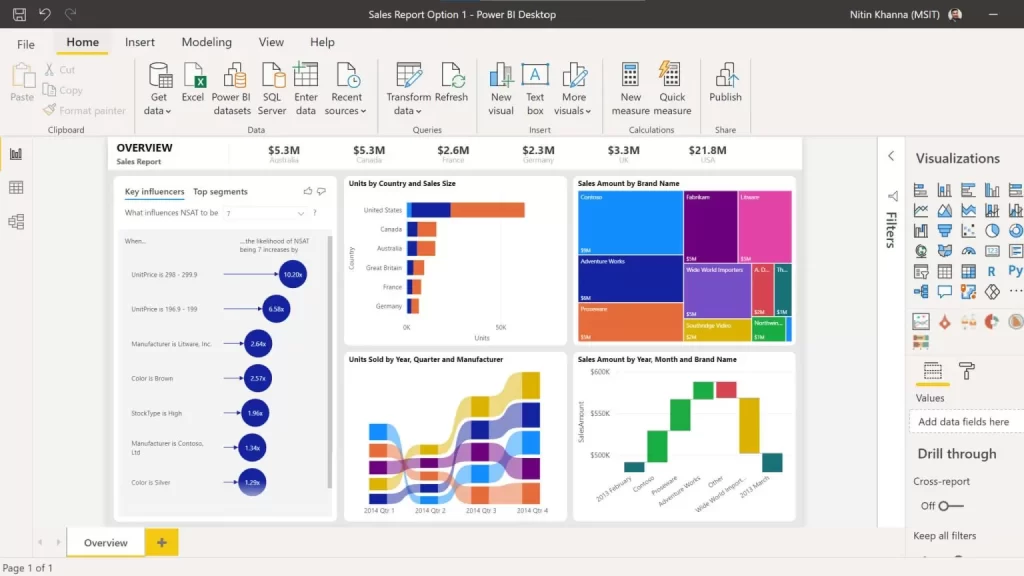
Dynamic Excel Dashboard Sample

Excel Data Analysis Training in Singapore at Intellisoft Systems

Excel Data Analysis Course in Singapore at Intellisoft Systems, Singapore[/caption]

Data visualization allows business users to gain insight into their vast amounts of data.

It benefits them to recognize new patterns and errors in the data.

The main goal of data visualization is to make it easier to identify patterns, trends and outliers in large data sets.

Making sense of these patterns can lead to enhanced quality and speed of decision-making processes, as well as measurable increases in productivity and efficiency.

Analyze Data With Charts to identify trends

The objective of this Advanced Data Analytics & Data Visualization training is to help companies in using business intelligence tools to turn raw data into consumable insights, making it a powerful tool people can use to make better, data-driven decisions.

In this course, learners will learn how to leverage the power of Excel to organize and summarize data. They will learn how to use Trend Analysis, Advanced Pivot Table Techniques and Advanced charts to summarize data in a dynamic way based on a selection of values from a list or other Pivot tables.

Data Interpretation & Analysis training at Intellisoft

The course covers Advanced Excel Data Analytics & Data Visualization Topics, like:

  • Best Excel functions for deeper data analysis, data mining & business analytics
  • Tips for cleansing, transforming & modelling data,
  • Sensitivity Analysis with Data Tables,
  • Goal Seek Find the missing pieces,
  • Advanced Excel Visualisation Techniques using Multiple Charts, Pivots & Slicers
  • Data Modeling & Linear Regression for Predictive Analysis
  • Creation of Excel Dashboards for Business Intelligence & Management Reporting of Insights

 Learn The Secrets of Data Analytics With Excel, & Become a Power Ninja Data Analyst!

Go To Top

Data Analyst reviewing data insightsMost data analysts, managers, decision-makers, and even end users typically struggle with report creation as they lack knowledge of features such as data analysis, data cleanup, advanced pivot tables techniques, and visualization techniques within Excel.

With this WSQ course, we target such people and will help such people learn advanced data analytic and data visualization techniques to organize data better and represent the same in both a dynamic tabular and chart format.

After attending this WSQ Advanced Excel Data Analytics & Visualization course, our audience will be better able to:

  1. Organize data within excel in a “normalized” way to create dynamic reports.
  2. Create Pivot tables and charts that provide a dynamic view of data based on slider selections.
  3. Create infographics summaries that are linked to the analyzed data and Pivot tables.

Go To Top

Advanced Data Analytics & Data Visualization Course With Excel
Course Outline

This is a very practical, hands-on, and insightful course, full of advanced Excel techniques to bring in the data, analyze it quickly, identify trends, and visualize the information in charts, graphs and dashboards.

Data Analysis & Visualization Training in Singapore at Intellisoft With WSQ Funding

Module 1: Data Modeling Using Pivot Tables & Pivot Charts

  • Introduction to Data Modeling
  • Data Filtering & Transformation
  • Use Pivots to identify patterns across multiple data sets
  • Visual Analysis with Pivot Charts

Module 2: Solver and Scenarios to Manage Multiple Constraints

  • Managing Multiple Constraints
  • Proof of concept using Data Solver
  • Decision Making using Scenarios

Module 3: Data Modeling & Linear Regression for Better Forecasts

  • Data Modeling Principles
  • Building a Model With Excel
  • Using Linear Regression

Module 4: Data Mining and Goal Seek To Derive Business InsightsExcel Dynamic Dashboard Course in Singapore

  • Data Mining With Lookup Functions
  • Business Insights From Goal Seek
  • Advanced Use Cases for Data Mining With Excel Functions

Module 5: Statistical Analysis and Data Visualization Dashboards

  • Key Principles of Data Visualization
  • Presentation of qualitative data-driven visualization
  • Statistical analysis of data

Learn The Secrets of Data Analysis With Excel Today in Singapore.

Join This  Practical Training
To Get Ahead With Advanced
Business Data Analysis & Visualization.

data analysis course

Learn The Best Excel Functions & Features for Data Analytics!

Business Data Analytics With Excel Course Trainer:

Advanced Data Analytics and Data Visualization with Excel Training at Intellisoft.

This Excel Data Analysis course is created and delivered by Vinai Prakash, Master Trainer & Founder of Intellisoft Systems.

Vinai has authored several articles on Data Analysis, Excel Dashboarding Techniques, Data Warehousing, Data Mining, Using SQL Databases for Creating Data-Rich applications, published in leading magazines, newspapers & books.

Click Here to Download The 8 Habits of Highly Effective Data Analysts(An article written by Vinai Prakash, published in The Straits Times Newspaper in Singapore)

Go To Top

It would be great if you have good knowledge of Excel and could write simple formulas like SUM, IF, Create Bar Charts and use Excel on a regular basis for basic analysis and reporting.

  • Good knowledge and experience in using Excel on a regular basis.
  • Familiarity with Basic Excel functions is a must.
  • A passion for acquiring Data Analysis Superpowers.
  • Note: Anyone with Database, Business Intelligence, IT Programming, or similar experience are pretty qualified to take this course, even if lacking in everyday Excel experience.

Microsoft Excel software is available for download from the Microsoft website as a subscription. We will provide you with a copy of Microsoft Excel for use in the class, on our laptops.

Go To Top

Post-Course Support

  • We provide free consultation related to the subject matter after the course.
  • Please email your queries to training@intellisoft.com.sg and we will forward your queries to the subject matter experts.

SkillsFuture Ready

Singaporeans can use $500 SkillsFuture Credits for this training to offset the course fees.

Contact us for advise on how to go about claiming your SkillsFuture.

Get Started Today!

Learn By Doing

You learn best when you Do It Yourself.

We teach you, step by step, how you can learn new skills, build your knowledge and enhance your career prospects quickly & easily, with Practical Tips & Tricks!


Do You Have Any Questions or Need a Quotation?

Simple. Just tell us what you need. We’ll be glad to help you!

Some of the companies that experienced our trainings

"What I love about this training is that the trainers make sure we learn the steps and are able to do it on our own. This is a real advantage and I will definitely come back for more practical training"
Michele Martin
HR Manager
“The training was everything I hoped for, and more. Intellisoft Systems really makes a difference, I would have never discovered the hidden features of the sotftware on my own. Thanks a lot Intellisoft !"
Joy Tan
Project Engineer

How To Register

How To Register For Advanced Data Analytics & Data Visualization With Excel Course in Singapore

Register for the 2 Days Advanced Excel Data Analytics & Data Visualization MasterClass Course today by simply clicking on the chosen course date available at the top of this page.

Need Help?
Call us at +65-6250-3575, SMS / WhatsApp: 9066-9991

Send an email to training@intellisoft.com.sg

We have regular public classes For Advanced Data Analytics & Visualization With Excel MasterClass each quarter, and Corporate Training can be arranged at your office too!

Infographic of Financial Reports

Note: This class uses a convenient and hands-on approach to gain Excel Analytics & Visualization Mastery. It requires you to take part in Data Analysis & Data Visualization exercises during the class. You can bring your own laptop or request to use our computer during the class beforehand.

WSQ Funded Data Analytics and Visualization With Microsoft Excel Training:

Join today, and begin to Master Excel Data Analytics with our Step-by-step instructions and helpful, patient, Microsoft Certified Trainers to guide you.

What are you waiting for? Get Started Right away…

Accelerate Your Career With the Most Effective & Practical Training.

Training Course Fees & Funding

Full course fee: S$900.00 (before GST & government funding) TGS: TGS-2022017399

Highest Funding
70% Grant

70% SSG Grant

Baseline + Enhanced Training Support

  • SG Citizens aged 40+ (Individual, SME or MNC)
  • SME-sponsored SG Citizens (21+)
  • SME-sponsored PRs (21+)
Course Fee S$900.00
SSG Funding (70%) − S$630.00
Nett Fee S$270.00
GST (9%) S$81.00
You Pay S$351.00
SSG Funded
50% Grant

50% SSG Grant

Baseline WSQ Funding

  • SG Citizens aged 21–39 (Individual or MNC)
  • MNC company-sponsored PRs (21+)
  • Individual PRs (21+)
Course Fee S$900.00
SSG Funding (50%) − S$450.00
Nett Fee S$450.00
GST (9%) S$81.00
You Pay S$531.00
Foreigners & other pass holders: Government grants are not applicable. Full course fee of S$900.00 + 9% GST = S$981.00 applies. Contact us for more details.

Need help with funding applications? We'll guide you through the process.

* Terms & conditions apply. Funding subject to eligibility and approval by respective agencies. GST applies on full course fee before subsidy. Fee information is accurate as of Apr 2026.

Practical Skills to Clean, Analyze & Visualize Data

🔧 Data Cleanup (Preparing Your Data for Analysis)

Master practical Excel techniques to ensure your data is clean, consistent, and analysis-ready. Learn how to:

  • Detect and remove duplicate rows and inconsistent or missing data

  • Use TRIM, CLEAN, FIND & REPLACE to standardize text formats

  • Apply LEFT, RIGHT, MID, and FIND functions to extract values from text

  • Use Data Tools to remove duplicates and Advanced Filter to extract unique records

  • Format dates consistently and clean up invalid or irregular entries

  • Convert cross-tab reports into proper tabular format

  • Correct inaccurate values and update missing information efficiently

  • Use Excel Tables with filters to explore and correct data issues.

🎯 These skills ensure you’re always working with accurate, clean data – the foundation of every good analysis.


📊 Data Analysis (Extracting Insights from Data)

Develop strong analytical skills using Excel’s powerful formulas and tools. You will learn how to:

  • Use XLOOKUP, VLOOKUP, OFFSET, INDEX & MATCH to fetch and combine data from multiple sources

  • Apply COUNTIFS, SUMIFS, and logical functions to summarize and evaluate complex data sets

  • Use TEXTJOIN, TEXTSPLIT, and TRANSPOSE for advanced data manipulation

  • Analyze work schedules with date functions like NETWORKDAYS, WORKDAY, TEXT

  • Handle errors with formulas like IFERROR, and understand Excel error types

  • Work with 3D References and Data Modeling Techniques to consolidate data across multiple sheets

  • Use Range Names for cleaner formulas and easier navigation.

🔍 By mastering these tools, you’ll be able to extract insights, solve problems, and make confident decisions from your data.


📈 Data Visualization (Presenting Data Effectively)

Turn your raw data into meaningful visuals and dashboards. You’ll be able to:

  • Create dynamic Pivot Tables and advanced summaries

  • Add Slicers and Timelines for interactive data filtering

  • Build dashboards with Excel Tables, custom filters, and visuals

  • Design impactful charts – bar, column, line, and pie – to tell your data story

  • Perform Pareto analysis to identify top contributing factors and solve problems

  • Use Conditional Formatting to highlight trends, outliers, and insights at a glance

  • Optimize Excel Table Design for professional and structured reporting

📊 These skills will help you present your findings clearly, impress stakeholders, and support data-driven decisions.


✅ Why Join This Excel Data Analytics Course?

Whether you’re in HR, finance, operations, or marketing – you’ll walk away with job-ready Excel skills to clean, analyze, and visualize data like a pro. If you’ve ever felt frustrated with messy spreadsheets or unsure how to get insights from raw data, this course will empower you with real-world techniques that make a difference.

Negotiation Skills (WSQ Funded) – TEMP

Negotiation Skills training in Singapore

Negotiation-Skills training at Intellisoft

Negotiation forms the heart of salesmanship and is one of the most important skills in the professional world, whether you are buying, selling, or just looking for a raise from your employer. We are negotiating all the time.

The art of negotiation is a challenge for all.  Assertiveness and persuasiveness are sought-after assets but are difficult to acquire.  This training will explore some of the techniques available to execute agreements successfully.

Our team of esteemed instructors, drawn from diverse industries, are successful communicators with unique skill sets they have acquired on their path to success.

Through this workshop, participants will be able to understand the basic types of negotiations, the phases of negotiations, and the skills needed for successful negotiating.

UP TO 70% WSQ Funding is available to Singapore Companies & Individuals. Call +65 6250-3575 for Details. SkillsFuture credits ready for Singaporeans. Duration: 2 Days (8:45 am to 5:45 pm)

UTAP Funding: NTUC Members can utilize UTAP to offset 50% of the remaining fees*.

Training Course Fees & Funding

Full course fee: S$700.00 (before GST & government funding) TGS: TGS-2023018630

Highest Funding
70% Grant

70% SSG Grant

Baseline + Enhanced Training Support

  • SG Citizens aged 40+ (Individual, SME or MNC)
  • SME-sponsored SG Citizens (21+)
  • SME-sponsored PRs (21+)
Course Fee S$700.00
SSG Funding (70%) − S$490.00
Nett Fee S$210.00
GST (9%) S$63.00
You Pay S$273.00
SSG Funded
50% Grant

50% SSG Grant

Baseline WSQ Funding

  • SG Citizens aged 21–39 (Individual or MNC)
  • MNC company-sponsored PRs (21+)
  • Individual PRs (21+)
Course Fee S$700.00
SSG Funding (50%) − S$350.00
Nett Fee S$350.00
GST (9%) S$63.00
You Pay S$413.00
Foreigners & other pass holders: Government grants are not applicable. Full course fee of S$700.00 + 9% GST = S$763.00 applies. Contact us for more details.

Need help with funding applications? We'll guide you through the process.

* Terms & conditions apply. Funding subject to eligibility and approval by respective agencies. GST applies on full course fee before subsidy. Fee information is accurate as of Apr 2026.

Upon completion of this workshop, participants will:

  • Understand the process of negotiations
  • Be able to apply techniques to improve their negotiation skills
  • Feel more confident about coming to agreements

The whole program is full of exercises, examples and practical scenarios that help to understand the real art and science of Successful Negotiations that create a Win-Win Solutions.

Attending the 2-day negotiation skills course in Singapore at Intellisoft provides practical guidance on how to learn negotiation skills effectively.

Go To Top

Anyone who wants to improve their Negotiation Skills and take them to the next level are welcome to join this 2 day practical workshop.

Go To Top

Getting Started

  • Icebreaker
  • Housekeeping Items
  • The Parking Lot
  • Workshop Objectives

Understanding Negotiation

  • The Three Phases
  • Skills for Successful Negotiating

Getting Prepared

  • Establishing Your WATNA and BATNA
  • Identifying Your WAP
  • Identifying Your ZOPA
  • Personal Preparation

Laying the Groundwork

  • Setting the Time and Place
  • Establishing Common Ground
  • Creating a Negotiation Framework
  • The Negotiation Process

Phase One: Exchanging Information

  • Getting off on the Right Foot
  • What to Share
  • What to Keep to Yourself

Phase Two: Bargaining

  • What to Expect
  • Techniques to Try
  • How to Break an Impasse
About Mutual Gain

  • Three Ways to See Your Options
  • About Mutual Gain
  • What Do I Want?
  • What Do They Want?
  • What Do We Want?

Phase Three: Closing

  • Reaching Consensus
  • Building an Agreement
  • Setting the Terms of the Agreement

Dealing with Difficult Issues

  • Being Prepared for Environmental Tactics
  • Dealing with Personal Attacks
  • Controlling Your Emotions
  • Deciding When It is Time to Walk Away

Negotiating Outside the Boardroom

  • Adapting the Process for Smaller Negotiations
  • Negotiating via Telephone
  • Negotiating via Email

Negotiating on Behalf of Someone Else

  • Choosing the Negotiating Team
  • Covering All the Bases
  • Dealing with Tough Questions

Wrapping Up

  • Words from the Wise
  • Lessons Learned
  • Completion of Action Plans and Evaluations

Intellisoft Training offers a range of courses in Singapore, including effective negotiation skills courses. Participants can enhance their negotiation abilities through the practical and interactive training provided in the effective negotiation skills course in Singapore with SkillsFuture & WSQ Grants.

Go To Top

Course Duration: 2 Days

Course Level: Beginner Friendly

Pre-Requisites: You must have basic knowledge of English and a willingness to learn how to negotiate.

This WSQ Business Negotiation skills course program is full of exercises and role plays to understand the process and make you a better negotiator.

Negotiate anything with confidence and win at work and personal life!

Go To Top

Post-Course Support

  • We provide free consultation related to the subject matter after the course.
  • Please email your queries to training@intellisoft.com.sg and we will forward your queries to the subject matter experts.
Microsoft Training at Intellisoft

Claim SDF Grant

Companies sponsoring their staff for training can Claim SDF Funding, subject to SSG Eligibility Criteria.

Applicable for Company Sponsored Singaporeans & PRs.

SkillsFuture Ready

Singaporeans can use $500 SkillsFuture Credits for this training to offset the course fees.

Contact us for advise on how to go about claiming your SkillsFuture.

Get Started Today!

Learn By Doing

You learn best when you Do It Yourself.

We teach you, step by step, how you can learn new skills, build your knowledge and enhance your career prospects quickly & easily, with Practical Tips & Tricks!

Do You Have Any Questions or Need a Quotation?

Simple. Just tell us what you need. We’ll be glad to help you!

Some of the companies that experienced our trainings

How To Register

Register for the 2 Day of Negotiation Skills Training today by simply clicking on the chosen course date available at the top of this page. Need Help?

  1. Call us at +65 6250-3575, SMS / WhatsApp: +65 9066-9991
  2. Send an email  to  training@intellisoft.com.sg  OR
  3. Submit an online enquiry if you have  any questions regarding Negotiation Skills training.

We also offer Corporate Trainings for Negotiation Skills Training. If you have a group of people, we can arrange to conduct the Negotiation Skills training at your office location too.

Just contact us for logistics. This program can be customized according to your needs and is conducted in house. For more information you can call us at +65 6250-3575  or email to training@intellisoft.com.sg

master negotiation skills
&
Advance your career

Time Management: Achieve More in Less Time – TEMP

Manage Your Time Well. Learn Time Management at Intellisoft

Are you suffering from:

  • Too many projects, too many things to do… and not enough time to do any of them properly?

    Manage Your Time Well. Learn Time Management at Intellisoft
    Manage Your Time Well. Learn Time Management at Intellisoft
  • Being too busy fighting every day fires and have no time to prevent the fires in the first place?
  • Embarrassment because you don’t seem to be making progress on the Big Priorities of your life and time is just passing by?

Fortunately, it is easy to learn effective time management techniques, and build proper time management skills. Attend a short, action packed 1 Day Practical Workshop on Effective Time Management in Singapore at Intellisoft.

Call +65 6250-3575 for Details.

Normal 0 false false false EN-US X-NONE X-NONE MicrosoftInternetExplorer4 /* Style Definitions */
table.MsoNormalTable
{mso-style-name:”Table Normal”;
mso-tstyle-rowband-size:0;
mso-tstyle-colband-size:0;
mso-style-noshow:yes;
mso-style-priority:99;
mso-style-parent:””;
mso-padding-alt:0in 5.4pt 0in 5.4pt;
mso-para-margin:0in;
mso-para-margin-bottom:.0001pt;
mso-pagination:widow-orphan;
font-size:10.0pt;
font-family:”Times New Roman”,”serif”;}

Time Management We at Intellisoft can help you learn how to manage your time and get back your life, handle multiple projects, prevent fires rather than fight fires, have an empty In tray, with full control over your email, your messages, and your life, so that you can find the time to get those things done that matter the most, and master the art of stress-free productivity!

This time management workshop is continuously updated to reflect the progress in productivity tools as well as new methodologies that help delegates to become more productive in the long term, and become better at managing time well.

Our objective is to provide you with practical tips, tricks, tools and techniques to learn time management skills for life! Take action to join the 1 Day Effective Time Management Class in Singapore!

Go To Top

Audience: Anyone, who is interested to learn the productivity tips to get more done in their work and personal life.

Course Duration: 1 Day. Practical, Hands-on Tips, Tricks and Techniques to Apply Immediately!

Go To Top

Using Case Studies, Examples, Activities, Games and Self Analysis, we help you in identifying your Time Management Problems, and Teach You Practical ways to over them. Become better at managing time and getting the right and important  things done... ON TIME! Attitude towards Time

  • How different people look at time and what are the implications of this?
  • What mental techniques can you use to increase your productivity?
  • What is the impact of perfectionism on your productivity and how can you manage it?
  • What stops you from starting a task and how can you overcome it?
  • What techniques can you use to avoid procrastination?
  • How to take advantage of “dead time”?Ideas for Time Management
  • How to free your mind from thinking continuously about critical tasks?
  • How can you optimise your day based on your capabilities and your workload?

Planning

  • How to set goals systematically to maximise your productivity?
  • How to set your mission statement based on everything you do in life?
  • Which planning style is better?
  • How to brainstorm?
  • How to plan if you don’t like planning?
  • What is a bottom-up and top-down approach to productivity?
  • What is the best way to plan in meetings to make the best use of time and produce a good plan?

Organizing

  • How to organise your physical and digital environments?
  • What reference system works best and what its critical qualities?
  • What tray system works best?
  • What calendar system works best?
  • How to take advantage of GTD principles (Getting Things Done) to organise your life?
  • How to set up and use your calendar using the latest methodologies such as GTD?
  • How to prioritize your tasks based on urgency and importance?
  • How to use GTD with Microsoft Outlook?

Dealing with People

  • How to say “No” and be loved for it?
  • How many different ways to say “No” and what are advantages and disadvantages of each type?
  • How to deal with interruptions politely and stay in control?
  • How to delegate to increase your productivity?
  • How many different ways can you delegate and when should you use each style?
  • How to handle phone interruptions?
  • How to “engineer” your environment to minimise interruptions?


Go To Top

There are no specific per-requisites for this Time Management Training workshop. Just come prepared to learn new concepts in time management, and be ready to begin applying them immediately.

Go To Top

Post-Course Support

  • We provide free consultation related to the subject matter after the course.
  • Please email your queries to training@intellisoft.com.sg and we will forward your queries to the subject matter experts.
Microsoft Training at Intellisoft

Learn Practical Skills

Companies sponsoring their staff for this Time Management training will benefit from increased employee productivity.

Your team will learn the most useful tips & tricks to become good at managing time.

Excel Dashboard Training Participants

1 Days Workshop

Empower your team to work smarter and achieve more with better Time Management Skills

Contact us for advice on how to get started in learning Time Management Skills for your company.

Get Started Today!

Learn By Doing

You learn best when you Do It Yourself.

We teach you, step by step, how you can learn new skills, build your knowledge and enhance your career prospects quickly & easily, with Practical Tips & Tricks!

Do You Have Any Questions or Need a Quotation?

Simple. Just tell us what you need. We’ll be glad to help you!

Some of the companies that experienced our trainings

How To Register

Register for the 1 Day of Time Management Training today by simply clicking on the chosen course date available at the top of this page. Need Help?

  1. Call us at +65 6250-3575, SMS / WhatsApp: +65 9066 – 9991
  2. Send an email  to  training@intellisoft.com.sg  OR
  3. Submit an online enquiry if you have  any questions regarding Time Management Skills training.

We also offer Corporate Trainings for Time Management Skills Training. If you have a group of people, we can arrange to conduct the Time Management Skills training at your office location too. Just contact us for logistics. This program can be customized according to your needs and is conducted in house. For more information you can call us at +65 6250-3575  Email to training@intellisoft.com.sg

Improve Communication Skills, Presentation & Public Speaking Skills, Time Management Skills To Succeed in any organization.

master time management
&
upgrade your productivity

Communicate with Confidence – TEMP

Training Course Fees & Funding

Full course fee: S$560.00 (before GST & government funding) TGS: TGS-2021002295

Highest Funding
70% Grant

70% SSG Grant

Baseline + Enhanced Training Support

  • SG Citizens aged 40+ (Individual, SME or MNC)
  • SME-sponsored SG Citizens (21+)
  • SME-sponsored PRs (21+)
Course Fee S$560.00
SSG Funding (70%) − S$392.00
Nett Fee S$168.00
GST (9%) S$50.40
You Pay S$218.40
SSG Funded
50% Grant

50% SSG Grant

Baseline WSQ Funding

  • SG Citizens aged 21–39 (Individual or MNC)
  • MNC company-sponsored PRs (21+)
  • Individual PRs (21+)
Course Fee S$560.00
SSG Funding (50%) − S$280.00
Nett Fee S$280.00
GST (9%) S$50.40
You Pay S$330.40
Foreigners & other pass holders: Government grants are not applicable. Full course fee of S$560.00 + 9% GST = S$610.40 applies. Contact us for more details.

Need help with funding applications? We'll guide you through the process.

* Terms & conditions apply. Funding subject to eligibility and approval by respective agencies. GST applies on full course fee before subsidy. Fee information is accurate as of Apr 2026.

WSQ Grant of up to 70%* from SSG for Singaporeans and PRs, subject to eligibility.

Group Communication at Work

Good communicators help to build relationships, earn trust and respect from others. A very in-depth, practical training full of examples, individual exercises and role-plays.

Improve your Communication Skills in just 2 days and see a huge difference in your improved communications – both in written as well as verbal communication with clients, colleagues, managers and vendors.

Being an effective communicator extends to written communication as well, as more employers become aware of the damage poor writing can wreak on brand image and business-to-business relations.

The Communication Skills training provides essential knowledge and skills & improve your communication with Customers, Vendors, Team members, Management & Colleagues.

WSQ Grants & SkillsFuture can be used for this Communication Skills Course.

Upon completion of the course, learners will be to manage content & execute policies to better manage the content with Google Workspace.

This is a combined course, which actually consists of a google workspace course, google workspace training, google workspace course, google drive course, Google sheets course, Google docs course, google forms course, jamboard course, google Slides course, and much more.

In this Best Google Workspace course in Singapore, learners will delve into the dynamic world of content management using Google Workspace. From setting up organizational content management policies to posting engaging content, the course ensures a comprehensive grasp of effective content handling in Google Workspace.

Learners will also acquire skills to stay abreast of market offerings, using this knowledge to create compelling content within the Google Workspace ecosystem.

After the end of our Best Google Workspace course in Singapore, you will have the skills, knowledge and abilities to do the following tasks on your own:

  • Content management policies, guidelines and permissions on content management
  • Web content for deployment
  • Organization’s web properties and assets
  • Creation and curation of web content guidelines
  • Web content and platform management systems
  • Types of performance metrics of content management systems
  • Customer and visitor experience on web properties and assets
  • Types of market offerings on content management systems
  • Types of plug-ins to manage the organization’s web properties and assets
  • Implement content management policies, guidelines and permissions on content management
  • Post and update content on content management systems
  • Maintain web properties and assets to uphold standards on user experience
  • Maintain awareness of market offerings on content management systems
  • Report on metrics to measure performance of content management systems
  • Recommend the adoption of appropriate plug-ins to manage and maintain the organization’s web properties and assets
  • Generate ideas to improve customer and visitor experience on web properties and assets

Go To Top

This course is best suited for

  • professionals,
  • managers,
  • executives,
  • technicians,
  • Senior Leadership,
  • junior staff,
  • freelancers,
  • data entry operators,
  • web designers and
  • content creators.

Go To Top

Topic 1 Overview of Google WorkspaceWSQ Funded Google Workspace Course with SKillsfuture at Intellisoft Training

  • Setup Google Workspace for your organization
  • Post and update content on Google Drive
  • Manage web content on Google Drive

Topic 2 Google Workspace Contents and Assets

  • Create and Curate Google Docs, Sheets, Slides
  • Maintain Google Forms, Jamboard, Gmail, Calendar, Meet
  • Maintain Google Sites

Topic 3 Google Admin and Add-ons

  • Reports on key metrics of your organization)
  • Google workspace add-ons
  • Improve Google Workspace

Go To Top

Minimum Entry Requirements
Knowledge and Skills
• Able to operate computer functions with minimum Computer Literacy Level 2 based on ICAS Computer Skills Assessment Framework
• Minimum 3 GCE ‘O’ Levels Passes including English or WPL Level 5 (Average of Reading, Listening, Speaking & Writing Scores)

Attitude
• Positive Learning Attitude
• Enthusiastic Learner

Experience
• Minimum of 1 year of working experience.
• Minimum 18 years old

Go To Top

Post-Course Support

  • We provide free consultation related to the subject matter after the course.
  • Please email your queries to training@intellisoft.com.sg and we will forward your queries to the subject matter experts.

Venue:

All courses are conducted at:

190 Middle Road, 10-08 Fortune Centre, Singapore 188979.  5 mins walk from Bencoolen MRT station. Bugis, Rochor, Bras Basah MRT are nearby, within walking distance.

The venue is disabled-friendly.

SkillsFuture Ready

Singaporeans can use $500 SkillsFuture Credits for this training to offset the course fees.

Contact us for advise on how to go about claiming your SkillsFuture.

Get Started Today!

Learn By Doing

You learn best when you Do It Yourself.

We teach you, step by step, how you can learn new skills, build your knowledge and enhance your career prospects quickly & easily, with Practical Tips & Tricks!

Do You Have Any Questions or Need a Quotation?

Simple. Just tell us what you need. We’ll be glad to help you!

Some of the companies that experienced our trainings

"What I love about this training is that the trainers make sure we learn the steps and are able to do it on our own. This is a real advantage and I will definitely come back for more practical training"
Michele Martin
HR Manager
“The training was everything I hoped for, and more. Intellisoft Systems really makes a difference, I would have never discovered the hidden features of the sotftware on my own. Thanks a lot Intellisoft !"
Joy Tan
Project Engineer

How To Register

To register for the 2 Days Communicate with Confidence Training:

  1.  Simply fill out this REGISTRATION FORM  to confirm your seat today.
  2. Intellisoft will apply for the WSQ Funding on your behalf.
  3. An invoice for the net fee will be sent. Apply SkillsFuture or make the payment via PayNow.
  4. Attend & Enjoy the Training!

Otherwise, you may send an online enquiry for any questions.

You may also reach our friendly staff by calling 6252-5033, What’s app at +65 9066-9991 or email us at us info@traningint.com 

Certification: Successful trainees will receive a recognized Statement of Attainment from SSG.

Improve Communication Skills, Presentation & Public Speaking Skills, Time Management Skills To Succeed in any organization.

Accelerate Your Career With the Most Effective & Practical Training.

Writing Professional Emails – TEMP

Writing professional email training at Intellisoft in Singapore

Learn the Art of Writing Professional Emails That Make an Impact! All business communications are done with Email, and becoming email savvy is essential in today’s world. Attend a 1 day practical session full of exercises, examples that will make it easy to understand and implement.

At the end of the training, you will be able to:

  • Write professional, clear,  effective emails that are to the point,  precise and grammatically correct.
  • Have a solid understanding of the importance of professional email etiquette.
  • Create a perfect structure of Business Emails
  • Have a clear structure, organization, planning, and execution required to draft and send perfect emails that deliver.

Recommended Reading: How To Write An Effective Email With Virtual offices, global clients and multiple time zones, most business communication is happening over email. Yet, most people struggle at writing great, effective and professional emails.

The result: People judge you by your emails. If the email seems unprofessional, or buggy with mistakes, your and the company’s reputation is immediately tarnished. Fortunately, it is extremely easy to write effective, and professional emails within a few minutes.

Just remember to take note of the following tips.
Subject lines: Always use a simple, to the point subject line. Ideally, it should be no longer than 5-7 words. Most people look at the subject line to decide if they are going to open, and read the email, or simply delete it, irrespective of the content.

To read more, please visit How To Write An Effective Email

Learn the Art of Writing Professional Emails That Make an Impact! All business communications are done with Email, and becoming email savvy is essential in today’s world. Attend a 1 day practical session full of exercises, examples that will make it easy to understand and implement.

At the end of the training, you will be able to:

  • Write professional, clear,  effective emails that are to the point,  precise and grammatically correct.
  • Have a solid understanding of the importance of professional email etiquette.
  • Create a perfect structure of Business Emails
  • Have a clear structure, organization, planning, and execution required to draft and send perfect emails that deliver.

Improve Communication Skills, Presentation & Public Speaking Skills, Time Management Skills To Succeed in any organization.

Go To Top

All Professionals, Executives, Managers, Technicians, Front Line and Supervisory staff. Anyone involved in writing, answering emails, and attending to customers, prospects, government officials, clients

Methodology: Practical Examples, lectures, examples, exercises, self-analysis, group exercises, critique sessions by the trainer, and in groups and individually.

Go To Top

  1. Introduction to Emails, and The Business of Emails
    • What is Email Etiquette
    • Essential Rules For Business Writing
  2. Key Factors in Planning an Effective Email
    • How to Plan an email – questions, audience, intended action
    • Practice Exercise: Planning an Email
  3. Organizing The Email Based on Intent
    • Different Types of Email Structures
    • Practice Writing: Formal & Informal Emails
  4. Using Effective Subject Lines & Messaging
    • Getting Action From Recipients
    • Building Relationships With Recipients
    • Practice Writing: Identifying Communication Styles, & Writing Effective Emails
  5. Clear, Concise & Comprehensive Messages
    • Getting the Grammar and Spellings Right
    • Formatting Emails for Success
    • Using Appropriate Language for Maximum Impact
    • How To Improve Readability of Emails
  6. Writing Difficult Messages Effectively
    • How to Deliver Negative News
    • How to Provide Constructive Feedback
    • How to Write to Difficult Customers/Colleagues
    • Exercise: Writing Difficult Messages
  7. Useful terms, phrases, and terminology to use in emails
    • Choosing the correct Terms & Phrases in Emails
    • How To Summarize Key Information in Emails
  8. Customizing the Emails for different types of Readers & Recipients
    • Understanding the Key Points to consider in Writing Emails
    • Exercise: Picking the Correct Type of Email based on Reader, and writing them
  9. The Final Editing & Review Before Sending the Emails
    • Key Editing Features
    • What to Review in Emails
    • Fixing Grammar, Punctuation & Tone

Why should you join a soft skills course Singapore? Read our in-depth article.

Go To Top

Must have knowledge of writing & sending basic emails.

Go To Top

Post-Course Support

  • We provide free consultation related to the subject matter after the course.
  • Please email your queries to training@intellisoft.com.sg and we will forward your queries to the subject matter experts.
Microsoft Training at Intellisoft

Claim SDF Grant

Companies sponsoring their staff for training can Claim SDF Funding, subject to SSG Eligibility Criteria.

Applicable for Company Sponsored Singaporeans & PRs.

Learn By Doing

You learn best when you Do It Yourself.

We teach you, step by step, how you can learn new skills, build your knowledge and enhance your career prospects quickly & easily, with Practical Tips & Tricks!

SkillsFuture Ready

Singaporeans can use $500 SkillsFuture Credits for this training to offset the course fees.

Contact us for advise on how to go about claiming your SkillsFuture.

Get Started Today!

Do You Have Any Questions or Need a Quotation?

Simple. Just tell us what you need. We’ll be glad to help you!

Some of the companies that experienced our trainings

How To Register

Register for the 2 Day of  Writing Professional Emails today by simply clicking on the chosen course date available at the top of this page. Need Help?

  1. Call us at +65 6250-3575, SMS / WhatsApp: +65 9066 – 9991
  2. Send an email  to  training@intellisoft.com.sg  OR
  3. Submit an online enquiry if you have  any questions regarding Writing Professional Emails

We also offer Corporate Trainings for Writing Professional Emails If you have a group of people, we can arrange to conduct the Writing Professional Emails training at your office location too. Just contact us for logistics

be a Professional email writer
&
Accelerate Your Career

Introduction to SQL – TEMP

SQL training at Intellisoft in Singapore
Learn SQL to query any database quickly in Singapore

Introduction to SQL: With up to 70% WSQ Grant

WSQ, UTAP & SkillsFuture Grants in Singapore
Up To 70% WSQ Funding, SkillsFuture, UTAP & SFEC grants available for Power BI Course

The Best SQL Training in Singapore: Introduction to SQL

SQL stands for Structured Query Language. It is the language used to work with any relational database like MySQL, Oracle SQL, Microsoft SQL Server, Postgre SQL, and hundreds of SQL RDBMS software.

SQL databases can be queried using this Structured Query Language. It is an extremely powerful database query language, can make your life easy while working with any Relational database (RDBMS).

Learn to retrieve any data from any database tables or multiple tables from any SQL database. So if your company uses Oracle Database or MySQL or Microsoft SQL Server database, you can be confident that you will be able to retrieve anything based on your selected criteria with ease, anytime. Simply join our SQL Certification Course for Beginners.

You will also learn how to insert, update or delete data with ease using SQL programming course in Singapore.  Manage and maintain large amounts of data using SQL in any Relational database. This SQL instructor led training is hands-on, classroom training on SQL. It covers the fundamentals of SQL and the querying of any relational databases using the structured query language.

SQL training at Intellisoft in Singapore
SQL training Class at Intellisoft in Singapore

If you want to learn how to query any database using the SQL Query language, you are in the right place.

This Structure Query Language is written for the business person. Whether you are a beginner or experienced in using SQL, you will gain a lot from our SQL certification course for beginners.

Extremely easy to read and write, the SkillsFuture SQL course gives you additional skills and power over your data – you can now retrieve, analyze and report information quickly and efficiently.

SQL is used by almost all Relational Database Systems. So if you are looking for any of the following WSQ SQL courses in Singapore,

  • Oracle database course, or
  • MySQL database course, or 
  • Microsoft SQL Server certification course, or
  • Microsoft Access course, or 
  • MariaDB SQL course

Our SQL Training Singapore Couse  is an Instructor Led Classroom Training- The Best Way To Learn SQL Easily, with our friendly, helpful trainers and step by step training on how to install the SQL frontend software, how to create a SQL database, how to query, insert, update, delete data in the database easily. 

The best part is that you learn to query SQL tables – reading & writing single table SQL queries, and then move on to read and write multiple table queries, by joining multiple tables.

WSQ Funding: WSQ Funding for the SQL Training Class in Singapore.  COMPANY SPONSORED/ Individual, SINGAPOREAN or PR can get 50-70% WSQ grant.

UTAP Funding: NTUC Members can utilize UTAP to offset 50% of the remaining fees* for attending the SQL certification courses for beginners.

You may be wondering – What the heck is SQL? Why should I learn SQL?

Recommended Reading: 3 Reasons Why You Should Learn SQL

Whether you work in Business, Finance, IT, Services, Sales, Marketing, Human Resources, Manufacturing, R&D or any other domain, it is important for you to learn SQL.

It empowers you to query any relational database, since you will learn how to write SQL queries, How to Retrieve Data from any RDBMS, How to Manipulate data using SQL, and How to Update or Delete it easily.

SQL training in Singapore

Objectives of the SQL Training Course

The objective of our Best SQL database training is to teach you all the key skills, knowledge, tips and tricks to use and manipulate any relational database with ease, only using SQL. We will teach you the following SQL Queries & topics in detail in this workshop:

Introduction to RDBMS & SQL

  • Features & Benefits of SQL
  • Understanding RDBMS Concepts
  • Installing SQL with Various Client Tools

RDBMS Database Design 

  1. Understand Data & Column Types in SQL Tables
  2. Create an Efficient Database Design

Basic Data Extraction Techniques using SQL

  • Extract Information using  SELECT
  • Build Single Table Queries for any SQL database

Data Manipulation using SQL

  • Update & Delete Data Rows from any table
  • Performance Considerations when querying multiple rows

Advanced Data Extraction Techniques using SQL queries

  • Grouping Query Data with Aggregation
  • Retrieve Data from Multiple Tables using SQL
  • Perform Nested Sub-Queries within SQL Databases
  • Creating Custom Functions with SQL
  • Perform SET Operations – UNION & INTERSECT

Advanced SQL Concepts

  • Creating Views from single or multiple tables in SQL
  • Exporting & Importing Data using SQL – creating Excel or CSV files from the exported data
  • SQL Storage Engines & Transaction Processing in RDBMS

This SQL Training Singapore is Instructor led, conducted in a highly interactive classroom setting with many exercises to learn the practical aspects of SQL.

A PC or Laptop will be provided to each student during the SQL training class in Singapore. You can bring in your own laptop or notebook, if it is pre-loaded with any RDBMS. We will provide you with the sample SQL database scripts in our instructor led SQL Training course with SkillsFuture. WSQ Funding for SQL Certification course is available for Singaporeans and PRs in Singapore.

Learn to use simple use-cases and exercises to build SQL Scripts, which interact with the Oracle or Microsoft SQL Server database, and do Insert, Update, Delete and Select operations using SQL in any Relational Database.

We use MySQL database in the classroom for doing the SQL exercises. If you want, you can bring your own laptop with Oracle database, or SQL Server database pre-installed, for doing the SQL language exercises. Other Relational Databases are fine to use in this beginner SQL Training course too.

Go To Top

Who Should Attend The SQL Training Class in Singapore?

The SQL Training Workshop suits both Beginners and Experienced Users of SQL

Whether you have a little or no previous experience with a relational database management system, or are an experienced SQL user, you will benefit from the strong foundation and fundamentals of SQL query language class.

Both new SQL Developers and Database Administrators of any database will benefit from this SQL class.

Applies to any RDBMS, irrespective of Version:

  • ORACLE,
  • MySQL,
  • Microsoft SQL Server,
  • Access
  • Postgre SQL

Training Material Provided in SQL Training Class:

Software Installation Assistance, Installation Instructions, Notes in folders, Sample SQL Databases, and Exercise Files  will be provided.

Size of Class for SQL Training Singapore 

8-15 participants in a typical SQL class in Singapore, with safe distancing. We keep the class size small to give enough attention & support to all participants in learning to write their first SQL statements with confidence and understanding.

It is very practical, and hands-on experience for all participants to learn the power of SQL.

The target audience for an “Introduction to SQL” workshop typically includes individuals who are interested in learning the fundamentals of SQL (Structured Query Language) and database management. The workshop is suitable for a variety of professionals, including:

Beginner programmers: Individuals who are new to programming or have limited experience with databases can benefit from attending the workshop. SQL is a fundamental language for interacting with databases, and this workshop can provide a solid foundation.

Data analysts: Data analysts who work with data and need to extract, manipulate, and analyze information from databases can enhance their skills through an SQL workshop. SQL enables efficient querying and retrieval of data, making it a valuable tool for data analysis.

Database administrators: Professionals responsible for managing and maintaining databases can benefit from understanding SQL. It allows them to perform tasks such as creating and modifying database structures, managing user access, and optimizing database performance.

Business professionals: Attendees from non-technical backgrounds, such as managers, business analysts, or product owners, can benefit from an SQL workshop. Understanding SQL enables them to communicate effectively with technical teams, ask relevant questions about data, and gain insights from databases.

Web developers: SQL is often used in web development to interact with databases and store/retrieve data. Web developers looking to build dynamic websites or web applications that involve database interactions can gain valuable skills through an SQL workshop.

It’s important to note that our Best SQL Course Singapore SkillsFutureIntroduction to SQL certification training is typically designed for beginners or those with limited experience in SQL.

For more advanced or specialized topics, contact us so we can customize an advanced SQL Training workshop for your organization.

Go To Top

SQL Training Singapore: Course Outline:

Introduction to SQL Language To Create, Update and Query Any Database

  • Installing SQL, command-line and graphical clients/tools.
  • Understand the features and benefits of Using SQL
  • Understand the basics of Using a Relational Database Management System
  • Understand the usage of a Database and SQL query language
  • Understand Data/Column types with regard to efficient database design
  • Be able to view a database design structure/content
  • Create a database design using an efficient, normalized database structure
  • Be able to extract basic database information using the SELECT command
  • Be able to troubleshoot syntax and understand typical warnings and errors
  • Be able to modify or delete a database
  • Be able to modify or delete table row data
  • Grouping query data with Aggregation
  • Connect data from multiple table rows using JOIN
  • Perform nested sub-queries in SQL
  • Use of Simple Functions (String, Date, Numerical)
  • Understand the primary methods for exporting and importing data using SQL, so you can export or import Excel or CSV files.
  • Understand SQL storage engines, transactions and features of the common engines.

Your SQL Trainer: Mr. Vinai Prakash, PMP, MBA, GAP, ACTA

Vinai Prakash is a highly skilled SQL trainer with extensive expertise in data management, data warehousing, and business intelligence. With over 35 years of experience in the field, Vinai has established himself as a seasoned professional in SQL programming.

Throughout his career, Vinai has demonstrated a deep understanding of databases and their efficient management. He possesses a comprehensive knowledge of SQL syntax, data manipulation techniques, and query optimization strategies. Vinai’s proficiency extends to various relational database management systems (RDBMS), including popular platforms such as Oracle, MySQL, and Microsoft SQL Server.

Vinai’s expertise goes beyond SQL fundamentals. He has a wealth of knowledge in data warehousing, encompassing concepts like dimensional modeling, ETL (Extract, Transform, Load) processes, and data integration. He has successfully implemented robust data warehousing solutions for organizations, enabling them to effectively store, manage, and analyze large volumes of data.

In the realm of business intelligence, Vinai has played a pivotal role in helping companies leverage their data for informed decision-making. He possesses a strong grasp of data analytics, reporting tools, and dashboard creation.

Vinai’s insights and guidance have empowered organizations to extract valuable insights from their data, leading to improved strategic planning and performance optimization.

As a SQL trainer, Vinai’s approach is characterized by his ability to simplify complex concepts and deliver practical knowledge.

He is known for his engaging training sessions, where he combines theoretical concepts with hands-on exercises to ensure participants grasp the SQL concepts effectively.

Vinai’s dedication to empowering individuals with SQL skills has made him a highly sought-after trainer in the industry.

With Vinai Prakash’s extensive experience, deep expertise in SQL, data management, Python, Excel, Power BI, Power Apps, Power Automate, SQL Server, Oracle, SAP, SAS, Hyperion, Business Objects, Sagent, Informatica, Tableau, Qlik View, and business intelligence.

Vinai continues to make a significant impact by sharing his knowledge with professionals, helping them enhance their SQL proficiency and achieve success in their respective fields.

Vinai has coached and trained thousands of participants in learning and using SQL efficiently, and making the most of their data using these Business Intelligence tools.

His accolades and testimonials are far too many to list here. His corporate client list includes Samsung, OCBC Bank, Sony, NUH, NUS, GSK, Pfizer, Manulife, Shell, Tamasek, Blackrock, Bank of Singapore to name a few…

Go To Top

What Do You Need To Learn SQL?

Basic computer literacy is required. Knowledge of database concepts would be helpful but is not necessary. 

Access to a personal or company database or corporate system can be helpful to practice writing SQL after attending this course.

To attend and learn the SQL programming course, there are a few advantages if you know the following. But even if you are completely new to RDBMS, Relational Databases, SQL, programming and have never come across SQL, our beginner program in SQL is still the best program to get started.

By attending our SQL Database Training Course, you will be able to have a:

1. Basic understanding of databases: Familiarize yourself with the concept of databases and how they store and organize data. Understanding tables, rows, and columns will be beneficial.

2. Knowledge of relational databases: SQL is primarily used with relational databases, so having a basic understanding of how tables relate to each other through primary keys and foreign keys is important.

3. Fundamentals of programming: While SQL is a declarative language and not a traditional programming language, having a foundation in programming concepts like variables, control structures, and basic logic will help you grasp SQL more easily.

4. Data manipulation concepts: Understanding concepts like selecting data, filtering records using conditions, sorting data, and performing basic calculations will be essential for working with SQL.

5. Database management tools: Familiarize yourself with popular database management systems (DBMS) like MySQL, Oracle, or Microsoft SQL Server. Install a DBMS and practice interacting with it using SQL commands.

6. Practice and hands-on experience: SQL is best learned by practicing and working with real-world data scenarios. Take on projects, work with sample databases, and practice writing SQL queries to gain proficiency.

Remember, SQL syntax and specific features may vary slightly between different database management systems, so it’s a good idea to focus on a particular system or learn the standard SQL syntax first before diving into system-specific features.

We will use the MySQL or MariaDB SQL Database in our workshop. For Corporate trainings on SQL, we often use Microsoft SQL Server Training, or the Oracle SQL Training for the SQL Certification Course.


Go To Top

Post-Course Support

  • We provide free consultation related to the subject matter after the course.
  • Please email your queries to training@intellisoft.com.sg and we will forward your queries to the subject matter experts.
Microsoft Training at Intellisoft

Claim WSQ Grant

Companies sponsoring their staff for training can Claim up to 70% WSQ Funding, subject to SSG Eligibility Criteria.

Applicable for Individuals & Company Sponsored Singaporeans & PRs.

SkillsFuture Ready

Singaporeans can use $500 SkillsFuture Credits for this training to offset the course fees.

Contact us for advise on how to go about claiming your SkillsFuture.

Get Started Today!

Learn By Doing

You learn best when you Do It Yourself.

We teach you, step by step, how you can learn new skills, build your knowledge and enhance your career prospects quickly & easily, with Practical Tips & Tricks!

Training Course Fees & Funding

Full course fee: S$900.00 (before GST & government funding) TGS: TGS-2022017398

Highest Funding
70% Grant

70% SSG Grant

Baseline + Enhanced Training Support

  • SG Citizens aged 40+ (Individual, SME or MNC)
  • SME-sponsored SG Citizens (21+)
  • SME-sponsored PRs (21+)
Course Fee S$900.00
SSG Funding (70%) − S$630.00
Nett Fee S$270.00
GST (9%) S$81.00
You Pay S$351.00
SSG Funded
50% Grant

50% SSG Grant

Baseline WSQ Funding

  • SG Citizens aged 21–39 (Individual or MNC)
  • MNC company-sponsored PRs (21+)
  • Individual PRs (21+)
Course Fee S$900.00
SSG Funding (50%) − S$450.00
Nett Fee S$450.00
GST (9%) S$81.00
You Pay S$531.00
Foreigners & other pass holders: Government grants are not applicable. Full course fee of S$900.00 + 9% GST = S$981.00 applies. Contact us for more details.

Need help with funding applications? We'll guide you through the process.

* Terms & conditions apply. Funding subject to eligibility and approval by respective agencies. GST applies on full course fee before subsidy. Fee information is accurate as of Apr 2026.

Do You Have Any Questions or Need a Quotation?

Simple. Just tell us what you need. We’ll be glad to help you!

Some of the companies that experienced our trainings

How To Register

Ready To Join the Best SQL Training in Singapore?

Register for the 2 Days SQL Training Class in Singapore today by simply clicking on the chosen course date available at the top of this page. This SQL Course is SkillsFuture ready, and is eligible for WSQ Grants

Need Help with SQL Course Registration?

  1. Call us at +65 6250-3575, SMS / WhatsApp: +65 9066 – 9991
  2. Send an email  to  training@intellisoft.com.sg  OR
  3. Submit an online enquiry if you have  any questions regarding Introduction to SQL training.
We also offer Corporate Training for SQL in Singapore. If you have a group of 12 or more participants, we can conduct this SQL training course at your office location too. Contact us for more information or a quotation.

What are the benefits of arranging and attending a corporate training on sql for your employees?

Arranging and attending a corporate training on SQL for your employees can offer several benefits:

1. Improved productivity: SQL training equips employees with the skills to effectively work with databases. They can write efficient queries, perform data manipulation tasks, and extract valuable insights. This leads to increased productivity and efficiency in handling data-related tasks.

2. Enhanced data management: SQL training course provides employees with a solid foundation in database management. They learn how to organize and structure data, create tables, define relationships, and enforce data integrity. This knowledge contributes to better data management practices within the organization.

3. Data-driven decision-making: SQL enables employees to retrieve and analyze data, allowing them to make informed decisions based on insights. With SQL certification training, employees can write complex queries, perform aggregations, and generate reports, empowering them to extract meaningful information from the company’s databases.

4. Streamlined processes: SQL proficiency can streamline various business processes. Employees can automate repetitive tasks, generate standardized reports, and perform data updates efficiently. This leads to time savings and improved operational efficiency.

5. Collaborative work environment: When employees receive SQL training together, it creates a shared language and understanding of data management. This fosters collaboration among team members, as they can communicate and work on data-related tasks more effectively.

6. Cost savings: By training employees in SQL, organizations reduce the need to hire external database experts or rely heavily on IT departments for data-related tasks. The ability to handle data internally can lead to cost savings in the long run. Certification in SQL also builds a competent workforce that is qualified to handle data analysis and data management tasks easily and efficiently.

7. Career growth opportunities: SQL is a widely used and valuable skill in the job market. Offering SQL training to employees not only benefits the organization but also enhances the employees’ skill set and career prospects. They can apply their SQL knowledge to diverse roles within the company or even explore new job opportunities.

Overall, arranging a corporate training on SQL equips employees with essential skills for data management, promotes collaboration, and enables data-driven decision-making, leading to improved productivity and operational efficiency within the organization.

Contact us today to arrange a Corporate SQL Programming & Training Course solely for your employees.

Turn your entire workforce into data warriors, who make better decisions based on insights driven by data. This is a best investment in your employee base.

Master SQL
&
Accelerate Your Career

WSQ, UTAP & SkillsFuture Grants in Singapore
Up To 70% WSQ Funding, SkillsFuture, UTAP & SFEC grants available for Power BI Course

Free Tips, Tutorials & Training Grants Info

Learn from expert tips, tricks and resources for Excel, PowerPoint, Photoshop, Python, Power BI, Project Management, IT, Soft Skills & more with our Email Newsletter.
Plus get the latest news on Grants. Join Today!

Found What You Were
Looking For?

Just Tell us...

We're Here To Help You!