Excel for HR Professionals

Analyse HR Data Using Microsoft Excel Tools

23+
Years
120+
Courses
3,460+
Corporate Clients
28,000+
People Trained
Trusted by
WSQ Accredited ยท Intellisoft
Next Available Date
๐Ÿ“… Next Class โšก 14, 15 May 2026
Course Details
โฐ Duration 2 Days
๐Ÿ“ Venue Fortune Centre, Singapore
๐Ÿ‘ฅ Class Size Up to 15 Pax
๐ŸŽ“ Certificate โœ“ WSQ Certificate Issued
Accreditation
๐Ÿ”– TSC Code HRS-HRM-2030-1.1
From S$390 after WSQ Grant*
Full fee: S$1,090.00 incl. 9% GST  ยท  See grant table โ†’
๐Ÿ›๏ธ WSQ & SkillsFuture funding available โ€” view full grant breakdown โ†’
โœ“ 100% satisfaction guarantee ยท Respond within 2 hours
๐Ÿ› Up to 70% SSG Grant  ยท  Pay from S$390 after funding
WSQ Funded SkillsFuture UTAP SFEC Learn more โ†“
About This Course

About This Excel for HR Professionals Course

Microsoft Excel training at Intellisoft

Up to 70% WSQ Funding & SkillsFuture Credits Eligible Course on Excel Analytics for HR Professionals in Singapore

Course Duration for Microsoft Excel for HR Training: 2 days

Where: Intellisoft Training Room @FortuneCentre
Using: Microsoft Excel 365.ย  ย Call +65 6250-3575 for Details.
Excel for HR course in Singapore at Intellisoft with SkillsFuture Credits Eligibility

Unlock the power of data-driven decision-making with Excel for HR Professionals, a comprehensive 2-day hands-on workshop designed specifically for Human Resource executives, managers, and analysts.

In todayโ€™s fast-paced, metrics-driven workplace, HR teams must go beyond spreadsheets and truly analyze their workforce data to provide strategic insights. This workshop equips you with the tools, techniques, and confidence to clean, manage, analyze, and visualize HR data using Microsoft Excel.

Youโ€™ll learn how to calculate HR metrics, build interactive dashboards, use PivotTables for workforce analysis, and even perform hypothesis testing to validate HR strategies. From understanding employee turnover trends to visualizing recruitment funnels, this course will help you deliver clear, data-backed insights to management.HR Analytics Course Singapore

Led by a senior HR analytics expert, this course blends real-world HR scenarios with Excel’s practical capabilities, making it an essential upskilling program for modern HR professionals.

Learn practical Excel techniques for HR data analysis, workforce reporting, and employee information management to support better HR decision-making.
๐Ÿ–ฅ๏ธ
Learn By Doing
Hands-on exercises on real Singapore business datasets from the very first module.
๐Ÿ‘ฅ
Small Class Sizes
Capped at 15โ€“20 participants for personal attention.
๐Ÿ“ง
Post-Training Support
30-day free email support after the course to training@intellisoft.com.sg.
What You'll Walk Away With
๐Ÿ“Š Analyse HR datasets such as employee records, payroll data, and workforce reports using Excel.
๐Ÿ“ˆ Create HR dashboards and reports using PivotTables, charts, and Excel data tools.
โš™๏ธ Automate HR calculations and reporting tasks using Excel formulas and functions.
๐Ÿ“‹ Organise employee data efficiently for HR reporting and workforce planning.
What You Will Learn

What You Will Learn in Excel for HR Professionals

๐Ÿ“Š

Analyse HR Data Using Excel

Analyse employee data and HR metrics using Excel formulas and analytical tools.

๐Ÿ“ˆ

Create HR Reports And Dashboards

Create HR dashboards and reports using PivotTables and Excel charts.

โš™๏ธ

Apply Excel Functions For HR

Apply Excel functions to calculate payroll, attendance, and HR metrics.

๐Ÿงฎ

Organise Workforce Data Efficiently

Organise and structure employee data using Excel tables and worksheets.

๐Ÿ“‘

Develop HR Data Tracking Sheets

Develop Excel templates to track employee records and HR information.

๐Ÿ“‰

Visualise HR Trends With Charts

Visualise HR trends such as turnover and workforce statistics using charts.

Is This For You?

Who Should Attend Excel for HR Professionals?

๐Ÿ‘ฉโ€๐Ÿ’ผ

HR Executive

You manage employee data but struggle to analyse HR information efficiently.

๐Ÿ“‹

HR Administrator

You handle HR records daily but want faster Excel reporting techniques.

๐Ÿ“Š

HR Analyst

You analyse workforce data but need stronger Excel analytical tools.

๐Ÿง‘โ€๐Ÿ’ผ

HR Manager

You need clear HR dashboards and reports for workforce decisions.

This course is targeted towards HR Executives, HR Analysts, Talent Acquisition Specialists, and HR Business Partners who want to enhance their Excel skills for real-world HR use. If you have some HR background, or work in any function in HR, this practical and hands-on course on HR Analytics with Advanced Excel skills will be of great use to you and your organization.

After completion of the Advanced Excel for HR Analytics Training, you will be able to do the following easily:

  1. Calculate the tax deductibleย  amount based on the different salary range.
  2. Display first name, last name with prefix in one single column from three different columns.
  3. Find years of service of employees.
  4. Find the total salary expenses in different regions, different departments.
  5. Totalย  number of employees in the companyย  in different departments.
  6. Find the total salary given to employees of a particular department or designation in a particular month.
  7. Find number of employees joined on particular date/month in any department in any country.
  8. Calculate the bonus based on overall performance of an employee.
  9. Find the number of leaves taken by any employee, find the designation of an employee from his salary.
  10. Count number of directors or any designation in a company.
  11. Display the records according to department, by hire date, by salary etc.
  12. Calculate the total overtime hours for employees for any month.
  13. View summarized salary for all the different countries in different departments.
  14. Set the status, department of an employee through data validation.
  15. Validate the hire date upon data entry.
  16. Calculate salary based on overtime hours.
  17. Calculate the net pay of an employee from his/her daily pay and leaves taken.
  18. Consolidate overtime hours and rate for two employees
  19. Compare employeeโ€™s involvement in department from the working hours using charts.
  20. Find total number of employees working in specific department from specific dates, and much more in this 2 day HR focused Microsoft Excel 365 workshop.

Register today!

Before You Attend

Pre-Requisites for Excel for HR Professionals

This course is designed for: New and Experienced HR professionals from:

  • ย ย ย  Admin Professionals
  • ย ย ย  Compensation and Benefits Professionals
  • ย ย ย  HR Reward and Payroll Professionals
  • ย ย ย  HR Managers
  • ย ย ย  Anyone who perform HR functions in their organizations on daily basis

This course is extremely practical with multitude of hands on exercises that HR Executives will learn to apply in routine HR work and present meaningful information to the management. You can attend the HR workshop on Excel at Intellisoft Systems.

You must know the basics of using computer, and using elementary usage of Microsoft Excel.

๐Ÿ›๏ธ  SkillsFuture Credit eligible โ€” reduce your out-of-pocket cost significantly.

Curriculum

Excel for HR Professionals: Course Outline & Curriculum

Module 1

Introduction to Excel for HR

  • Excel interface overview
  • Working with worksheets
  • Entering and formatting HR data
  • Organizing employee records
  • Basic Excel navigation
Module 2

Using Excel Functions for HR Analysis

  • SUM and AVERAGE functions
  • COUNT and COUNTIF
  • IF function for HR conditions
  • Date calculations
  • Basic HR formulas
Module 3

Managing HR Data

  • Sorting HR datasets
  • Filtering employee records
  • Using Excel tables
  • Managing employee lists
  • Data validation techniques
Module 4

HR Reporting With PivotTables

  • Creating PivotTables
  • Summarizing HR data
  • Filtering PivotTable reports
  • Using PivotTable fields
  • Building HR summary reports
Module 5

Visualizing HR Data

  • Creating Excel charts
  • Workforce trend charts
  • Employee turnover analysis
  • Formatting charts
  • Presenting HR insights

Excel Training @Intellisoft

Excel for HR Professionals: 2-Day Practical Workshop – Course Outline

Empower HR decisions with Data-Driven Insights Using Microsoft Excel

Excel for HR course in Singapore at Intellisoft with SkillsFuture Credits Eligibility

Day 1: Foundations of Excel for HR Analytics

Module 1: Introduction to HR Analytics with Excel

  • The role of HR analytics in modern workforce planning and decision-making.
  • Overview of key HR metrics: turnover, absenteeism, training ROI, cost per hire, etc.
  • How Excel supports people analytics in daily HR operations.

Module 2: Excel Basics Refresher for HR Teams

  • Navigating Excel’s interface and layout.
  • Best practices for entering, editing, and formatting HR data.
  • Time-saving shortcuts and tricks tailored for HR scenarios.

Module 3: Managing & Cleaning HR Data

  • Data formatting essentials: text, numbers, dates, currencies.
  • Cleaning messy HR data using Text Functions in Excel like TRIM, PROPER, UPPER/LOWER, and SUBSTITUTE.
  • Removing duplicates, fixing blank records, and using Flash Fill for smart entries.

Module 4: Sorting, Filtering & Conditional Formatting in HR

  • Sorting multi-column HR data (e.g. tenure within departments).
  • Advanced filters: finding employees with specific certifications or expiring contracts.
  • Highlighting absenteeism, birthdays, or contract expiry using conditional formatting.

Module 5: Key Statistics and Descriptive Analytics for HR

  • Understanding key statistical indicators: average, median, mode, min, max, standard deviation.
  • Using built-in functions for Analysis using Average, Median, Mode, Standard Deviation: AVERAGE(), MEDIAN(), MODE.SNGL(), STDEV.P().
  • Applying statistics to HR use cases: average age, training hours, salaries.

Module 6: Useful Formulas for HR Analysis

  • Using IF, COUNTIF, SUMIF, AVERAGEIF for common HR calculations.
  • XLOOKUP vs VLOOKUP: when and how to use each to fetch employee details.
  • Introduction to trend analysis & forecasting in HR Data

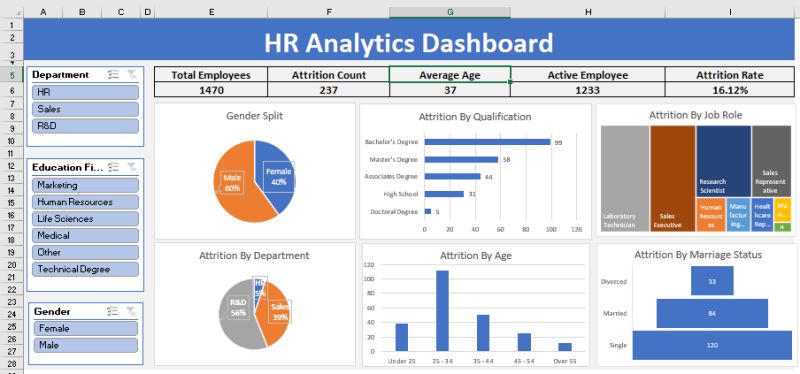
HR Dashboard for Analytics in Excel at Intellisoft Systems Singapore

Day 2: Advanced HR Analytics, Reporting & Dashboards

Module 7: Pivot Tables for HR Reporting & Analysis

  • Creating PivotTables to analyze headcount, turnover, attendance.
  • Grouping and binning by age, years of service, and salary ranges.
  • Calculating % of total, count of hires by department, and more.
  • Adding slicers for filtering by department, gender, or employment type.
  • Hypothesis Testing in HR data

Module 8: HR Data Visualization with Excel Charts

  • Choosing the right chart type for HR reports.
  • Creating trend charts for attrition, headcount growth, or training hours.
  • Combining multiple data series (e.g. budget vs actual training spend).

Module 9: Building HR Dashboards in Excel

  • Elements of a good HR dashboard: KPIs, interactivity, simplicity.
  • Creating interactive dashboards using slicers, PivotTables, and PivotCharts.
  • Designing dashboards for recruitment, employee engagement, or manpower planning.
  • Incorporating Excel form controls (drop-downs, checkboxes) to enhance dashboards.

Module 10: Working with Protected & Shared HR Data

  • Locking specific cells, sheets, or workbooks to protect sensitive data.
  • Using data validation for dropdowns in HR forms (e.g. job roles, departments).

Module 11: Real-World Case Studies & Practice

  • Case 1: Employee turnover analysis and exit trend identification.
  • Case 2: Performance appraisal summary using VLOOKUP & PivotTables.
  • Case 3: Recruitment dashboard using slicers to filter by job level or location.


Target Audience

HR Executives, HR Analysts, Talent Acquisition Specialists, and HR Business Partners who want to enhance their Excel skills for real-world HR use.

Learning Outcomes

By the end of the course, participants will be able to:

  • Organize, clean, and analyze HR data using Excel formulas and tools.
  • Create PivotTables with binning and slicers to gain deeper insights.
  • Apply descriptive statistics to identify patterns in workforce data.
  • Build dashboards to communicate HR metrics and support strategic decisions.

Full ofย  Practical, Hands on Exercises based on HR work. A Laptop for doing the exercises is provided in the class room for all participants. What are you waiting for? Register for Excel for HR Executives.

Trusted by professionals from 500+ organisations
Canon CPF Board OCBC NTU NUS Mindef HDB JTC ExxonMobil Sembcorp
AXA Epson NTUC Health DSO Toyota Asia Pacific BNY Mellon Ritz-Carlton Standard Chartered Singapore Police Force Tan Tock Seng Hospital

Training Course Fees & Funding

Full course fee: S$1,000.00 (before GST & government funding) TGS: TGS-2025055079

Highest Funding
70% Grant

70% SSG Grant

Baseline + Enhanced Training Support

  • SG Citizens aged 40+ (Individual, SME or MNC)
  • SME-sponsored SG Citizens (21+)
  • SME-sponsored PRs (21+)
Course Fee S$1,000.00
SSG Funding (70%) โˆ’ S$700.00
Nett Fee S$300.00
GST (9%) S$90.00
You Pay S$390.00
SSG Funded
50% Grant

50% SSG Grant

Baseline WSQ Funding

  • SG Citizens aged 21โ€“39 (Individual or MNC)
  • MNC company-sponsored PRs (21+)
  • Individual PRs (21+)
Course Fee S$1,000.00
SSG Funding (50%) โˆ’ S$500.00
Nett Fee S$500.00
GST (9%) S$90.00
You Pay S$590.00
Foreigners & other pass holders: Government grants are not applicable. Full course fee of S$1,000.00 + 9% GST = S$1,090.00 applies. Contact us for more details.

Need help with funding applications? We'll guide you through the process.

* Terms & conditions apply. Funding subject to eligibility and approval by respective agencies. GST applies on full course fee before subsidy. Fee information is accurate as of Mar 2026.

Funding & Subsidies

Singapore Government Grants Available

WSQ-funded courses qualify for SSG subsidies. Singaporeans may also use SkillsFuture Credits and NTUC members can claim UTAP reimbursement.

70% Subsidy
Enhanced Funding
  • SG Citizens aged 40 & above (Individual)
  • SG Citizens aged 40 & above (SME or MNC sponsored)
  • SME-sponsored SG Citizens aged 21โ€“39
  • SME-sponsored Permanent Residents aged 21+
50% Subsidy
Standard Funding
  • SG Citizens aged 21โ€“39 (Individual or MNC sponsored)
  • MNC company-sponsored Permanent Residents aged 21+
  • Individual Permanent Residents aged 21+
Additional
More Ways to Save
  • SkillsFuture Credit โ€” Use your $500 credit (all SG Citizens aged 25+)
  • UTAP โ€” NTUC members get 50% of remaining fees reimbursed, up to S$500/year
  • PSEA โ€” Post-Secondary Education Account funds accepted

Foreigners and other pass holders: Government training grants are not applicable. Course fees apply in full.

Register

Register for Excel for HR Professionals in Singapore

๐Ÿ’ฌ Corporate / Group Enquiry
Date Duration Venue
14, 15 May 2026
2 Days Fortune Centre, Singapore Register โ†’
16, 17 Jul 2026
2 Days Fortune Centre, Singapore Register โ†’
10, 11 Sep 2026
2 Days Fortune Centre, Singapore Register โ†’
16, 17 Nov 2026
2 Days Fortune Centre, Singapore Register โ†’
๐Ÿข Running this for a group? Request a Custom Corporate Run โ†’
Common Questions

Frequently Asked Questions

How much does the Excel for Human Resources course cost and are grants available? โ–พ
The course fee may vary depending on the class schedule and training arrangements. Singapore learners may be able to use SkillsFuture Credit to offset part of the course fee where applicable. Organisations may also explore workforce training subsidies for staff development. It is recommended to contact Intellisoft Systems directly for the latest pricing and funding eligibility.
How long is the Excel for Human Resources training course? โ–พ
The Excel for Human Resources course is typically delivered as an instructor-led training session focused on practical HR data analysis. Participants learn Excel tools commonly used for HR reporting and workforce analysis. The course includes demonstrations and hands-on exercises using HR data examples. This ensures learners can apply the skills immediately at work.
Do I need prior Excel experience before attending this course? โ–พ
Basic familiarity with Microsoft Excel is recommended before attending the course. Participants should know how to enter data and navigate worksheets. The training focuses on applying Excel tools specifically for HR data analysis and reporting. Beginners can still follow the course with basic computer skills.
Will I receive a certificate after completing the course? โ–พ
Participants who attend the training typically receive a certificate of completion from Intellisoft Systems. The certificate confirms that the learner has completed the Excel for Human Resources course. Many organisations use the certificate for employee training records. It demonstrates competency in HR data analysis using Excel.
Where is the Excel for Human Resources training conducted? โ–พ
The classroom training is conducted at Intellisoft Systems training centre located at Fortune Centre, 190 Middle Road, #14-05, Singapore 188979. The venue provides a professional learning environment with computers and practical exercises. Corporate organisations may also request onsite training sessions at their office. This allows teams to use real HR datasets during the training.
Who should attend the Excel for Human Resources course? โ–พ
This course is designed for HR professionals who regularly work with employee data and HR reports. It is particularly suitable for HR executives, HR administrators, HR analysts, and HR managers. Anyone responsible for workforce reporting or employee data analysis will benefit from the training. The course focuses on practical HR data management using Excel.
How can I register for the Excel for Human Resources course? โ–พ
You can register directly through the course page by selecting an available class schedule. Alternatively, you may contact Intellisoft Systems via phone or email to confirm course dates and seat availability. Organisations planning group training can request a corporate training proposal. Early registration is recommended because class sizes are usually limited.
Ready to Get Started?

Upgrade Your Skills.
Seats Fill Quickly.

Join thousands of professionals who've trained with Intellisoft. With WSQ funding, this is the most cost-effective way to upskill your team.

โœ‰๏ธ training@intellisoft.com.sg ยท We respond within 2 business hours

๐Ÿ’ฌ Quick Enquiry

We respond within 2 business hours.

By submitting, you consent to Intellisoft collecting your data in accordance with Singapore's PDPA.

โœ… Thank you! We'll be in touch shortly.
Excel for HR Professionals
Next class: 14, 15 May 2026 ยท Fortune Centre, Singapore ยท 2 Days
Course Brochure
Excel for HR Professionals

Enter your details and we'll send the full course brochure โ€” complete outline, funding details, and registration instructions.

Free Tips, Tutorials & Training Grants Info

Learn from expert tips, tricks and resources for Excel, PowerPoint, Photoshop, Python, Power BI, Project Management, IT, Soft Skills & more with our Email Newsletter.
Plus get the latest news on Grants. Join Today!

Found What You Were
Looking For?

Just Tell us...

We're Here To Help You!