
Intellisoft Launches Oracle SQL Expert Certification Training

Oracle SQL Expert Certification is an excellent way to demonstrate your expertise, build your credibility, and boost your career in the Oracle Relational Database Management by writing fast and efficient SQL.

Whether you are an Oracle application developer, an SQL Query Writer, or creating Web ASP.Net / PHP Programs, it is essential to know the full potential of the Oracle SQL Database engine, and the best way to write simple, complex and powerful SQL Queries that deliver quick results for your end users.

Oracle SQL expert certification requires a thorough knowledge and understanding of SQL. The certification will test your knowledge, and application experience with multiple questions.

Anyone can brag about their expertise and experience, but Certification also gives confidence to the employer, and shows that you are serious about your career.

Certification demonstrates your expertise, knowledge, experience and builds your credibility. It also gives you the confidence, and helps you plan your next career move.

Intellisoft Systems, a premier training and skills development institute, has come up with a detailed, 5 day training and coaching program that gives you the required knowledge, skills, step by step approach to learn to build, manage, execute and manage simple to complex SQL database queries, and build robust SQL that can handle the pressure of small and large businesses with ease.

After this training, you will have the required skills and know how to prepare and give the Oracle SQL Expert Certification Examination with ease. This course is appropriate if you are using Oracle 10g or Oracle 11g database.  This course is well suited for beginners and advanced users of Oracle, who are vying for Formal Oracle Certification in the use of SQL – with passing the Oracle SQL Expert certification exam.  Course Duration: 5 Full Days (9am – 5pm)

This course is well suited for beginners and advanced users of Oracle, who are vying for Formal Oracle Certification in the use of SQL – with passing the Oracle SQL Expert certification exam.
Course Duration: 5 Full Days (9am – 5pm)

The Oracle SQL Expert Certification (1Z0-047) is a 2 hour test with 70 multiple choice questions. You need to score 66% to pass the exam and gain this coveted certification. The exam can be scheduled at any PearsonVue Centre, and there are several centres in each country, with  15+ examination centres in Singapore alone.

The SQL Expert Certification Training and Coaching is provided by Vinai Prakash, founder and CEO of Intellisoft Systems. He has over 25 years of experience working with SQL Databases, and has extensive experience with Oracle, SQL Server, MySQL, Sybase, and many other databases. His expertise in Business Intelligence, Performing Complex Query Optimization and Managing Large and Distributed databases is exceptional. Further, Vinai is passionate about training, and has been conducting Oracle, Microsoft SQL Server, MySQL training and consulting projects over the past 20 years.

Certification is the way to go for adding value to your portfolio, differentiating yourself from your peers, and raising your standard. It is a must for continuous, lifelong learning.

Contact Intellisoft at +65 6250-3575 or email to training@intellisoft.com.sg for more information, training dates, and for training course registration.

Effective Presentation Techniques for the Board Room

Creating Killer Presentations @ Intellisoft

After years of slogging, you are finally getting a chance to do a presentation in the board room. Do not take this lightly. And do not blow this chance to impress senior management about your skills.

Many a career have been contained when engineers, who are domain experts, completely knowledgeable, are called to the board room, and because of fear, or in-experience, are tongue tied, mutter, splutter, and mumble something incomprehensible.board-presentations

It is true, Fear of Public Speaking is the worst fear in the world. It is the highest fear, even ranking higher than the fear of death.

Do you want to stifle your career too soon, all because you are un-prepared for the big boardroom presentation?

Practice now. Get ready. Be prepared for your big chance. And play it safe, play it well, and present to win, present to wow, present to amaze your audience!

Effective presentation techniques for the boardroom can be easily acquired.

1. Prepare a Solid Presentation
This should not be a problem as you have the content, and you have the domain expertise. But it is an art to prepare a presentation. Do not present a 100 slide presentation full of bullet points. This leads to Death by PowerPoint.

The Secrets of a Great Presentation are:

A.  Tell ’em what you are going to tell ’em.
B.  Tell ’em.
C.  Tell ’em what you have just told them.

What this means is that a. Have a clear and thought about Agenda. State it in the beginning, so there is no mystery. Stick to the agenda.

boardroom-presentation

Secondly, have only 3-5 points to cover in the presentation. Keep slides simple. And stay away from amateurish PowerPoint Animation effects. Fly in objects, slow animation, corny graphics or too much use of clip art is sadly lost on the boardroom. Do a slick presentation with corporate like graphics, simple round or square bullets. Keep to only 2-3 bullets on a slide.

Show less information, and talk more from these bullet points. So that people are not reading your PowerPoint, but rather they are listening to you.

Thirdly, summarize the information. Tell them the key points, your own justification/stand, and the final outcome.

2. Rehearse it well.

You must rehearse your presentation a few time in front of the mirror, or in an empty room. Time it, so that you know you will not overshoot the allocated time. And practice how to open the speech. How to close the speech. Some speakers start with a joke. But this must be done with care. What if no one laughs on the joke? It can back fire on you. So choose your opening carefully. You can go to YouTube to watch some good presentations at Ted.com.

Another good way is to record your presentation using a Video recorder, or a audio recorder on your phone. Listening to your own voice can seem odd, but you will catch many mis-pronunciations, and many pauses which you were not aware of.

3. Maintain Eye Contact & Good Body Posture

Many people are so afraid of the audience that they try to hide behind the podium, or they look at some remote corner of the room while speaking. In one of my earlier presentations, someone from the audience congratulated me on observing their new curtains. When I told them I didn’t find anything new about their curtains, she told me that I was staring at the curtains all entire time I was speaking. What a polite way to tell me that I lacked eye contact. I was so naive… but then I realized the mistake and thanked her for being so thoughtful. I then worked upon improving my eye contact, and learnt how to work a room.

You can look at their foreheads and continue for a few seconds, then move to another forehead and so on… It will seem to the people that you are talking to them, and not staring at some remote corner.

Similarly, it is important to maintain a good body posture. Stand straight. Do not slump. Keep your hands in the front. Not in the pockets, not dangling like a pendulum. And do not keep jingling the key chain or loose change in your pockets to avoid any nervousness. Nothing is more distracting than jingling change or key noise in a presentation. Do not pace the room from left to right. Stand firm in one place. You can move to different areas to illustrate the points, but do not dangle like a pendulum. It should look natural movement, not deliberate, for the sake of moving.

4. Have Enough Time for Questions & Answers

Anticipate some questions. In fact, you can have a Frequently Asked Questions section, and show standard, canned responses to some standard questions.

Keep some time for audience questions. Once the question is asked, repeat the question, so that everyone can hear it, and thank the Enquirer about the thoughtful question. Do not ridicule the question if it is a simple or silly question. Then answer the question completely. And get a confirmation from the enquirer about whether you have answered their question completely or not.

empty_boardroom

Finally, once everything is said and done, thank the audience for giving you a chance to listen to you, and for their time and patience.

These are simple tips. Easy to master if you at least take notice, and practice on improving them. And once you apply them, you will be amazed at how powerful your presentations will begin to be.

If you would like to learn more practical tips, you can always attend a training program at Intellisoft, and learn from the gurus on how to improve your soft skills.

This article is written by Vinai Prakash, Founder, CEO and Principal Trainer of Intellisoft Systems. Vinai is a sought after trainer in the area of soft skills, project management skills, data analysis, business intelligence and IT courses. Vinai’s articles are published in the Straits Times, and many other books and magazines all over the world. Contact us to book Vinai for your next training or seminar.

Related Training: Presentation Skills: Speaking to Impress in our 1 day workshop. Full of exercises and practical examples, it is a totally immersive workshop that will work wonders to your Presentation Skills. Do check it out here: Presentation Skills: Speaking to Impress


Programming in C – Hands On Training in Singapore

Intellisoft Systems is proud to bring you new and exciting IT Training Courses. We have added yet another popular course for you – Programming in C Language.

This training is divided into 2 classes – a Beginners 2 Day C Programming Course, where you will learn the Fundamentals of C Programming – Data Types in C, Operators, Arrays, Conditional Statements etc. This will assist you to build a solid foundation in C Programming Language.

Advanced C Programming Workshop

Once you have mastered these foundational concepts of C Programming, you will be ready to move on to the More advanced concepts in C languagePointers, Memory, Manipulating Strings, Arrays, Files, Inputs and outputs

Some of the Advanced C Language Concepts we cover in our 2 day public classes in Singapore:

     * Working with bits: number system, OR, XOR , NOT ,Setting bit flags, Bitwise shift operators, Extracting bit values

     * Pointing to data: Getting values via pointers, Passing pointers to function, Arrays of pointers, Pointing to functions

     * Manipulating strings: String function, Working with strings

     * Building structures: Nested structures, Array & pointers in structures, Array of structures

     * Union: Array of union

     * Standard input & output file streams: Working with files

     * Header Function and Linking File: Function in custom headers, Multiple source files linking  files, Static functions.

It is best to take the Basic and Advanced course together – back to back. You can finish it in the same week, and be ready to start coding in C language.

Why not take this opportunity to check out the course outlines, and enroll in the C Language Training Programs. Check out our Training Calendar and Register online for C Programming Courses. You can also call us at +65 6250-3575, or email to us.

Cheers,
Intellisoft Systems Team

Recommended Training: C Programming FundamentalsC Programming – Advanced

How Good Are Your Soft Skills?

valuable_employee_cartoon

Most people learn the hard skills in college, and be a good engineer, architect, doctor, or a specialist based on the skills learnt in the academia. This is fine, and it helps in the initial years. However, as time goes by, you use less and less of these specialist, hard skills, and you need more of other soft skills. This is because as time goes by, you rise in your career, and have bigger and larger responsibilities. You will also have bigger teams to manage, and bigger amounts will be at stake.

This is the time you realize that the hard skills you learnt are not always of great use. What you really need is expertise, mastery and experience in using the soft skills – which is what really matters. Most of all, you have to realize that as you rise higher, you do less and less work, and you need to get other people to do more and more of the work. How do you push others to do the work? What skills are needed to do this?

What are soft skills really?

Wells, soft skills are communication skills, negotiation skills, presentation skills, general management skills, motivational skills, and leadership. These are really people management skills. To do any project, you need people, and to manage the project well, to get it done on time, cost, scope, quality, you need to work with your team, your people effectively.

These skills are generally not taught in school, as we focus to learn the hard skills. However, if you want to accelerate your career, move far, higher, faster, then you need to master these at a great speed. The thing with soft skills is that it improves with experience. But you must practice them. You can’t learn communication by reading a book on communication… just like you can’t be an expert swimmer just by reading the Advanced Manual of Swimming. You need to get into the water, learn to navigate your way, try, make mistakes, and learn from them. It is OK to make mistakes. The important thing is to learn from them, so that you don’t repeat them, and use this experience to get better and better.

Learning soft skills is like learning an art. It takes time, patience, determination, and perseverance. You can do it. Only thing is to become aware about it, take note of your current skills, and the areas where you need to improve. Then work out a plan, and practice to improve your skills in each area.

Today, there are several courses available to improve your soft skills – there are numerous Communication Skills courses, there are several Time Management courses, Stress Management Courses. Most of these courses are short, 1-2 days, and they are good because they tend to teach you a few techniques, a few ways to improve your communication. You will not become an expert in a day or two, but it will be a great start.

Any improvement can only be seen when you first become aware of the short coming, and measure where you are, and where you want to go. Once you know where you are, and what your plan is, then from then onwards, it is easier to take some steps, measure your progress, and see how small steps are shaping up your future, helping you grow, nurture your nature, and improve your skills, improve your life.

It is worthwhile to live a meaningful life, and life rich of experiences, of abundance, of contribution. Do not waste your time. Make the most of this opportunity. Do good, learn, help others grow by applying the principles of self mastery, and self growth. Once you improve, you improve the people around you.

Improve your soft skills. Invest in your future. You do not have to spend a fortune. There are several courses available for free on YouTube, Articles abound on the Internet, and there is a plethora of applications on the mobile phones that can be used to learn new things, grow your knowledge, and grow yourself.

Written by Vinai Prakash,
Master Trainer at Intellisoft

Related Training: Effective Communication Skills, Body Language, Interview Skills – Prepare for An Interview.

How To Use Custom Sort in Microsoft Excel

Excel training in Singapore at Intellisoft

Do you know how to use custom sort in Excel?

I bet you know how to sort data in Excel. It is pretty easy. Most of the time an ascending sorting is what we need – letters and numbers listed in the ascending order a to z, 1 to 100 etc. And just in case you need to sort in the reverse order, you have the Z to A sort, also called the Sort in Descending order. Between the two, most people are quite happy, thanks to Microsoft‘s intuitive sorting options.

However, there arises a time when you don’t want either the sort in Ascending order or the Descending order in Excel.

Examples where a Standard Sorting won’t work:

For example, if the departments in your organization are Finance, Marketing, Sales & Engineering. And you want the Sales department to be listed first, followed by Marketing, Engineering, and Finance being the last.

Now how would you sort the departments in this order? Ascending or descending sort is not going to work.

Do not despair however. Here is where the power of Microsoft Excel Custom sort shines.

Another scenario is the Sorting of Months – say you want to sort April, May & June, in this order. Or maybe you want to sort regions by East, West, North & South. This EWNS order also needs a custom sorting in Excel.

Or if you have a completely random order – which defies any kind of sorting. Say you want to list Oranges, then Apples, then Grapes, and finally Bananas. You can go nuts without custom sorting criteria in Excel.

Using Custom Sort in Excel 

First, let’s create the custom list in Excel.

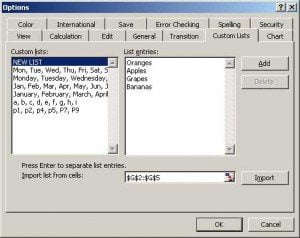
Go to Tools, Options, Custom Lists.

You can key in your list and click Add. Or you can import your list from another area of the spreadsheet, where you list the options in the sorted order.

Custom sort option screen in Excel


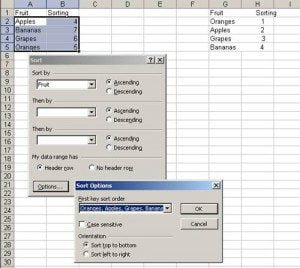
Once you have imported the list in the correct order, you can go to Data, Sort, and then click on Options at the bottom of this popup window.

Choose your custom sorted list from the list of First Key Sort Order.

Voila! Your list is now sorted in your very own custom order.

Multi level sort in Excel with Custom Sorting options


Alternatives to Custom Sort in Excel

Of course, if you don’t want to use Custom Sort, there are other alternatives. I have often used a Lookup Table

Fruit                Sorting
Oranges             1
Apples               2
Grapes               3
Bananas            4

I then use the inbuilt Lookup function of Excel called VLOOKUP function and pick the correct value, and then do an Ascending sort. This is a quick cheat trick.

But it would be tough if you did not know how to use the Lookup functions of Excel in the first place. More on this lookup function in another post.

Let me know if this neat trick help you. And if you want to learn more, join me in a Excel Training workshop in Singapore.

Till then…

Cheers,
Vinai Prakash
Founder & Master Trainer at Intellisoft Systems, in Singapore

Text to Columns in Microsoft Excel

Excel training in Singapore at Intellisoft

It is now very easy to split a name into first name and last name, using Excel, even if the name is in a single column.

Text to Column Function in Microsoft Excel 2010 or older versions

1. Select the data in Excel.

2. Go to the Data Menu, and select Text to Columns
3. Choose Delimited, and click the Space checkbox, and click Finish.
4.  The data would have been split into separate columns.

Text to Column Function in Microsoft Excel 2013, 2016, 2019

You can also customize how you want your data to be separated by specifying a fixed column break location in the cell, using Excel 2016 or Excel 2019.

  1. Select the  cells, and then click Text to Columns on the Data menu.
  2. In Step 1 of the Convert Text to Columns Wizard, click Fixed Width, and then click Next.
  3. In the Data preview window, drag a line to indicate where you want the content to be divided.
  4. The data will now be split according to your specifications, in separate columns.

Simple, isn’t it!

For more such tips on Excel, join Intellisoft Trainings on Excel in Singapore. Visit https://www.intellisoft.com.sg/advanced-excel-2016-training.html.

Cheers,
Vinai
Editor, Excel Tips

Free Tips, Tutorials & Training Grants Info

Learn from expert tips, tricks and resources for Excel, PowerPoint, Photoshop, Python, Power BI, Project Management, IT, Soft Skills & more with our Email Newsletter.
Plus get the latest news on Grants. Join Today!

Found What You Were
Looking For?

Just Tell us...

We're Here To Help You!