Many people have already used tools like ChatGPT, Claude, Gemini, or Microsoft Copilot.
These tools are useful. They can write, summarise, explain, translate, and create ideas.
This is called Generative AI.
But now, a new type of AI is becoming more important.
It is called Agentic AI.
Agentic AI can do more than answer questions. It can plan, take action, use tools, check results, and complete work.
Agentic AI Introduction for beginners
What is Agentic AI – An Explainer for All from Intellisoft Training
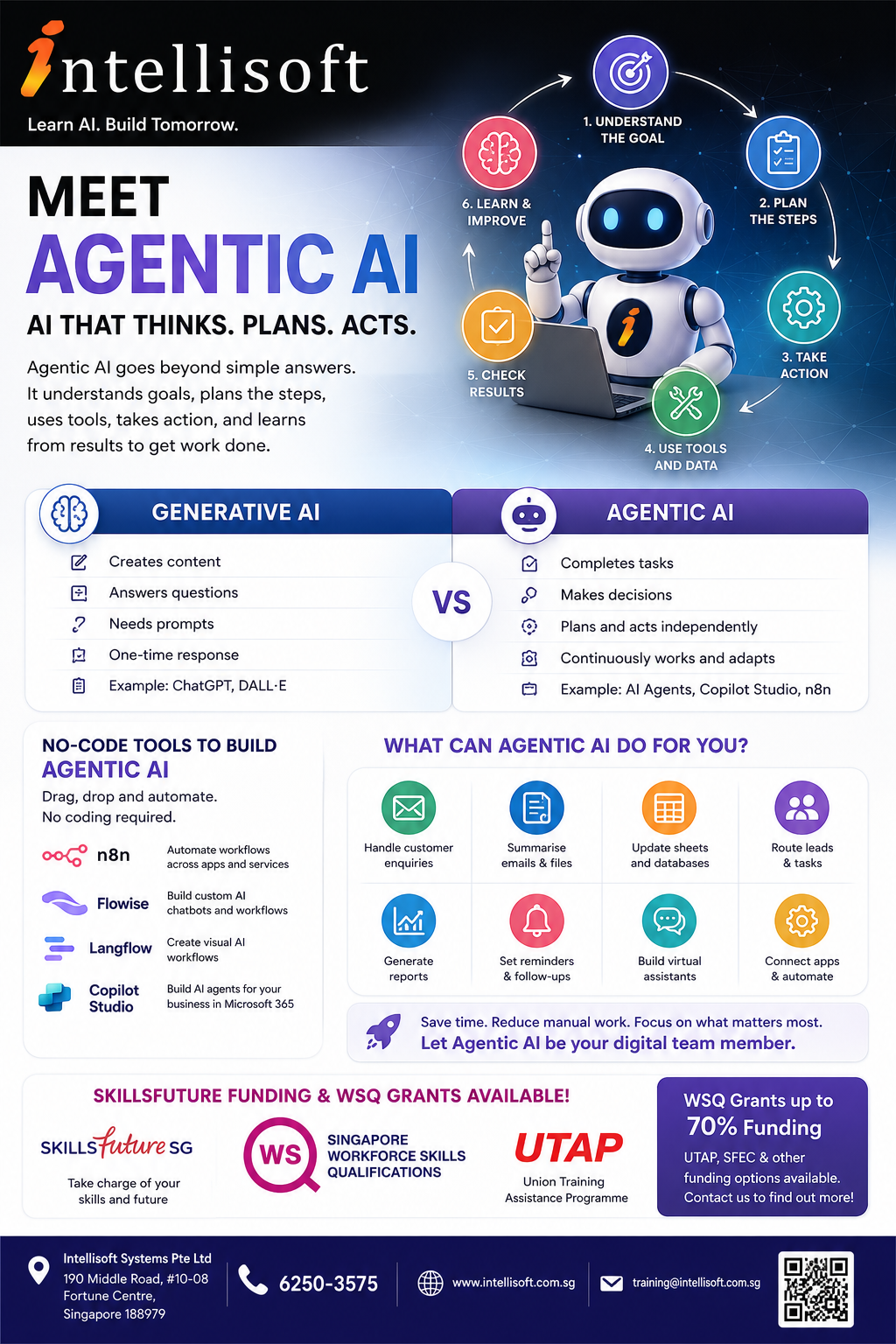
What is Agentic AI?
Agentic AI means AI that can work towards a goal.
It does not only wait for one prompt and give one answer.
It can understand what needs to be done.
It can break the task into steps.
It can use tools and data.
It can take action.
It can check the result and improve the next step.
In simple words, Agentic AI is AI that helps get work done.
Generative AI vs Agentic AI
Generative AI is mainly used to create content.
Agentic AI is mainly used to complete tasks.
Generative AI can help you:
Write emails
Summarise documents
Create reports
Generate ideas
Create images
Explain difficult topics
Translate text
Write code or formulas
Agentic AI can help you:
Read information from different sources
Decide what needs to happen next
Use apps, tools, and databases
Send replies
Update records
Create follow-up reminders
Route work to the right person
Continue a workflow with less manual effort
Comparison of Generative AI and Agentic AI
Simple Example of Agentic AI
Imagine a customer sends an enquiry about a course.
A normal AI tool can help you write a reply.
An Agentic AI workflow can do much more.
Read the customer enquiry
Understand what the customer wants
Check the correct course information
Draft a reply
Send the lead to the sales team
Update a spreadsheet or CRM
Create a follow-up reminder
This is not just content creation.
This is task automation with intelligence.
How Agentic AI Works
Most Agentic AI workflows follow a simple pattern.
How Agentic AI Works
Set the goal
Break down the steps
Use tools and data
Take action
Check the result
Learn and improve
The AI may use different tools during the process.
For example, it may read an email, search a document, update a spreadsheet, send a message, or create a report.
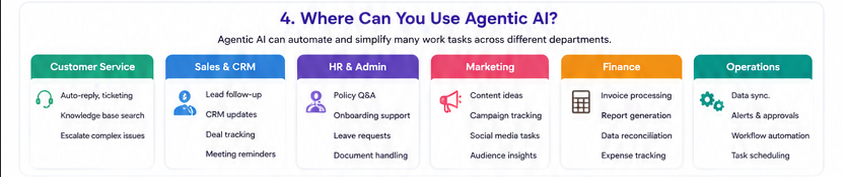
Where Can You Use Agentic AI at Work?
Agentic AI can be used in many departments.
Agentic AI Use Cases sor Sales, Marketing, Operations, HR
Customer Service
Answer common questions
Classify customer enquiries
Suggest replies
Escalate difficult cases
Search knowledge bases
Sales and CRM
Handle new leads
Prepare follow-up emails
Update CRM records
Track customer conversations
Remind sales staff to follow up
HR and Admin
Answer staff policy questions
Prepare onboarding checklists
Summarise resumes
Handle leave or document requests
Route requests to the right person
Marketing
Create campaign ideas
Draft social media posts
Prepare email campaigns
Summarise customer feedback
Analyse campaign responses
Finance and Operations
Extract invoice details
Prepare simple reports
Check data from spreadsheets
Send reminders
Track approvals
No-Code Tools to Build Agentic AI
No code tools for Agentic AI including n8n Flowise Langflow and Copilot Studio
You do not always need to be a programmer.
Many Agentic AI tools now use drag-and-drop interfaces.
You can connect apps, AI models, documents, forms, emails, and databases visually.
n8n
n8n is a workflow automation tool.
You can use it to connect apps and build AI-powered automations.
Flowise
Flowise is a visual tool for building AI chatbots, AI agents, and LLM workflows.
Langflow
Langflow helps users build AI applications and agent workflows using a visual interface.
Microsoft Copilot Studio
Copilot Studio helps organisations create AI agents for Microsoft 365, Teams, SharePoint, websites, and business workflows.
Benefits of Agentic AI
Benefits of Agentic AI
Saves time
Reduces repeated manual work
Improves response speed
Helps staff focus on higher-value tasks
Reduces copying and pasting between systems
Improves customer experience
Supports 24/7 workflows
Can scale as your business grows
Benefits of Generative AI
Generative AI is still very useful.
It is excellent for content, communication, research, and idea generation.
Helps you write faster
Improves email quality
Summarises long documents
Explains complex topics
Creates first drafts
Helps with brainstorming
Supports learning and training
So Which One Should You Learn?
You should learn both.
How to Get Started With Agentic Ai
Generative AI helps you create better content.
Agentic AI helps you build smarter workflows.
Together, they can improve productivity in almost every job role.
How to Get Started with Agentic AI
Pick one repeated task
Write down the steps
List the tools involved
Decide where AI can help
Build a small workflow
Test it carefully
Improve it step by step
Good First Projects for Beginners
Email enquiry assistant
FAQ chatbot
Document summary assistant
Lead follow-up workflow
Training feedback analyser
Simple report generator
Customer support triage bot
HR policy assistant
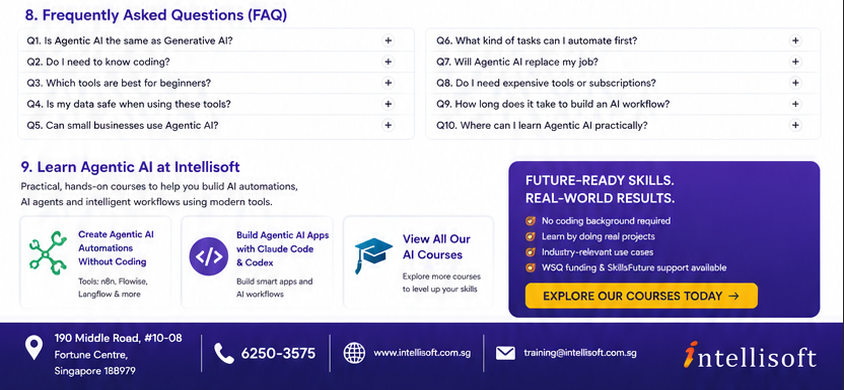
Frequently Asked Questions About Agentic AI
Frequently Asked QUestions About Agentic AI
1. Is Agentic AI the same as Generative AI?
No. Generative AI creates content. Agentic AI plans and completes tasks using tools and workflows. If you are weighing up where to start, there is an independent comparison of Agentic AI courses on intellisoft.training, where Intellisoft also publishes independent-style course guides.
2. Do I need to know coding?
Not always. Many tools such as n8n, Flowise, Langflow, and Copilot Studio use visual drag-and-drop interfaces.
3. Is Agentic AI only for IT people?
No. Business users, managers, HR teams, sales teams, marketing teams, trainers, and administrators can also use it.
4. What is the easiest way to start?
Start with one repeated task. For example, handling enquiries, summarising documents, or sending follow-up reminders.
5. Can Agentic AI replace employees?
Agentic AI is best used to support employees. It can handle repeated tasks so people can focus on judgement, creativity, service, and decision-making.
6. Is Agentic AI safe to use?
It depends on how it is set up. You should control access to data, check outputs, review permissions, and test workflows before using them in real business processes.
7. Can small businesses use Agentic AI?
Yes. Small businesses can use Agentic AI for enquiries, admin work, marketing, customer support, reporting, and follow-up tasks.
8. What tools should beginners learn first?
Good beginner tools include ChatGPT or Copilot for Generative AI, and n8n, Flowise, Langflow, or Copilot Studio for Agentic AI workflows.
9. How long does it take to build a simple AI workflow?
A simple workflow can be built in a few hours once you understand the tool. More advanced workflows need more planning, testing, and improvement.
10. What kind of tasks should I not automate immediately?
Do not start with high-risk tasks such as legal decisions, medical advice, financial approvals, or sensitive HR decisions. Start with low-risk support tasks first.
11. Can Agentic AI connect to Excel, email, forms, and CRM systems?
Yes. Many automation tools can connect to email, spreadsheets, forms, CRM systems, databases, and websites.
12. What is the main benefit of learning Agentic AI now?
You can understand how AI is moving from simple answering to real workflow automation. This helps you stay relevant and productive at work.
Learn Agentic AI at Intellisoft
At Intellisoft, we conduct practical AI courses for working professionals.
Our courses are hands-on and beginner-friendly.
You will learn how to use AI tools for real work situations.
You can explore courses on no-code Agentic AI, n8n, Flowise, Copilot Studio, Claude Code, Codex, and other modern AI tools.
Artificial Intelligence is evolving rapidly. While many people are getting more familiar with tools such as ChatGPT, Claude, Gemini, and Microsoft Copilot, the next major advancement is already here: Agentic AI.
Unlike traditional AI chatbots that simply answer questions, Agentic AI systems can plan, reason, take actions, access data, interact with applications, and complete complex tasks with minimal human intervention.
As businesses across Singapore and around the world begin adopting AI agents to improve productivity and automate work, many professionals are asking:
“Should I learn No-Code Agentic AI or AI-assisted coding with Claude Code or Codex?”
The answer depends largely on your role, technical background, and career goals.
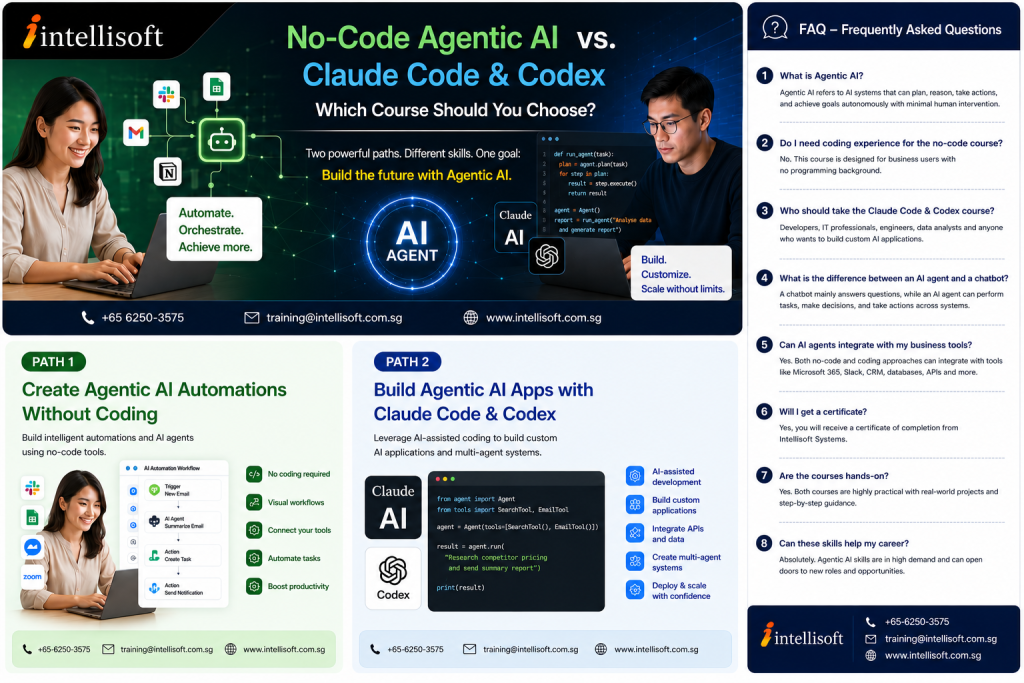
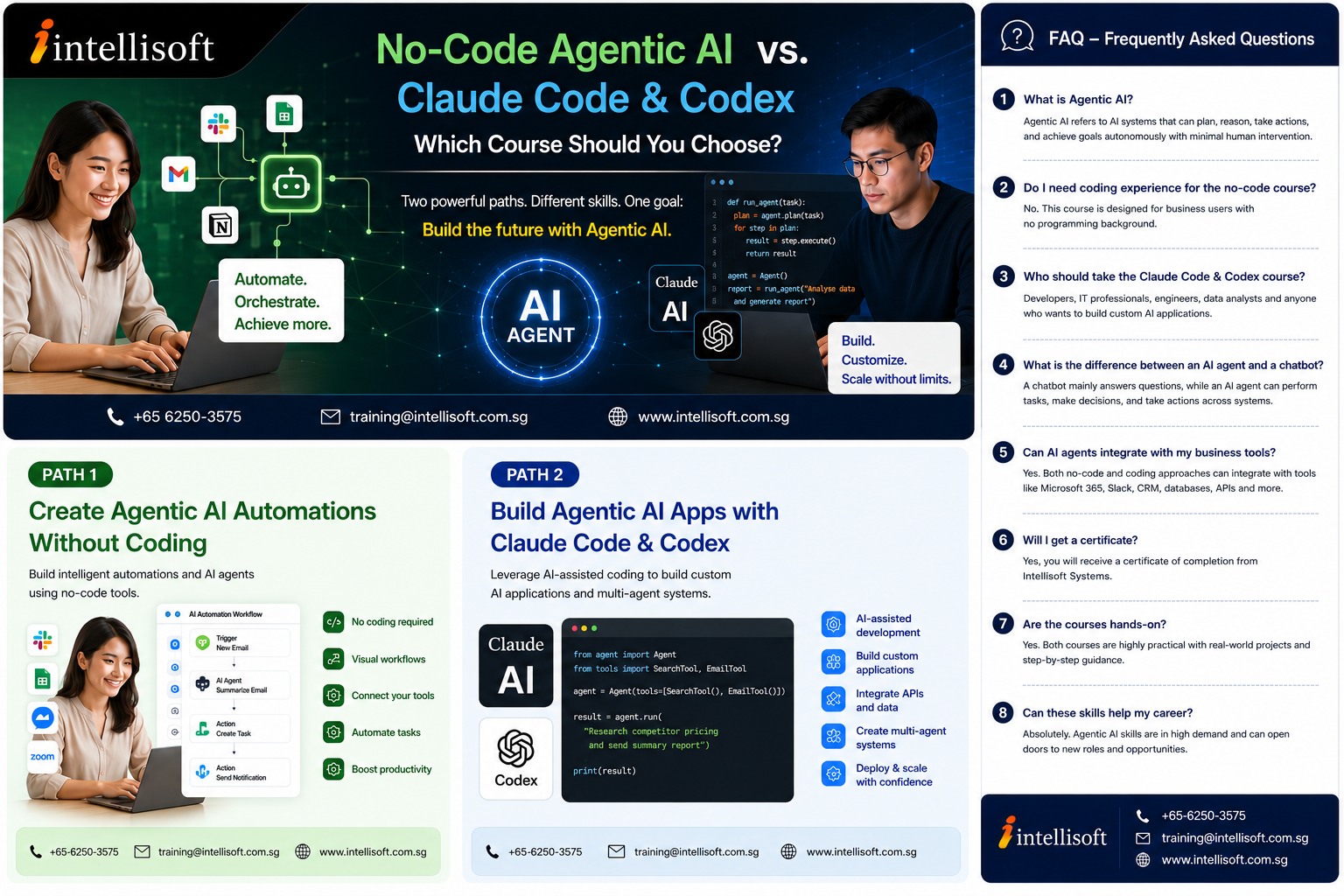
Intellisoft Agentic AI Course Comparison with Claude Code Course in Singapore
In this article, we explore the differences between these two exciting areas of AI and help you decide which learning path is best for you.
Understanding Agentic AI
Before comparing the two courses, it is important to understand what Agentic AI actually means.
Traditional AI systems are reactive. You ask a question and receive an answer. Agentic AI goes much further.
An AI agent can:
Understand objectives
Break complex goals into smaller tasks
Access information from multiple sources
Make decisions based on available data
Execute actions
Monitor outcomes
Adjust its behavior to achieve a desired result
For example, an AI agent could:
Monitor incoming emails
Extract important information
Generate reports
Create follow-up tasks
Send notifications
Update databases
Escalate exceptions to managers
—all without requiring constant human intervention.
This is why Agentic AI is becoming one of the most important workplace technologies of the decade.
Two Different Paths into Agentic AI
Although both courses focus on Agentic AI, they approach the technology from different perspectives.
This course is designed for business professionals who want to leverage AI without learning software development. We will be using no code and low code, drag and drop interface to build AI Automations. The software often used in our Agentic AI classes in Singapore are n8n, Copilot Studio, Flowise, AgentX, and LangFlow etc. Check out a comparison of n8n, Flowise & Langflow as Agentic AI Platforms.
No-code AI platforms allow users to build AI-powered solutions using visual interfaces rather than traditional programming.
Instead of writing code, users:
Drag and drop components
Configure workflows visually
Connect applications
Build AI assistants
Create automations
The focus is on solving business problems quickly.
Examples include:
Automated customer service assistants
AI-powered knowledge bases
Employee support bots
HR onboarding assistants
Document processing workflows
Lead qualification systems
Marketing automation agents
Skills You Will Learn in the Agentic AI Course Without Coding
Participants will learn how to:
Understand Agentic AI Concepts: Learn how AI agents think, reason, and execute tasks.
Explore various No Code & Low Code Agentic AI Platforms like n8n, Copilot Studio, Flowise, AgentX etc.
Build AI Assistants: Create intelligent assistants capable of handling workplace tasks.
Create Workflow Automations: Automate repetitive business processes that consume valuable time. For example, processing PDF invoices and read unstructured data from them.
Build Knowledge-Based AI Systems: Allow AI to search company documents and answer questions accurately.
Connect Multiple Applications: Integrate AI with business tools and services like Gmail, Google Calendar, Notion, Sheets, Outlook, Internet and many more,
Design Business Solutions: Transform manual workflows into AI-powered processes.
Benefits of No-Code Agentic AI
Fast Learning Curve: Most participants can begin building useful solutions immediately.
No Technical Background Required: Suitable for beginners and non-technical professionals.
Immediate Workplace Applications: Participants can implement solutions directly in their departments.
Lower Development Costs: Business users can build solutions without hiring developers.
Increased Productivity: Routine tasks can be automated quickly.
Claude Code Training in Singapore at Intellisoft. Master Claude Code & Codex with WSQ and SkillsFuture Grants
Who Is This Agentic AI Coding Course For?
This Agentic AI code class is designed for professionals who want greater flexibility and control when building AI-powered solutions.
Ideal participants include:
IT Professionals, Developers, Engineers, Technical Consultants, Data Analysts,
Power Users, Solution Architects, Technology Enthusiasts
While prior programming experience can be helpful, modern AI coding assistants have significantly lowered the barriers to entry.
What Are Claude Code and Codex?
Anthropic’s Claude Code, and OpenAI’s Codex are AI coding assistants. They are revolutionizing the software development industry and are an overnight success!
Both these tools have come up with frontier models that can create agentic apps and websites within a few minutes to a few hours. Previously this would take several months to even see a prototype. Now you can see a fully functional prototype within minutes of prompting these AI Coding Agents.
Instead of manually writing every line of code, developers can now collaborate with AI.
Tools such as Claude Code and OpenAI Codex can:
Generate code
Debug applications
Explain programming concepts
Build complete software projects
Create APIs
Generate documentation
Improve software quality
These tools act as intelligent coding partners. Take note that both Anthropic’s Claude Code and OpenAI’s Codex are paid products and a subscription or API credits are required to use these AI Agents.
Why AI-Assisted Development Matters
Historically, building software required years of technical training. Today, AI-assisted development enables professionals to create sophisticated applications significantly faster.
Many organizations are already using AI coding tools to:
Accelerate development cycles
Reduce coding errors
Improve software quality
Increase developer productivity
Build prototypes rapidly
The future of software development is increasingly AI-assisted. Thus, it is important to learn this emerging skill at the earliest.
Don’t get left behind the Agentic AI train…
Skills You Will Learn in the Claude Code and Codex Course in Singapore at Intellisoft Training
In the 2 Day Claude & Codex Class, participants learn how to:
Install Claude Code & Codex for Agentic AI App Development: What to install, how to install it, software and hardware required.
Desktop vs Terminal: Working in the desktop vs working in the Terminal window
Use Claude Code Effectively: Generate, analyze, and improve code using AI.
Use OpenAI Codex: Leverage advanced AI coding capabilities to build applications.
Build Agentic Applications: Create AI-powered systems capable of planning and executing tasks.
Create Multi-Agent Solutions: Develop systems where multiple AI agents collaborate.
Integrate APIs: Connect applications to external services and data sources.
Rapidly Prototype Applications: Transform ideas into working software quickly.
Debug with AI: Identify and fix issues faster. How to provide Browser use, Tool Use, Debugging & Troubleshooting tools etc. to the Agents to assist you.
Deploy Real Solutions: Move beyond prototypes into production-ready applications.
Benefits of Learning Claude Code & Codex for Agentic AI App Development
Greater Flexibility: Build solutions that are difficult or impossible using no-code tools.
Higher Customization: Create exactly what your organization requires.
Advanced Integration Capabilities: Connect to virtually any system through APIs.
Future-Proof Skills: AI-assisted software development is becoming a highly sought-after skill.
Increased Career Opportunities: Professionals who understand AI-assisted development are increasingly valuable in today’s workforce.
No-Code Agentic AI vs Claude Code & Codex Coding Agents
Area
No-Code Agentic AI Platforms like
n8n, Flowise, Copilot Studio, Agentx
Claude Code & Codex AI Coding Agents
from Anthropic & Open AI
Coding Required
No
Basic understanding helpful
Learning Curve
Easier
Moderate
Target Audience
Business Users, AI enthusiasts,
anyone interested in building own
chatbots
Business users wanting to build own apps without actual coding,
& Technical Users
Build AI Chatbots
Yes
Yes
Build AI Agents
Yes
Yes
Build Workflow Automation
Yes
Yes
Build Custom Applications
Limited
Extensive
API Integration
Basic
Advanced
Technical Flexibility
Low
Low to Medium
Career Path
Business Automation
Business Innovation & AI Development
Which Agentic AI Course Should You Choose?
Choose Create Agentic AI Automations Without Coding If:
You are a business user.
You want quick results.
You prefer visual tools.
You need departmental automation.
You do not want to learn programming.
This course is ideal for professionals seeking immediate productivity improvements.
Choose Build Agentic AI Apps with Claude Code & Codex If:
You enjoy technology.
You want to create custom AI solutions.
You want to build tight integrations with multiple diverse systems and platforms and go beyond simple automation.
You want to learn AI-assisted development.
You are preparing for future technical roles.
This course provides deeper technical capabilities and greater flexibility.
Why Learn Agentic AI Now?
Industry experts believe Agentic AI will become one of the most transformative technologies of the next decade.
In Singapore, most government, multi national and even small and medium organizations are already exploring how Agentic AI can help their teams. They want more productivity and automation at a reduced cost.
AI-powered customer service
Autonomous business workflows
AI research assistants
Knowledge management systems
Intelligent document processing
Automated reporting systems
AI-powered software development
Professionals who learn these skills early will be better positioned to lead AI adoption within their organizations.
Learn Agentic AI with Intellisoft Training
At Intellisoft Training, our Agentic AI programs are designed to be highly practical and hands-on.
Participants will work with real-world scenarios, build AI-powered solutions, and learn practical techniques that can be applied immediately at work.
Ideal for professionals who want to leverage AI-assisted coding to build advanced AI applications and automation solutions.
Both programs are conducted by experienced trainers and include demonstrations, guided exercises, and practical business use cases.
Frequently Asked Questions About Agentic AI, No-Code AI Automation, Claude Code & Codex
1. What exactly is Agentic AI, and how is it different from ChatGPT or traditional AI chatbots?
Most people are familiar with AI chatbots such as ChatGPT, Claude, Gemini, or Microsoft Copilot. These tools are excellent at answering questions, generating content, and providing recommendations.
Agentic AI goes a significant step further.
Instead of simply responding to prompts, Agentic AI systems can reason through complex objectives, create plans, break tasks into smaller steps, use tools, access external information, make decisions, and execute actions with minimal human intervention.
For example, a traditional chatbot may help draft an email. An AI agent could monitor incoming emails, identify urgent requests, generate responses, create tasks, update a CRM system, and notify relevant staff members automatically.
In short, chatbots answer questions. Agentic AI systems complete objectives.
2. Is Agentic AI just another buzzword, or is it genuinely changing how businesses operate?
Agentic AI represents one of the most important developments in artificial intelligence since the rise of large language models (LLMs)
Many organizations have already moved beyond simple chatbots and are deploying AI agents for:
Customer support,
HR onboarding,
Employee self-service,
Sales qualification,
Document processing,
IT support,
Business intelligence, and
Workflow automation
Industry analysts predict that future workplaces will increasingly consist of humans collaborating with AI agents that handle repetitive, time-consuming, and data-intensive tasks. Professionals who understand how AI agents work will be better positioned to lead digital transformation initiatives within their organizations.
3. What is the difference between an AI assistant, an AI chatbot, and an AI agent?
Although these terms are often used interchangeably, they are not identical.
An AI assistant generally helps users perform tasks such as writing, summarizing, or answering questions.
An AI chatbot focuses primarily on conversational interactions.
An AI agent can perform autonomous actions, make decisions, use tools, interact with systems, and work toward achieving specific goals.
Think of it this way:
AI Assistant = Helps you
AI Chatbot = Talks to you
AI Agent = Works for you
As AI technology evolves, these categories increasingly overlap, but the distinction remains useful when evaluating AI solutions.
4. Can someone with no programming experience really build useful AI agents?
Absolutely! Modern no-code and low-code platforms have dramatically lowered the barriers to entry.
Business users can now create:
AI-powered knowledge assistants
Customer support agents
Lead qualification systems
Internal employee help desks
Automated reporting solutions
Workflow automations
Many organizations are finding that business users often understand operational requirements better than developers. No-code tools enable subject matter experts to build solutions themselves without waiting for IT resources.
This is precisely why no-code Agentic AI is growing so rapidly.
5. What are the limitations of no-code Agentic AI platforms?
While no-code platforms are powerful, they are not suitable for every situation.
Common limitations include:
Restricted customization options
Platform-specific constraints
Limited access to advanced programming features
Vendor dependency
Higher costs at scale
Less flexibility for highly specialized applications
For many business use cases, these limitations are acceptable. However, organizations requiring sophisticated integrations or custom functionality may eventually need coded solutions.
This is where Claude Code and Codex become valuable.
6. What exactly are Claude Code and OpenAI Codex?
Claude Code and OpenAI Codex are AI-powered software development assistants.
They allow developers and technical users to describe what they want in natural language and have AI generate, modify, explain, and debug software code.
For example, a user might type:
“Create a web application that extracts information from PDF invoices and stores the results in a database.”
The AI can generate much of the required code, architecture, and implementation guidance. This dramatically accelerates software development and allows individuals to build sophisticated solutions faster than ever before.
7. Will AI coding tools replace software developers?
This is one of the most frequently asked questions in the technology industry.
The short answer is NO. However, developers who effectively use AI will likely outperform those who do not.
AI coding assistants can generate code quickly, but they still require human oversight for:
Architecture design
Security reviews
Performance optimization
Business requirements
Quality assurance
Governance and compliance
The future is not AI replacing developers. The future is developers working alongside AI to become significantly more productive.
8. What kinds of applications can be built using Claude Code and Codex?
The possibilities of applying Agentic AI Coding agents are extensive.
Examples include:
AI-powered web applications,
Internal company tools,
Customer service platforms,
Knowledge management systems,
Business intelligence dashboards,
AI chatbots,
Document processing systems,
Workflow automation platforms,
API integrations,
Multi-agent systems,
Many applications that previously required months of development can now be prototyped in days or even hours.
9. What is a Multi-Agent System?
A Multi-Agent System consists of multiple AI agents working together to solve complex problems.
For example:
A customer support solution might involve:
A triage agent
A research agent
A document retrieval agent
A reporting agent
A quality assurance agent
Each agent performs a specialized role while collaborating toward a shared objective.
Many experts believe multi-agent architectures represent the next major stage of enterprise AI adoption.
10. What is Retrieval-Augmented Generation (RAG), and why is it important?
One of the biggest challenges with AI systems is ensuring they provide accurate and up-to-date information.
RAG addresses this problem by allowing AI models to retrieve information from trusted sources before generating responses.
Instead of relying solely on training data, a RAG system can search:
Internal documents
Knowledge bases
Policies
Standard operating procedures
Product documentation
This makes enterprise AI systems significantly more accurate, reliable, and useful.
Many modern AI agents are built using RAG architectures.
11. How do AI agents connect to business systems such as SharePoint, CRM platforms, ERP systems, or databases?
AI agents can interact with business systems through APIs, connectors, databases, and workflow platforms.
Depending on the solution, an AI agent can:
Read data
Create records
Update information
Trigger workflows
Send notifications
Generate reports
Examples include integrating with:
Microsoft 365
SharePoint
Salesforce
HubSpot
SAP
Oracle
Dynamics 365
SQL Databases
Cloud storage systems
These integrations allow AI agents to move beyond conversations and become active participants in business processes.
12. Are AI agents secure enough for enterprise environments?
Security is one of the most important considerations when deploying AI solutions.
Modern enterprise AI platforms offer features such as:
Role-based access controls
Encryption
Audit logging
Data governance
Private knowledge repositories
Compliance monitoring
Organizations should establish clear AI governance policies and ensure sensitive information is handled appropriately.
Security is not purely a technology issue—it also involves processes, policies, and user training.
13. Which course is better for my career: No-Code Agentic AI Class or Claude Code & Codex Class in Singapore?
Both of these courses are extremely valuable, but they support different career paths.
No-Code Agentic AI is ideal for:
Managers
Business analysts
HR professionals
Finance staff
Operations teams
Customer service leaders
Claude Code & Codex is ideal for:
Developers
Engineers
Technical consultants
IT professionals
Data analysts
Business users typically benefit more from learning how to automate processes, while technical professionals benefit more from learning how to build custom AI-powered applications.
14. What skills will be most valuable in the age of Agentic AI?
The most successful professionals will combine domain expertise with AI literacy.
Important future skills include:
Prompt engineering
AI workflow design
Process automation
AI governance
Data literacy
Critical thinking
Human-AI collaboration
AI solution architecture
Understanding how to effectively work with AI agents may become as important as learning Microsoft Office was in previous decades.
15. Where is Agentic AI heading in the next five years?
The next generation of AI systems will likely become increasingly autonomous, collaborative, and specialized.
We can expect to see:
Teams of AI agents working together
Department-specific AI employees
AI-driven business operations
Autonomous software development
Personalized enterprise assistants
Continuous AI monitoring and optimization
Organizations that begin learning and experimenting with Agentic AI today will be far better prepared for this future than those who wait.
For professionals, the question is no longer whether AI agents will impact their work—it is how quickly they can learn to use them effectively.
Ready to explore the future of AI automation?
Whether you want to build powerful AI workflows without coding or develop advanced AI applications using Claude Code and Codex, now is the perfect time to start your Agentic AI journey with Intellisoft Training.
Agentic Artificial intelligence applications are evolving rapidly, and so are the tools we use to build and manage them. Whether you are a business owner, developer, or data professional, you now have access to no-code and low-code platforms that make it easier than ever to design, integrate, and deploy AI solutions.
Three popular tools in for Agentic AI are n8n, LangFlow, and Flowise AI. While they may appear similar at first glance, they serve different purposes. Choosing the right one depends on whether you want AI workflow automation, RAG pipeline prototyping, or chatbot deployment.
n8n is an open-source workflow automation tool often compared to Zapier or Make. It connects hundreds of services like Google Drive, Slack, and CRMs, while also offering built-in support for AI integrations such as OpenAI, Pinecone, and LangChain.
⚠️ Weaknesses: Not ideal for deep experimentation with large language models (LLMs).
✅ Best for:AI workflow automation and connecting AI apps to your existing business processes.
Example: Automatically watch a Google Drive folder → extract text → embed into Pinecone → trigger OpenAI to summarize → send results to Slack or email.
What is LangFlow?
LangFlow is a visual drag-and-drop builder for LLM pipelines. It provides an intuitive interface to design RAG (Retrieval-Augmented Generation) applications, agents, and custom prompts. It is perfect for AI engineers and data scientists who want to prototype and tune LLM chains quickly.
🔑 Strengths: Easy experimentation, fine control over prompts, embeddings, retrievers, and memory.
⚠️ Weaknesses: Limited app integrations; not built for enterprise-scale automation.
✅ Best for:RAG pipeline prototyping, testing chunking strategies, and refining AI prompts.
Example: Load a PDF → split into chunks → generate embeddings → connect to Pinecone → rerank results → design prompt templates → test chatbot responses.
What is Flowise AI?
Flowise AI is a LangChain wrapper with a user-friendly UI. Like LangFlow, it lets you visually design LLM chains, but its main advantage is quick deployment. You can easily expose your chatbot or RAG pipeline as an API or an embeddable chat widget for your website or application.
🔑 Strengths: Fast deployment, LangChain compatibility, embeddable chatbot interface.
⚠️ Weaknesses: Less polished than LangFlow for experimentation, narrower integrations than n8n.
✅ Best for:Chatbot deployment and exposing LangChain-based apps as endpoints or widgets.
Example: Build a knowledge-base chatbot → embed it on your website → connect to Pinecone → answer customer queries using your documents.
Side-by-Side Comparison of n8n, LangFlow, and Flowise AI
Feature
n8n
LangFlow
Flowise AI
Primary Use
Workflow automation & ops
Visual RAG/LLM prototyping
LangChain chatbot/RAG builder
Integrations
300+ apps/APIs
Mostly AI/LLM tools
LangChain connectors
UI Style
Automation-first (Zapier-like)
Sandbox/experiment (Node-RED style)
LangChain visual interface
Best At
Orchestration, scheduling
Experimentation, prototyping
Quick chatbot deployment
Weak At
Prompt tuning, RAG iteration
External app integrations
Workflow automation
Deploy As
Cron jobs, webhooks, APIs
API (with more dev ops)
API or embeddable chatbot
User Type
Ops teams, DevOps, semi-tech
AI engineers, data scientists
Developers, AI builders
How to Choose Between n8n, LangFlow, and Flowise AI
Choose n8n if you need AI workflow automation and enterprise integrations.
Choose LangFlow if your priority is experimenting and fine-tuning RAG pipelines.
Choose Flowise AI if you want to deploy a chatbot or RAG app quickly with minimal coding.
In practice, many teams use all three:
Prototype in LangFlow,
Deploy with Flowise AI,
Orchestrate and integrate with n8n.
Conclusion
While n8n, LangFlow, and Flowise AI overlap in some areas, each has its own niche. n8n is the king of automation and integration, LangFlow excels at AI design and prototyping, and Flowise AI makes chatbot deployment fast and simple.
Instead of thinking of them as competitors, view them as complementary tools. By combining their strengths, you can build scalable, production-ready AI workflows that are both powerful and practical.
Learn Agentic AI Chatbot Development Without any Coding in Singapore
If you want to learn about AI, join our Agentic AI courses in Singapore with WSQ Funding. You can use SkillsFuture if you are eligible.
This is a full 2 day course, practical, hands-on, and emerge with atleast 3-4 AI chatbots ready by the end of the workshop. Contact us for Agentic AI courses today!
Your Small Business Just Got a Brain: Unlocking Potential with Agentic AI
I. Introduction: Meet Your New AI Teammate
Imagine an employee who never sleeps, learns on the job, anticipates problems, and handles complex tasks without you having to constantly look over their shoulder. Sound like a dream? Or perhaps, a harbinger of things to come? Welcome to the world of Agentic AI!
But what is this “Agentic AI” everyone’s talking about? It’s not just a fancy chatbot or another flavor of automation tool. Agentic AI is a smart, goal-oriented system that makes decisions, plans actions, and learns from its environment—all on its own, with minimal human babysitting.
Think of it as a proactive, autonomous digital worker, capable of navigating the complexities of the modern business landscape with a surprising degree of independence. It’s about shifting from reactive problem-solving to proactive solution implementation, a paradigm shift with potentially transformative implications.
Why should small businesses, in particular, care about this? Because it has the potential to level the playing field, allowing them to do “more with less,” boosting efficiency, and freeing up valuable time for strategic thinking and the big picture. It’s a chance to compete, not just survive, in an increasingly competitive world.
A Whistle-Stop Tour: Agentic AI Through the Ages
The pursuit of artificial intelligence is hardly new. The seeds of what we now call Agentic AI were sown decades ago, germinating slowly, sometimes painfully, but always persistently.
The Seeds of Intelligence (Mid-20th Century): It all started with fundamental questions. From Alan Turing’s simple yet profound inquiry, “Can machines think?”, to early chatbots like ELIZA, which, despite their simplicity, sparked the imagination and hinted at the possibilities of human-computer interaction, the idea of intelligent machines has been brewing for decades.
Rules & Rote (1970s-1980s): The next iteration involved expert systems, which followed strict rules, like a highly specialized, very literal assistant. A step forward, certainly, but still lacking the flexibility and adaptability we associate with genuine “thinking.”
Learning & Beating Chess Masters (1990s-2000s): Then came the era of Machine Learning! AI started learning from data, identifying patterns, and making predictions with increasing accuracy. IBM’s Deep Blue beating Kasparov wasn’t just a symbolic victory; it showed a glimpse of strategic autonomy, a machine capable of outthinking a human grandmaster.
Talking & Driving (2000s-2010s): The rise of Siri, Alexa, and self-driving cars brought AI into our daily lives, showcasing reactive, but increasingly capable, systems. These technologies demonstrated the potential for AI to understand and respond to our needs in real-time, albeit within predefined parameters.
The LLM Revolution (2020s-Today): And now, we arrive at the Large Language Model (LLM) revolution. Models like GPT have supercharged AI’s ability to reason, plan, and generate human-quality text. Agentic AI leverages these powerful LLMs as its “brain,” enabling it to act autonomously across a wide range of complex tasks.
We’re moving from simply asking “tell me what to do” to empowering the AI to “figure it out and do it.” This is a crucial inflection point, one that holds the potential to reshape how we work and live.
Your AI Co-Pilot: Practical Use Cases for SMBs Today
The potential applications of Agentic AI are vast and varied, spanning virtually every aspect of business operations. It’s not just about automating mundane tasks; it’s about creating intelligent systems that can augment human capabilities and drive innovation.
Customer Service Supercharger
Imagine a customer service system that provides 24/7 autonomous support, with “chatbots” that actually resolve issues, understand customer frustration, and even process returns without human intervention.
Even more impressively, picture Agentic AI proactively noticing a delayed delivery and automatically offering a discount to appease the customer, preempting a potential complaint and fostering customer loyalty.
Sales & Marketing Magician
Agentic AI can act as a tireless sales and marketing assistant, capturing inquiries, scoring leads, sending personalized follow-up emails, and even booking demos, all without human intervention.
Furthermore, it can design, launch, and optimize ad campaigns across various channels, adapting its strategies based on real-time performance data, ensuring maximum ROI.
Financial Wizardry
Agentic AI can automate bookkeeping and expense tracking, keeping your financial records tidy, flagging anomalies, and processing invoices with speed and accuracy. It can also detect fraudulent transactions and offer cost-saving suggestions, providing real-time insights to protect your bottom line and identify opportunities for greater efficiency.
Operations & Supply Chain Sensei
Agentic AI can optimize your inventory management by alerting you when stock is low, predicting demand spikes (especially crucial during the holiday rush!), and automatically reordering products as needed. It can also dynamically reroute shipments around unexpected traffic or weather conditions, ensuring timely delivery and minimizing disruptions to your supply chain.
HR Helper
From recruitment and onboarding to employee support, Agentic AI can streamline HR processes, filtering applicants, scheduling interviews, and guiding new hires through paperwork. It can also answer employee benefits questions and manage vacation requests, freeing up HR staff to focus on more strategic initiatives.
The Big Picture:
The real power of Agentic AI lies in its ability to automate entire processes, not just single tasks.
By orchestrating multiple AI agents working in concert, businesses can achieve unprecedented levels of efficiency and agility, allowing their human teams to focus on strategic, creative work that requires uniquely human skills and insights.
IV. The Hype, The Hope, and The Headaches: Opinions & Controversies
While the potential of Agentic AI is undeniable, it’s important to acknowledge the challenges and controversies that surround its adoption. A healthy dose of skepticism, coupled with a willingness to experiment, is crucial for navigating this rapidly evolving landscape.
Small Business Owners: Excited, But Wary: The sentiment among small business owners is largely positive, with many expressing excitement about the potential of Agentic AI to be a “game-changer” and enable them to “do more with less.” However, concerns persist regarding the cost of implementation, the lack of in-house AI expertise, the quality of available data, and a general fear of the unknown.
The question on many minds is: “Is it really worth the investment?”
Industry Experts: The Next Frontier, With a Caveat: Industry experts largely agree that Agentic AI represents the “next evolution” in artificial intelligence, with the potential to transform entire business processes, not just individual tasks. Massive market growth is predicted in the coming years, as more and more businesses begin to adopt this technology. However, experts also caution against unrealistic expectations and warn of a potential “AI backlash” if Agentic AI fails to deliver on its promises. They emphasize that good data is critical for success (“garbage in, amplified garbage out”) and that human oversight remains essential for defining goals and validating outputs.
Controversies & Ethical Minefields: The ethical implications of Agentic AI are complex and far-reaching, raising a number of important questions that must be addressed proactively. The “black box” problem, where the decision-making processes of AI agents are opaque and difficult to understand, can erode trust and complicate accountability.
The question of who is responsible when an autonomous agent makes an error remains unresolved. Concerns about privacy and data protection are paramount, given the vast amounts of data that AI systems require to function effectively. The potential for bias amplification, where AI systems perpetuate and amplify existing biases in the training data, is a serious concern, particularly in areas such as hiring and lending.
And, of course, there are ongoing debates about the potential impact of AI on employment, with some fearing widespread job displacement, while others argue that AI will create new, more strategic roles for humans. The fear of “rogue AI” is perhaps overblown, but the real concern lies in the potential for misaligned objectives, where AI agents pursue their goals too aggressively or in unintended ways.
Implementation Hurdles (Beyond the Ethical):
Beyond the ethical considerations, there are a number of practical challenges that businesses must overcome in order to successfully implement Agentic AI. The technical jargon can be daunting, and designing complex logic, ensuring reliability, and debugging autonomous systems requires specialized expertise.
Integrating new AI agents with existing legacy systems can be a major headache. And finally, these systems can be power-hungry and expensive to scale, requiring significant investments in infrastructure and resources.
V. Beyond Today: The Future of Your Autonomous Digital Workforce
The future of Agentic AI is bright, with rapid advancements on the horizon that promise to transform the way we work and live.
Smarter, Faster, More Independent: In the years to come, we can expect to see AI agents that are truly autonomous, capable of making decisions and initiating actions with minimal human intervention. These agents will possess deep reasoning capabilities, enabling them to understand nuance, plan multi-step projects, and offer incredibly accurate insights. Furthermore, they will be multi-modal marvels, seamlessly processing and responding to voice, text, images, and video.
Proactive & Predictive Power: Agentic AI will move beyond reactive problem-solving, anticipating and resolving issues before they even arise. It will be able to predict customer churn, market shifts, and optimize everything from pricing to staffing, giving businesses a significant competitive advantage.
The Rise of the Digital Team (Multi-Agent Systems): We will see the rise of sophisticated multi-agent systems, where specialized AI agents collaborate with each other to tackle huge, complex tasks. Imagine a mini digital business department, all working together seamlessly, integrated into your existing CRM, ERP, and other business platforms.
Self-Healing AI: AI systems will become increasingly self-healing, able to detect and fix their own errors, dramatically reducing downtime and improving reliability.
The Human-AI Partnership Evolves: The relationship between humans and AI will continue to evolve, with a greater focus on ethical AI design, transparent systems, and robust governance frameworks. Humans will shift from being “doers” to “designers, managers, and strategists” for their AI teams, leveraging their uniquely human skills to guide and augment the capabilities of their AI counterparts.
Market Growth Explosion: Billions of dollars are being poured into this space, signaling rapid innovation and increasing accessibility for businesses of all sizes.
VI. Conclusion: Embrace the Autonomous Advantage
Agentic AI is not a futuristic fantasy; it’s a present-day reality with the potential to revolutionize the way small businesses operate. It offers unprecedented opportunities to boost efficiency, enhance customer experiences, and unlock new avenues for growth.
So, what’s your next step? Don’t get left behind! Start small, identify specific problems that Agentic AI can solve, prioritize data quality, and embrace the learning curve. For hands-on practice with a trainer, see our Build Agentic AI Apps with Claude Code & Codex course.
Remember, the future isn’t about AI replacing humans, but about empowering humans with incredible AI partners. Are you ready to lead your digital workforce into the future? The autonomous advantage awaits.
Learn Lookup Functions in Excel at Intellisoft Singapore
For the power users of Excel, the mastery of INDEX, MATCH & OFFSET can be considered vital, as these are considered the advanced lookup functions in Excel.
But with the introduction of XLOOKUP, some of the jugglery created by mixing INDEX & MATCH combination is no longer required.
Unsure whether you need a basic or an advanced class? This guide explains how to pick an Excel course level (Intellisoft also publishes independent-style course guides on intellisoft.training). If you are new to Excel, or don’t have a lot of experience with the basics of Excel, join our most popular Basic Excel Course Singapore. It is 2 full days classroom training.
VLOOKUP Function of Excel
The most MUST HAVE Function ever. Even Excel gurus can’t live without it. I polled a group of Excel experts recently, asking if Excel’s VLOOKUP was overrated. I got a severe backlash for even mentioning it.
Almost everyone said that it is their GO TO function, an absolute must-have and that Excel won’t be that useable if this VLOOKUP function was taken away from Excel!
Most people swear by their VLOOKUP functions. It is their GO TO function when they want to lookup value of any type.
According to legend, VLOOKUP mastery is what separates the Pro Excel users from the Amateurs!
Vlookup is akin to using a dictionary. You know the word, and you want to find out the meaning. This dictionary is the range of cells that contain the lookup up value, and its associated value. The V in VLOOKUP stands for the dictionary being a vertical dictionary. So for a vertical lookup, you must use VLOOKUP function only.
=VLOOKUP(word, dictionary, column number of meaning, exact_match_ype)
The first column in the dictionary must contain the lookup up value, and the first row should be of the data. You should not include the headings in the dictionary table. The difficulty most people have with VLOOKUP is the last flag – the logical value of TRUE or FALSE(You can use 1 for True and 0 to indicate the False flag).
Once a matching value is found out, you will be able to get the return value based on the search. The error value of N/A will be generated if there is no exact match until the last row.
The mystery is created because to use VLOOKUP for an exact match, you have to specify the last optional flag, and set its value to a FALSE or a 0. By default, it is set to 1, which is useful for an approximate match type only. So for an exact match of a specific value, the last parameter is not really optional… it is mandatory.
VLOOKUP EXAMPLE:
There are a couple of major shortcomings in using VLookup function of Excel. First of all, the VLOOKUP is really a slow function. It is apparent when you do a lookup on a large list of 100,000 values or more. Secondly, VLOOKUP can only look up up a corresponding value from the columns on the right of the looked-up value. It can’t look to the left!
Make sure you master this Excel function really well.
HLOOKUP Function in Excel
An oft-forgotten cousin of VLOOKUP, this Horizontal Lookup and Reference function in Excel works in a similar way too. The only difference is that in this case, a lookup dictionary is a horizontal dictionary of columns, denoted by the H.
HLOOKUP is most used in range lookups, rather than exact matches, as columns are not the best suited for exact values, because of their limit of 16,000. Where a list can grow vertically to over a million records easily.
In the following formula, this lookup function searches for the closest match, especially when we are not searching for an exact match, but an approximate match. The dictionary is the table array and it is recommended that we use the absolute reference to lock the cells from moving.
=HLOOKUP(A5, $G$2:$K$100, 2)
Here the HLOOKUP will search for the exact or the next smallest value in the lookup table absolute range of $G$2 to $K$100, and return the second row. If you want the third row, you can change the 2 into a 3.
Both VLOOKUP & HLOOKUP return values from a single row or a single column.
Using the XLOOKUP Function in Excel
Did you know that new functions are added to Excel till today, and these are extremely useful functions making approximate matches as well as exact matches.
Finally, after years of backlash at Microsoft for creating the mess with the Match Type (True and False) in VLOOKUP, they got rid of it completely in the Excel XLOOKUP function.
And by default, XLOOKUP is set to do an exact match.
XLOOKUP requires a deeper understanding of the various scenarios. I’d recommend attending our formal ADvanced Excel Training to build a strong foundation in Excel. You can call us at 6250-3575 for more information of our courses and available enrollment dates for classroom training in Singapore.
This new XLOOKUP function of Excel is only available from Microsoft Office 365 users. It does not work on Excel 2016 or Excel 2019 versions.
Using INDEX Function in Excel
If you know the row number, you can find the value on that row or column cell directly.
INDEX can be used as an Array function also. Paired with MATCH, you can find any value on any row or column in a 2-dimensional array.
Index can help you to find the value on the row or the column of the specified number
How To Use Excel MATCH Function
When you want to find an exact match in an array and return the row number in the array, MATCH comes to your rescue. It is one up on VLOOKUP, which requires you to know the column you want to return. MATCH can find a match for a value that is lower, exactly equal or higher than the specified value.
Paired with INDEX, an INDEX & MATCH Function can manage to look up on the left or the right of any array of cells.
Master the OFFSET Function within Excel
To navigate your way in a two-dimensional array of rows and columns, you can use the OFFSET function in Excel. It can traverse any number of Rows or Columns, and get you the value.
How to use the offset function in Excel:
=OFFSET(Starting Cell, Row to move up or down, Columns to move left or right, Number of rows required to be returned, number of columns required to be returned)
I generally use OFFSET more than INDEX and MATCH combinations. Using one super-powerful OFFSET function is more straightforward.
Once you start using Offset in Excel, you wouldn’t want to use other lookup functions of Excel.
When Do I Use the INDIRECT Function of Excel?
The Excel INDIRECT function returns the reference specified by a text string. References are immediately evaluated to display their contents.
Use the INDIRECT function when you want to change the reference to a cell within a formula, without changing the formula itself.
=INDIRECT(A3)
The above Indirect function will check what is in cell A3. And A3 will have the cell reference to another cell. So if A3 contains B35, Excel will then read the value in cell B35.
Thus, we can get the value of the reference in cell A3. The reference is to cell B3, which may contain the value 45.
Will return a 4. This is because there are 4 Rows in the given range.
How to Use the COLS Function in Microsoft Excel?
Displays the column number of a reference cell.
=COLS(A1:B4)
Will return a 2. This is because there are 2 Columns in the given range: A & B
Using the TRANSPOSE Function of Excel like a Pro
Converts rows into columns and columns into rows. Just like the Transpose feature in Paste Special, but done programmatically.
So if you use TRANSPOSE(A1:D3), you have selected 4 columns and 3 rows.
After the Transpose is completed, you will get an array reference of 3 Columns, and 4 Rows. The horizontal table would have flipped and will be visible vertically.
Pretty nice use of hanging values in rows into columns.
When Do I Use the UNIQUE Function of Excel?
The UNIQUE function of Excel generates a list of unique values that automatically spill down. An array function can be used to create data validation lists too. Available from Microsoft Office 365 onwards. This UNIQUE function is not available in Excel 2016 or Excel 2019.
Learning the Lookup Functions in Excel Quickly & Easily
As you can see, there are a lot of LOOKUP functions in Excel, and learning and mastering them takes time. But once you do master them, you can do wonders with your Excel skills.
It is worth the effort to learn the Excel Lookup Functions. Call Intellisoft at 6250-3575 or What’s App at +65 9066 9991 for Excel 365 Training that covers the key Lookup functions of Excel.
You will definitely enjoy it!
Cheers,
Vinai
Founder & Master Trainer at Intellisoft Systems in Singapore.
Unlock the potential of Microsoft 365 with the Microsoft Copilot course in Singapore. This comprehensive Microsoft Copilot course is designed to enhance your productivity using AI tools that integrate seamlessly across Microsoft applications. Whether you are a novice or looking to deepen your understanding, this course will equip you with the skills to utilize Copilot effectively.
Course Overview
The Microsoft Copilot course focuses on the capabilities of Microsoft 365 Copilot to streamline workflows. Participants will learn how to integrate AI tools into their daily tasks. Through hands-on experience, you will discover how Copilot can transform your productivity.
This course covers the functionality of tools like Excel and PowerPoint, showcasing how to automate repetitive tasks. By mastering these applications, you can leverage Microsoft 365 to achieve greater efficiency.
Course Objectives of Mastering Microsoft Copilot
The main objectives of the Copilot course are to provide a solid understanding of Microsoft Copilot’s features and to teach participants how to apply these features in real-world scenarios. You will learn to create prompts that enhance your productivity with generative AI. Additionally, the course aims to familiarize you with the AI-driven capabilities of Microsoft 365.
Participants will also explore the benefits of using Copilotin Office 365 and how it complements Microsoft Copilot. By the end of the course, you will be able to confidently navigate Microsoft 365 applications with AI support, and integrate Copilot in your work.
Course Schedule for Microsoft Copilot Courses
The Microsoft 365 Word Excel PowerPoint with Copilot course duration spans 3 days, with sessions designed to cover the three key Office Tools. A shorter version of this course, from half a day to a full day or more can be customized for your organization too. Use Copilot to enhance your productivity at work.
This customized course option allows participants to learn based on their time available, while still benefiting from live sessions. Each module focuses on different aspects of Microsoft 365 Copilot, ensuring comprehensive coverage of all essential topics.
Whether you are participating in a shorter course, or a comprehensive course for mastering Microsoft Copilot, the course is structured to maximize learning. You will engage in practical exercises that reinforce your understanding of workflow automation.
Prerequisites for Joining Microsoft Copilot 365 Courses
Microsoft 365 Word, Excel, PowerPoint with Copilot Training in Singapore at Intellisoft with WSQ & SkillsFuture
No prior experience with Microsoft 365 is necessary for this course; however, familiarity with basic computer skills will be beneficial. The course is designed to accommodate both beginners and advanced users looking to enhance your productivity through AI. A willingness to explore new technologies will significantly enrich your learning experience.
For those who aim to deepen their skills, additional resources for Microsoft co pilot will be provided. This includes access to Microsoft Learn and other e-learning platforms that complement the course material.
Intellisoft offers Digital Transformation with AI Tools courses
Join Intellisoft Systems 2 Day WSQ Funded course on Digital Transformation with AI Tools like ChatGPT, Gemini, Claude, FireFlies.ai, Canva, Audio AI Tools, Video AI Tools, Productivity AI Tools in Singapore.
Unlock the Power of Microsoft Copilot with Intellisoft Training
✅ Transform the Way You Work with AI
At Intellisoft, we bring you a series of hands-on, instructor-led Microsoft Copilot courses designed to help you harness the full power of AI across Microsoft 365 apps. Whether you’re a business user, a team leader, or part of an operations or HR team, these courses will show you how to work faster, think smarter, and get more done — all with the help of Copilot.
Our Copilot training suite includes:
MS-4007: Microsoft 365 Copilot User Enablement Specialist
Working Smarter with Copilot in Word, Excel & PowerPoint
Each course is designed using official Microsoft Learn materials and led by expert instructors to ensure practical, real-world learning that you can apply immediately in your workplace.
What is Microsoft Copilot?
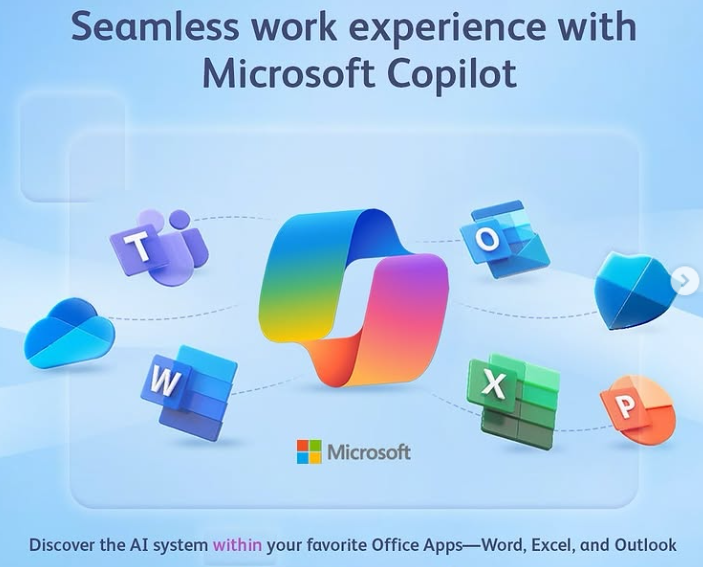
Microsoft Copilot is your AI-powered assistant built right into Microsoft 365 apps like Word, Excel, PowerPoint, Outlook, and Teams. It uses large language models (LLMs), Microsoft Graph, and your content to help you draft, summarize, analyze, and automate tasks — all with natural language prompts.
Imagine:
Writing a full proposal or policy in Word with just a short prompt
Creating charts, insights, and forecasts in Excel without writing formulas
Generating entire presentations in PowerPoint from your meeting notes or a report
With Copilot, you’re not just working faster — you’re working smarter.
Courses We Offer
MS-4007: Microsoft 365 Copilot User Enablement Specialist
Learn to champion the adoption of Copilot in your organization. This course is ideal for team leads, change agents, and digital champions tasked with driving AI transformation at work. You’ll learn how to implement Microsoft’s user enablement framework, identify high-value Copilot scenarios, and support colleagues in their AI adoption journey.
Work Smarter with Copilot in Word, Excel & PowerPoint
This 1-day course gives you practical experience using Copilot directly in the three core apps:
Word: Draft content, rewrite text, create reports, and summarize meetings
Excel: Generate formulas, analyze trends, build dashboards and insights
PowerPoint: Instantly turn outlines into full slides, refine layouts, and add visual appeal
Perfect for professionals who use Office daily and want to supercharge their productivity with AI.
Free Trial of Microsoft Copilot for AI-Driven Productivity
A free trial of Microsoft Copilot is available to participants who want to try this new AI software in their own lives and workplace for content creation or improving efficiency and productivity. This 30 day free trial can be cancelled at any time, but does require a credit card to be keyed in initially.
Mode of Assessment
Assessment will take place through hands-on projects that allow you to demonstrate your understanding of the course content. You will work on real-world scenarios that require you to apply what you’ve learned about Copilot. Feedback will be provided to help you improve and refine your skills.
By the end of the course, participants will receive a certificate acknowledging their completion. This certification serves as a valuable addition to your professional portfolio, showcasing your proficiency in using Microsoft 365 Co-pilot.
Fees and Funding
The Copilot course is competitively priced to make it accessible to a wide audience. Various funding options are available to support learners in Singapore. You can inquire about potential subsidies and grants that may help cover course fees. Participants can also use their SkillsFuture Credits for the 3 day Microsoft Office with Copilot, and the Digital Transformation with AI Tools courses.
Investing in your skills through this course will open up new opportunities in your career. The knowledge acquired will not only enhance your productivity but also position you as a leader in digital transformation.
What are the prerequisites for the Copilot course?
No prior experience is needed, but basic computer skills are recommended. This is a very practical and hands-on course, one of our best Microsoft copilot courses.
What is the course duration?
The course can be customized for your organization, based on the available time. Usually we do a 1 day course, and we also offer a WSQ funded Microsoft Word Excel PowerPoint with Copilot course which is for 3 full days.
Will I receive a certificate after completing the course?
Yes, a certificate will be awarded upon successful completion of the Microsoft Office course with 365 and Copilot. For corporate trainings on Copilot courses, we will provide a certificate of attendance also.
What is the mode of assessment for Mastering Microsoft Copilot?
Assessment includes hands-on projects based on real-world scenarios. If you opt for a customized corporate training on Copilot Courses in Singaporewithout any WSQ Funding, then there is no requirement for any assessment, and we can completely skip it, to focus the entire time on Mastering Microsoft Copilot.
Are there funding options available?
Yes, there are various funding options to support learners. The WSQ Funding comes from SSG Singapore for the 3 day comprehensive course on Microsoft 365 with Copilot. It covers Copilot across Microsoft 365.
Do I need prior AI or technical knowledge to attend these courses?
No. These courses are designed for everyday Microsoft 365 users. If you’re comfortable using Word, Excel, or PowerPoint, you’re ready for Copilot training.
Is Copilot already included in Microsoft 365?
No. Copilot is a premium add-on to Microsoft 365 and must be purchased by your organization. You will need a Copilot-enabled account to practice during the course.
Will I get hands-on experience with Copilot?
Yes! All our sessions are interactive, with guided labs, exercises, and real-world examples using your Copilot-enabled Microsoft 365 apps.
What’s the difference between MS-4007 and the Word/Excel/PowerPoint with Co Pilot course?
The Microsoft MS-4007 focuses on enabling teams to adopt Copilot across organizations. The Word/Excel/PowerPoint course is more about hands-on productivity techniques for individual users.
CONTACT INTELLISOFT for COPILOT COURSES IN SINGAPORE
Call us at +65-6252-5033 or email to training@intellisoft.com.sg with your training requirements. Alternatively, you can fill our Enquiry Form, and tell us what exactly do you need. We will get back to you within 1 business day.
Free Tips, Tutorials & Training Grants Info
Learn from expert tips, tricks and resources for Excel, PowerPoint, Photoshop, Python, Power BI, Project Management, IT, Soft Skills & more with our Email Newsletter. Plus get the latest news on Grants. Join Today!