





Mastering Power Apps & Power Automate Course

Build Power Apps and Automate Workflows in 2 Days

23+
Years
120+
Courses
3,460+
Corporate Clients
45,000+
People Trained
Trusted by
WSQ Accredited · Intellisoft
Next Available Date
📅 Next Class ⚡ 20, 21 Apr 2026
Course Details
Duration 2 Days
📍 Venue Fortune Centre, Singapore
👥 Class Size Up to 15 Pax
🎓 Certificate ✓ WSQ Certificate Issued
Accreditation
🔖 TSC Code ICT-DES-3005-1.1
From S$468 after WSQ Grant*
Full fee: S$1,308.00 incl. 9% GST  ·  See grant table →
🏛️ WSQ & SkillsFuture funding available — view full grant breakdown →
✓ 100% satisfaction guarantee · Respond within 2 hours
🏛 Up to 70% SSG Grant  ·  Pay from S$468 after funding
WSQ Funded SkillsFuture UTAP SFEC Learn more ↓
About This Course

About This Mastering Power Apps & Power Automate Course Course

The world needs great solutions. Build yours faster.

Now everyone can quickly build and share low-code apps with Microsoft Power Apps.

  • Create useful apps for everyday use
  • Automate your work-flow with Power Automate

This 2 day Mastering Power Apps & Power Automate Class will guide you step by step in learning to create awesome apps in no time.

Power Apps Course for Low Code app development in Singapore

Get started quickly
Empower your team to start building and launching apps right away using prebuilt templates, drag-and-drop simplicity, and quick deployment—then roll out continuous improvements as needed.

Build apps without compromises
Give everyone the power to build the apps they need with advanced functionality previously only available to professional developers—including pre-built AI components.

Innovate quickly for fast results

Driving success with employee-built apps using Microsoft Power Apps

  • Toyota Motor employees have created more than 400 apps that help with everything from product quality control to COVID-19 screening.
  • GSK Singapore has built 12 apps in just 2 days. And these people are not software developers… but engineers, quality inspectors, people from different departments doing their daily job.

Enable extensibility for developers

Provide professional developers with the tools to seamlessly extend app capabilities with Azure Functions and custom connectors to proprietary or on-premises systems.

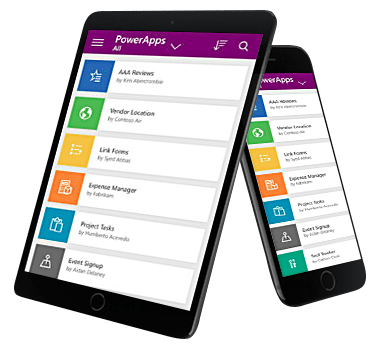
Power Apps Training To Create Mobile Apps for iOS & Android
Create low-code business apps, connect to SharePoint data, and automate approvals fast with practical Power Apps and Power Automate training.
🖥️
Learn By Doing
Hands-on exercises on real Singapore business datasets from the very first module.
👥
Small Class Sizes
Capped at 15 participants for personal attention.
📧
Post-Training Support
30-day free email support after the course to training@intellisoft.com.sg.
What You'll Walk Away With
📱 Build Canvas apps that run on web, iOS, Android, and desktop with a low-code approach.
🔄 Automate approval workflows, status updates, and multi-step business processes using Power Automate.
🗂️ Use Microsoft SharePoint Lists to store, manage, and update app data for departmental solutions.
🧩 Design and deploy your own end-to-end app from scratch with guided hands-on exercises.
What You Will Learn

What You Will Learn in Mastering Power Apps & Power Automate Course

📲

Build Low-Code Canvas Apps

Build Power Apps Canvas apps that connect to data and run across devices.

🔗

Connect Apps To Data

Connect to company databases and SharePoint Lists to store and retrieve business data.

⚙️

Create Automated Approval Workflows

Create Power Automate flows that trigger approvals, updates, and follow-up actions automatically.

🧠

Use Formulas And Actions

Use controls, properties, formulas, and actions to customise app behaviour and user experience.

🗃️

Configure SharePoint List Solutions

Configure SharePoint Lists and forms to support app data entry and process tracking.

🚀

Deploy Apps For Users

Deploy tested apps for immediate organisational use after building and refining prototypes.

Is This For You?

Who Should Attend Mastering Power Apps & Power Automate Course?

🛠️

Process Improvement Engineer

You need faster ways to digitise manual workflows without waiting for full software development.

📋

Operations Executive

You handle repetitive approvals and tracking tasks that should be automated and easier to manage.

🧑‍💼

Department Manager

You want simple internal apps for forms, approvals, and monitoring without relying fully on IT.

💻

IT Support Specialist

You need practical low-code tools to deliver department solutions quickly using Microsoft platforms.

This PowerApps class has something for everything, from beginners who wish to customise their data entry forms in SharePoint right up to advanced users who need to use advanced formulas to deliver more bespoke actions to their apps.

Engineers, researchers, technicians, managers, directors, customer service staff, and people from marketing, sales, operations, finance, logistics, admin, manufacturing, networking, IT, and infrastructure are welcome.

We have trained hundreds of professionals in creating low-code apps that are ready within a short span of just 2 days, with Power Apps, Automation & Dashboards for Management views, Tracking & monitoring purposes.

Beginners, experienced developers and non-developers can join this training and create apps in no time. All you need is a good understanding of the process you want to automate and create an app for and a willingness to learn new low-code technologies introduced by Microsoft.

Microsoft PowerApps is a pioneer in low-code development solutions. It is used by more than 485 Fortune 500 companies.

What are you waiting for?
Before You Attend

Pre-Requisites for Mastering Power Apps & Power Automate Course

No previous experience of PowerApps or Power Automate is required.

We will start from the very basics, from what software is required, how to download, what other tools do you need, and then do the design of the app, develop the prototype from scratch, and test it. Once it is tested, we will deploy it for you and other users to use it.

A very systematic, step by step process for beginners and experienced users alike.

🏛️  Up to 70% SSG funding plus SkillsFuture Credit and UTAP support.

Curriculum

Mastering Power Apps & Power Automate Course: Course Outline & Curriculum

Module 1

Power Apps: Introduction, Building Low-Code Apps, Testing on Mobile

  • Connect to data sources
  • Filter results by criteria
  • Screens and navigation
  • Controls, properties, formulas, actions
  • Configure app settings
  • Save, share, run mobile app
Module 2

Microsoft SharePoint List Interface

  • Create custom List
  • Customize custom List
  • Use the Form control
  • Save data into SharePoint
  • List source for Power Apps
  • Update Power Apps from list
Module 3

Power Automate – Introduction, Workflow Automation With Multiple Apps

  • Flow on new SharePoint row
  • Automate approval requests
  • Conditional branching approvals
  • Trigger flow on new record
  • Update approval status and comments
  • Check flow run status
Module 4

Create Multi-Step Approvals With Multiple Apps

  • Create automation with third-party apps
  • Complex flow automation tips
  • Advanced automation tricks
Module 5

Create Your Own App From Scratch

  • Design the app layout
  • Configure SharePoint List database
  • Create screens and interaction
  • Build automation flows
  • Debug and test application
  • Deploy app to users

This is a detailed, step-by-step training course for you to get hands-on experience with the Microsoft Power Platform technologies – Power Apps, Power Automate, and Microsoft SharePoint.

The training includes practical, hands-on exercises for people new to these technologies to build low-code app solutions within a short span.

Technologies covered in the Intellisoft Power Apps & Power Automate Class in Singapore are:

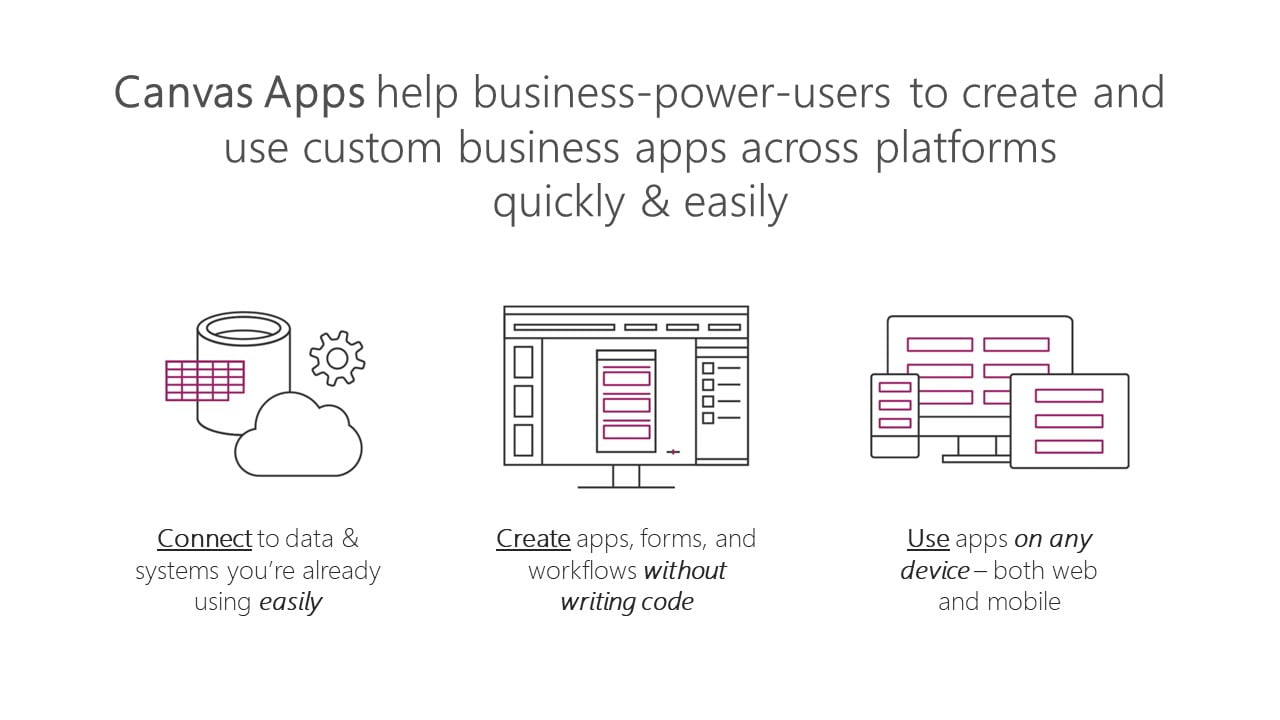
  • Power Apps: A software as a service (SAAS) application platform that enables power users in line of business roles to easily build and deploy custom business apps. You will learn how to build Canvas style of apps that work on mobile devices or desktops with ease.
  • Power Automate: A business service for line of business specialists and IT pros to build automated workflows intuitively.
  • Microsoft SharePoint: Create and share list of important things to track within the department or the organization. Maintain & manage a complete app from within your company’s SharePoint Portals.

Power Apps Course in Singapore with Power Automate in Singapore

Module 1: Power Apps: Introduction, Building Low-Code Apps, Testing on Mobile

Focuses on the basic concepts involved in building Power Apps Canvas apps.

  • Connect to data sources and filter results based on specified criteria
  • Work with screens and navigation
  • Use controls, properties, formulas, and actions to customize the user experience
  • Configure app settings
  • Save and share an app
  • Run the app on a mobile device

Module 2: Introduces you to Microsoft SharePoint List Interface.

You will learn how to:

  • Create and customize a custom List
  • Use the Form control
  • Save data into the Microsoft SharePoint using the Form control
  • Use a list as a source for creating and updating Power Apps

Module 3: Power Automate – Introduction, Building simple to complex workflow automation with multiple apps.

Introduces you to Power Automate. 

  • Create a flow that is triggered when a new Microsoft SharePoint List row is created
  • Automate sending approval requests
  • Conditional branching based on the approval response
  • Trigger a flow when a new record is created
  • Update the record with the approval status and the approver’s comments
  • Customize the approval based on the SharePoint item add/update
  • Use the Approval centre on mobile and web
  • Check the status of flow runs

Module 4: Create multi-step approvals with multiple apps

  • Create automation with third-party apps
  • Create a complex flow with Advanced Automation Tips & Tricks

Module 6: Create your own App from Scratch

  • Design the App Layout
  • Configure the database or Sharepoint List
  • Create the Screens and interaction
  • Build Automation flows
  • Debug & test the application
  • Deploy the app to other users

Gain a competitive advantage by linking all your data
Connect to hundreds of data sources using a library of connectors and Microsoft SharePoint —bringing your data together for a single source of truth while you uncover insights as well as customize and extend Office 365, Dynamics 365, and Azure capabilities.

Scale your low-code apps with Azure
Use Azure to extend low-code apps built with Power Apps and create enterprise solutions that scale to meet your organization’s needs. Professionally manage your enterprise app development using Azure DevOps, plus tap into the power of reusable components, AI services, and your entire data estate on Azure.

Powerful alone. Better together.
Build powerful end-to-end business solutions by connecting Power Apps across the entire Microsoft Power Platform—and to Microsoft 365, Dynamics 365, Azure, and hundreds of other apps—to drive innovation across your

Join the Intellisoft MasterClass Training Course on Power Apps & Power Automate

Build apps in hours—not months—that easily connect to data, use Excel-like expressions to add logic and run on the web, iOS, and Android devices.

Your Trainer
👤
Your Trainer

Vinai Prakash

MBA Microsoft Certified Trainer 35+ Years Experience

Founder of Intellisoft Systems. Trained 45,000+ professionals across Singapore corporates, government agencies, and polytechnics, in several countries. Vinai has published articles on data analysis in The Straits Times and written content for leading business publications. He is the author of the bestselling book on Amazon - Excel Crash Course.

Trusted by professionals from 500+ organisations
Canon CPF Board OCBC NTU NUS Mindef HDB JTC ExxonMobil Sembcorp
AXA Epson NTUC Health DSO Toyota Asia Pacific BNY Mellon Ritz-Carlton Standard Chartered Singapore Police Force Tan Tock Seng Hospital

Training Course Fees & Funding

Full course fee: S$1,200.00 (before GST & government funding) TGS: TGS-2023036311

Highest Funding
70% Grant

70% SSG Grant

Baseline + Enhanced Training Support

  • SG Citizens aged 40+ (Individual, SME or MNC)
  • SME-sponsored SG Citizens (21+)
  • SME-sponsored PRs (21+)
Course Fee S$1,200.00
SSG Funding (70%) − S$840.00
Nett Fee S$360.00
GST (9%) S$108.00
You Pay S$468.00
SSG Funded
50% Grant

50% SSG Grant

Baseline WSQ Funding

  • SG Citizens aged 21–39 (Individual or MNC)
  • MNC company-sponsored PRs (21+)
  • Individual PRs (21+)
Course Fee S$1,200.00
SSG Funding (50%) − S$600.00
Nett Fee S$600.00
GST (9%) S$108.00
You Pay S$708.00
Foreigners & other pass holders: Government grants are not applicable. Full course fee of S$1,200.00 + 9% GST = S$1,308.00 applies. Contact us for more details.

Need help with funding applications? We'll guide you through the process.

* Terms & conditions apply. Funding subject to eligibility and approval by respective agencies. GST applies on full course fee before subsidy. Fee information is accurate as of Apr 2026.

Register

Register for Mastering Power Apps & Power Automate Course in Singapore

💬 Corporate / Group Enquiry
Date Duration Venue
20, 21 Apr 2026
2 Days Fortune Centre, Singapore Register →
18, 19 May 2026
2 Days Fortune Centre, Singapore Register →
6, 13 Jun 2026
2 Days Fortune Centre, Singapore Register →
15, 16 Jun 2026
2 Days Fortune Centre, Singapore Register →
9, 10 Jul 2026
2 Days Fortune Centre, Singapore Register →
🏢 Running this for a group? Request a Custom Corporate Run →
Common Questions

Frequently Asked Questions

How much does the Power Apps & Power Automate course cost, and what grants are available?
The full course fee is S$1,200 before GST and government funding. Eligible learners may receive 70% SSG funding or 50% SSG funding, depending on their profile, and Singaporeans aged 25 and above can also use SkillsFuture Credit to offset nett fees. NTUC members may also claim UTAP on the remaining payable amount, subject to terms. Foreigners and other pass holders are not eligible for the government grants shown on the page.
How long is the Mastering Power Apps & Power Automate course?
This is a 2-day hands-on training course. The page describes it as a step-by-step class designed to help learners build low-code apps quickly and automate workflows within a short span. It is suitable for practical learning, not just theory.
Do I need prior experience before attending this course?
No previous experience in Power Apps or Power Automate is required. The course starts from the basics, including software requirements, setup, app design, prototype development, testing, and deployment. It is designed for both beginners and more experienced users.
Will I receive a certificate after completing the course?
The page does not clearly spell out the certificate details in the extracted sections. It is best to confirm directly with Intellisoft Systems whether a certificate of completion, attendance record, or funded-course documentation is issued after the class. This is especially important if your company or HR team needs formal proof of training.
Where is the course conducted, and is there an online option?
The course venue listed on the page is Intellisoft Training Rooms at Fortune Centre, 190 Middle Road, #14-05, Singapore 188979. The page also states that corporate training can be arranged either as a physical class or a virtual classroom using Zoom or Microsoft Teams. Companies may also request training at their own office location.
Who should attend this Power Apps & Power Automate training?
The course is suitable for a wide range of business and technical users, including engineers, researchers, technicians, managers, directors, customer service staff, and professionals from marketing, sales, operations, finance, logistics, admin, manufacturing, networking, IT, and infrastructure. It is especially useful for people who want to customise forms, automate processes, or build departmental apps quickly. Non-developers and experienced users can both benefit.
How do I register for the course?
You can register by clicking the chosen course dates shown at the top or registration section of the page. If you need help, the page provides phone and WhatsApp contact options for registration support. Corporate teams can also request a brochure or quotation for onsite or virtual group training.
What technologies are covered in this training?
The course covers Microsoft Power Apps, Power Automate, and Microsoft SharePoint. You will learn to build Canvas apps, connect to data, create automated approval flows, and use SharePoint Lists as a data source for forms and business apps. This makes the training highly relevant for Microsoft 365 and Power Platform users.
Ready to Get Started?

Upgrade Your Skills.
Seats Fill Quickly.

Join thousands of professionals who've trained with Intellisoft. With WSQ funding, this is the most cost-effective way to upskill your team.

✉️ training@intellisoft.com.sg · We respond within 2 business hours

💬 Quick Enquiry

We respond within 2 business hours.

By submitting, you consent to Intellisoft collecting your data in accordance with Singapore's PDPA.

✅ Thank you! We'll be in touch shortly.
Mastering Power Apps & Power Automate Course
Next class: 20, 21 Apr 2026 · Fortune Centre, Singapore · 2 Days
Course Brochure
Mastering Power Apps & Power Automate Course

Enter your details and we'll send the full course brochure — complete outline, funding details, and registration instructions.

Free Tips, Tutorials & Training Grants Info

Learn from expert tips, tricks and resources for Excel, PowerPoint, Photoshop, Python, Power BI, Project Management, IT, Soft Skills & more with our Email Newsletter.
Plus get the latest news on Grants. Join Today!

Found What You Were
Looking For?

Just Tell us...

We're Here To Help You!