Advanced Power BI MasterClass

Build Advanced Power BI Dashboards Using DAX and Data Models

23+
Years
120+
Courses
3,460+
Corporate Clients
45,000+
People Trained
Trusted by
WSQ Accredited · Intellisoft
🔥 Filling Up Fast
Next Available Date
📅 Next Class ⚡ 25, 26 May 2026
Course Details
Duration 2 Days
📍 Venue Fortune Centre, Singapore
👥 Class Size Up to 15 Pax
🎓 Certificate ✓ WSQ Certificate Issued
Accreditation
🔖 TSC Code ICT-BIN-3104-1.1
From S$468 after WSQ Grant*
Full fee: S$1,308.00 incl. 9% GST  ·  See grant table →
🏛️ WSQ & SkillsFuture funding available — view full grant breakdown →
✓ 100% satisfaction guarantee · Respond within 2 hours
🏛 Up to 70% SSG Grant  ·  Pay from S$468 after funding
WSQ Funded SkillsFuture UTAP SFEC Learn more ↓
About This Course

About This Advanced Power BI MasterClass Course

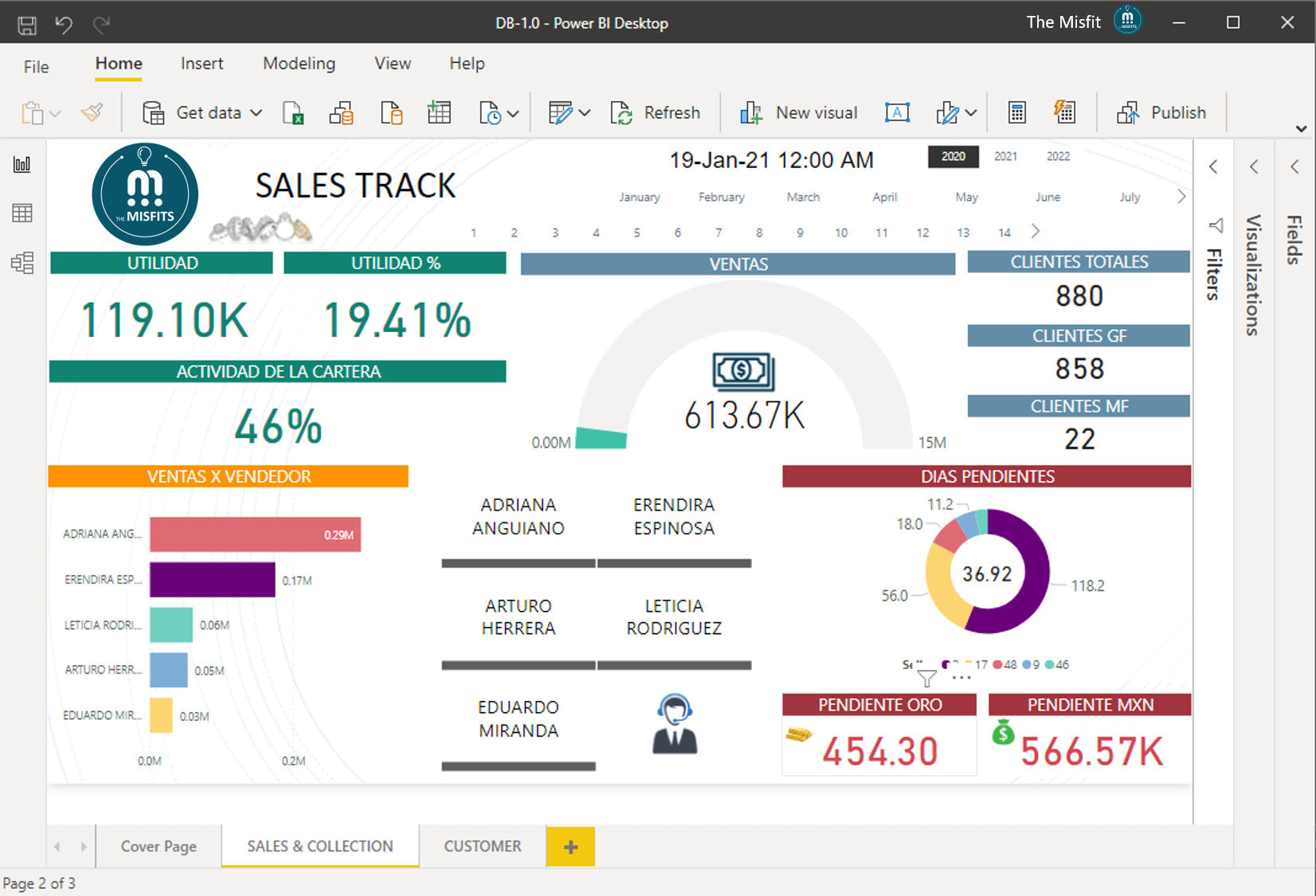
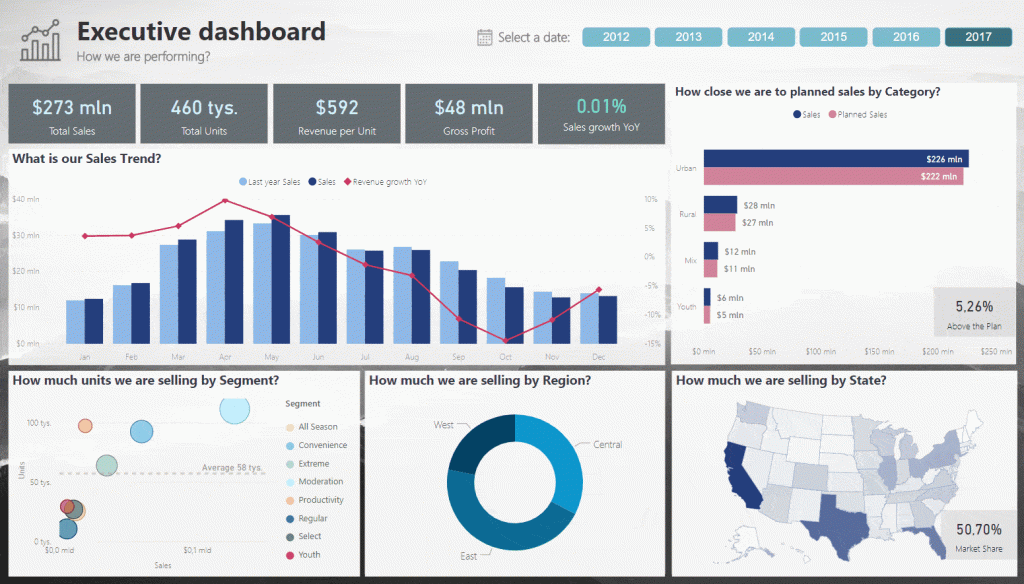
Visualization using Advanced Power BI Tips & Tricks

Unlock the full potential of Power BI with our Advanced Power BI course!

Dive deep into

  • Advanced DAX measures,
  • Explore sophisticated use cases for Power Query, and
  • Master data visualization using advanced settings.

Learn to implement row-level security, keep your data models optimized, and import custom visuals.

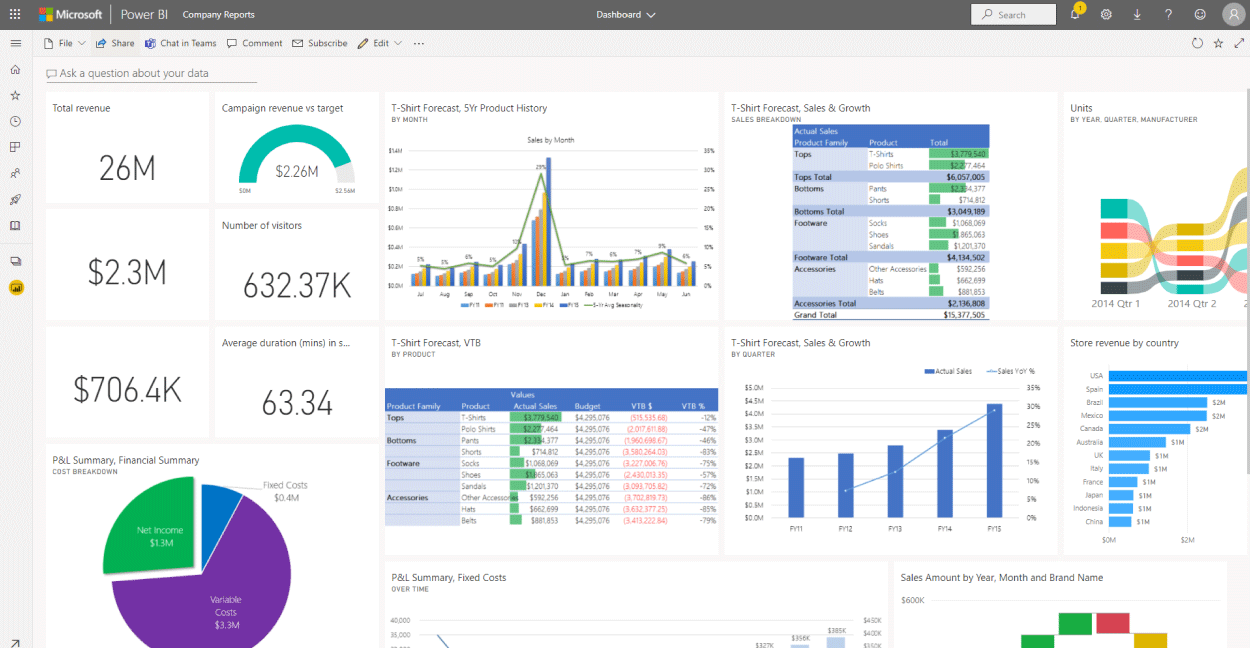
Enhance your reports with Python or R visuals, and leverage new KPI cards, Gauges, and more to create Stellar Dashboards for your management.Add Python Visualizations and Scripts in Power BI
This comprehensive two-day Advanced Power BI course in Singapore is designed for those who already know the basics of Power BI and are ready to elevate their skills to the next level.

Learn From Power BI Experts

Led by Power BI Guru Vinai Prakash, with over 35 years of experience in data analysis and business intelligence, this course promises hands-on, practical learning to empower you with advanced skills.

Move beyond basic reporting by mastering advanced Power BI modeling, DAX calculations, and interactive dashboards for deeper business insights.
🖥️
Learn By Doing
Hands-on exercises on real Singapore business datasets from the very first module.
👥
Small Class Sizes
Capped at 15 participants for personal attention.
📧
Post-Training Support
30-day free email support after the course to training@intellisoft.com.sg.
What You'll Walk Away With
📊 Design advanced Power BI dashboards that reveal trends, KPIs, and deeper insights from business data.
🧠 Write powerful DAX calculations including CALCULATE, FILTER, time intelligence, and advanced measures.
🔗 Build optimized Power BI data models with relationships, hierarchies, and performance best practices.
Create interactive reports with advanced visuals, drill-through analysis, and dynamic filtering.

What You Will Learn

What You Will Learn in Advanced Power BI MasterClass

📐

Build Advanced Power BI Data Models

Build scalable Power BI data models using relationships, hierarchies, and optimized modeling techniques.

🧮

Create Advanced DAX Measures

Create complex DAX calculations such as CALCULATE, FILTER, and advanced aggregation measures.

📊

Design Interactive Power BI Dashboards

Design interactive dashboards with drill-through, slicers, and dynamic visual filtering.

🔍

Analyse Business Data With DAX

Analyse datasets using advanced DAX formulas and time intelligence functions.

⚙️

Implement Performance Optimisation Techniques

Implement Power BI best practices for improving model efficiency and report performance.

🧭

Use Advanced Visualisation Techniques

Use advanced visuals, KPIs, and analytical charts to highlight key insights.

Is This For You?

Who Should Attend Advanced Power BI MasterClass?

📊

Business Intelligence Analyst

You build Power BI reports but struggle to write advanced DAX measures and optimise models.

📈

Data Analyst

You need deeper analysis techniques and advanced visuals to present clearer business insights.

👔

Reporting Manager

You rely on dashboards for decisions but want more advanced analytics and automation.

🧑‍💻

Power BI Developer

You want to build scalable data models and advanced reports beyond beginner Power BI skills.

This course is perfect for:

  • Business analysts and data professionals who have a basic understanding of Power BI.
  • Professionals looking to enhance their data visualization and analysis skills.
  • Individuals seeking to implement advanced Power BI features in their work.
  • Anyone interested in taking their Power BI knowledge to an intermediate or advanced level.

Best Advanced Power BI dashboard Course in Singapore

Before You Attend

Pre-Requisites for Advanced Power BI MasterClass

  • Basic knowledge of Power BI, including data import and basic DAX measures.
  • Familiarity with creating basic reports and dashboards in Power BI.

🏛️  SkillsFuture Credit eligible — reduce your out-of-pocket cost significantly.

Curriculum

Advanced Power BI MasterClass: Course Outline & Curriculum

Module 1

Advanced Data Modeling in Power BI

  • Review Power BI data model concepts
  • Creating table relationships
  • Managing relationship cardinality
  • Using hierarchies in Power BI
  • Data modeling best practices
Module 2

Advanced DAX Calculations

  • DAX formula fundamentals
  • CALCULATE function deep dive
  • Using FILTER in DAX
  • Aggregation functions in DAX
  • Creating calculated measures
Module 3

Time Intelligence in Power BI

  • Understanding time intelligence concepts
  • TOTALYTD and TOTALMTD
  • Year over year analysis
  • Date table best practices
  • Using SAMEPERIODLASTYEAR
Module 1

Advanced Visualizations and Dashboards

  • Designing effective Power BI dashboards
  • Using advanced visuals
  • KPI visualizations
  • Drill-through analysis
  • Interactive report navigation
Module 2

Power BI Performance Optimization

  • Improving data model performance
  • Optimizing DAX calculations
  • Reducing report load times
  • Managing large datasets
  • Best practices for Power BI reports
Module 3

Power BI Publishing and Collaboration

  • Publishing reports to Power BI Service
  • Managing dashboards in Power BI Service
  • Sharing reports with teams
  • Scheduled data refresh
  • Power BI workspace management

ADVANCED POWER BI – COURSE OUTLINE

Section 1: Data analytics With Power BI

  • Understanding data analytics
  • Explore Roles in data Analysis
  • Key Tasks for a data analyst
  • Introduction to Power BI Desktop Advanced Features
  • Components of Power BI
  • Understanding Power BI Services

Section 2: Design a data model in Power BI

  • Get data from files & folders

    Advanced Analytics in Power BI Class

  • Get data from relational data sources
  • Get data from a NoSQL database
  • Get data from online services
  • Select a storage mode
  • Get data from Azure Analysis Services
  • Fix performance issues
  • Resolve data import errors
  • Understanding Constraints & Performance issues
  • Understand data types mismatch issues
  • Resolving data quality errors

Section 3: Data Cleansing With Power BI

  • Shape the initial data
  • Simplify the data structure
  • Evaluate and change column data types
  • Combine multiple tables into a single table
  • Profile data in Power BI
  • Use Advanced Editor to modify M code

Section 4: Creating Advanced DAX measures in Power BI

  • Using the Calculate function
  • Understanding Filter Context
  • Using IF, SWITCH, FIND
  • Using VALUES, HASONEVALUE, SELECTEDVALUE, and CONCATENATEXUse sophisticated Time Intelligence Functions in Power BI
  • Using ALL, ALLEXCEPT, ALLSELECTED, KEEPFILTERS
  • Creating Virtual Tables
  • Create semi-additive measures
  • Advanced Date Comparisons With Same Period Last Year, Year To Date, Month to date totals,
  • Using Date Functions like DATEADD, FIRSTDATE, LASTDATE, NEXTYEAR
  • Writing Custom Time Intelligence Functions
  • Using RELATED & RELATEDTABLE functions in Power BI

Section 5: Performance Optimization in Power BI

  • Performance optimization Considerations
  • Review performance of Measures, Relationships, and visuals
  • Using variables to improve performance & Troubleshooting
  • Reduce cardinality in the Data Model
  • Optimize DirectQuery models with table level storage
  • Create and manage aggregations

Power BI Dashboard Course for Advanced Users

Section 6: Working with Power BI visuals

  • Introduction to Advanced Power BI visualizations
  • Add visualization items to reports
  • Choose an effective visualization
  • Format and configure visualizations
  • Import a custom visual into Power BI
  • Add an R or PYTHON visual in a reportPython Visuals in Power BI Advanced training course

Section 7: Create a data-driven story with Power BI reports

  • Introduction to create a data-driven story with Power BI reports
  • Design a report layout
  • Add buttons, bookmarks, and selections
  • Design report navigation
  • Use advanced interactions and drill through
  • Configure conditional formatting
  • Apply slicing, filtering, and sorting
  • Publish and export reports
  • Comment on reports
  • Fine Tune report performance
  • Optimize reports for mobile use

Section 8: Create dashboards in Power BI

  • Introduction to dashboards
  • Configure data alerts
  • Explore data by asking questions
  • Add a dashboard theme
  • Pin a live report page to a dashboard
  • Configure a real-time dashboard
  • Configure data classification
  • Explore mobile view & Auto Mobile Layouts

Section 9: Perform analytics in Power BI

  • Introduction to analytics
  • Advanced Power BI Course in Singapore at Intellisoft SystemsExplore statistical summary

  • Identify outliers with Power BI visuals
  • Group and bin data for analysis
  • Apply clustering techniques
  • Conduct time series analysis
  • Use the Analyze feature
  • Use advanced analytics custom visuals
  • Review Quick insights
  • Apply AI Insights

Section 10: Work with AI visuals in Power BI

  • Introduction to working with AI visuals
  • Use the Q&A visual
  • Find important factors with the Key influencers visual
  • Use the Decomposition Tree visual to break down a measure

Section 11: Create and manage workspaces in Power BI

  • Distribute a report or dashboard
  • Monitor usage and performance
  • Recommend a development life cycle strategy
  • Troubleshoot data by viewing its lineage
  • Configure data protection

Section 12: Secure Access With Row-Level Security

  • Configure row-level security with the static method
  • Configure row-level security with the dynamic method

Section 13: Manage datasets in Power BI

  • Create dynamic reports with parameters
  • Create what-if parameters
  • Use a Power BI gateway to connect to on-premises data sources
  • Configure a dataset scheduled refresh
  • Configure incremental refresh settings
  • Manage and promote datasets
  • Troubleshoot service connectivity
Trusted by professionals from 500+ organisations
Canon CPF Board OCBC NTU NUS Mindef HDB JTC ExxonMobil Sembcorp
AXA Epson NTUC Health DSO Toyota Asia Pacific BNY Mellon Ritz-Carlton Standard Chartered Singapore Police Force Tan Tock Seng Hospital

Training Course Fees & Funding

Full course fee: S$1,200.00 (before GST & government funding) TGS: TGS-2024050953

Highest Funding
70% Grant

70% SSG Grant

Baseline + Enhanced Training Support

  • SG Citizens aged 40+ (Individual, SME or MNC)
  • SME-sponsored SG Citizens (21+)
  • SME-sponsored PRs (21+)
Course Fee S$1,200.00
SSG Funding (70%) − S$840.00
Nett Fee S$360.00
GST (9%) S$108.00
You Pay S$468.00
SSG Funded
50% Grant

50% SSG Grant

Baseline WSQ Funding

  • SG Citizens aged 21–39 (Individual or MNC)
  • MNC company-sponsored PRs (21+)
  • Individual PRs (21+)
Course Fee S$1,200.00
SSG Funding (50%) − S$600.00
Nett Fee S$600.00
GST (9%) S$108.00
You Pay S$708.00
Foreigners & other pass holders: Government grants are not applicable. Full course fee of S$1,200.00 + 9% GST = S$1,308.00 applies. Contact us for more details.

Need help with funding applications? We'll guide you through the process.

* Terms & conditions apply. Funding subject to eligibility and approval by respective agencies. GST applies on full course fee before subsidy. Fee information is accurate as of Apr 2026.

Course validity: 2 Dec 2024 to 1 Dec 2026

Register

Register for Advanced Power BI MasterClass in Singapore

💬 Corporate / Group Enquiry
Date Duration Venue
25, 26 May 2026
2 Days Fortune Centre, Singapore Register →
3, 4 Aug 2026
2 Days Fortune Centre, Singapore Register →
26, 27 Oct 2026
2 Days Fortune Centre, Singapore Register →
21, 22 Dec 2026
2 Days Fortune Centre, Singapore Register →
🏢 Running this for a group? Request a Custom Corporate Run →
What Participants Say

What Past Advanced Power BI MasterClass Participants Say

★★★★★
The Advanced Power BI course exceeded my expectations. Vinai’s expertise and practical approach made complex concepts easy to understand. I feel much more confident in my ability to create impactful reports and dashboards now.
S
Sarah Lim
Data Analyst, Vodafone
★★★★★
Taking this course was a game-changer for my career. The hands-on exercises and real-world examples provided invaluable insights. Vinai is an outstanding instructor who truly cares about his students’ success.
J
John Tan
Director, Business Innovation
Ready to Get Started?

Upgrade Your Skills.
Seats Fill Quickly.

Join thousands of professionals who've trained with Intellisoft. With WSQ funding, this is the most cost-effective way to upskill your team.

✉️ training@intellisoft.com.sg · We respond within 2 business hours

💬 Quick Enquiry

We respond within 2 business hours.

By submitting, you consent to Intellisoft collecting your data in accordance with Singapore's PDPA.

✅ Thank you! We'll be in touch shortly.
Advanced Power BI MasterClass
Next class: 25, 26 May 2026 · Fortune Centre, Singapore · 2 Days
Course Brochure
Advanced Power BI MasterClass

Enter your details and we'll send the full course brochure — complete outline, funding details, and registration instructions.

Free Tips, Tutorials & Training Grants Info

Learn from expert tips, tricks and resources for Excel, PowerPoint, Photoshop, Python, Power BI, Project Management, IT, Soft Skills & more with our Email Newsletter.
Plus get the latest news on Grants. Join Today!

Found What You Were
Looking For?

Just Tell us...

We're Here To Help You!