Time Management: Achieve More in Less Time

Manage Your Time Well. Learn Time Management at Intellisoft

Are you suffering from:

  • Too many projects, too many things to do… and not enough time to do any of them properly?

    Manage Your Time Well. Learn Time Management at Intellisoft
    Manage Your Time Well. Learn Time Management at Intellisoft
  • Being too busy fighting every day fires and have no time to prevent the fires in the first place?
  • Embarrassment because you don’t seem to be making progress on the Big Priorities of your life and time is just passing by?

Fortunately, it is easy to learn effective time management techniques, and build proper time management skills. Attend a short, action packed 1 Day Practical Workshop on Effective Time Management in Singapore at Intellisoft.

Call +65 6250-3575 for Details.

Normal 0 false false false EN-US X-NONE X-NONE MicrosoftInternetExplorer4 /* Style Definitions */
table.MsoNormalTable
{mso-style-name:”Table Normal”;
mso-tstyle-rowband-size:0;
mso-tstyle-colband-size:0;
mso-style-noshow:yes;
mso-style-priority:99;
mso-style-parent:””;
mso-padding-alt:0in 5.4pt 0in 5.4pt;
mso-para-margin:0in;
mso-para-margin-bottom:.0001pt;
mso-pagination:widow-orphan;
font-size:10.0pt;
font-family:”Times New Roman”,”serif”;}

Time Management We at Intellisoft can help you learn how to manage your time and get back your life, handle multiple projects, prevent fires rather than fight fires, have an empty In tray, with full control over your email, your messages, and your life, so that you can find the time to get those things done that matter the most, and master the art of stress-free productivity!

This time management workshop is continuously updated to reflect the progress in productivity tools as well as new methodologies that help delegates to become more productive in the long term, and become better at managing time well.

Our objective is to provide you with practical tips, tricks, tools and techniques to learn time management skills for life! Take action to join the 1 Day Effective Time Management Class in Singapore!

Go To Top

Audience: Anyone, who is interested to learn the productivity tips to get more done in their work and personal life.

Course Duration: 1 Day. Practical, Hands-on Tips, Tricks and Techniques to Apply Immediately!

Go To Top

Using Case Studies, Examples, Activities, Games and Self Analysis, we help you in identifying your Time Management Problems, and Teach You Practical ways to over them. Become better at managing time and getting the right and important  things done... ON TIME! Attitude towards Time

  • How different people look at time and what are the implications of this?
  • What mental techniques can you use to increase your productivity?
  • What is the impact of perfectionism on your productivity and how can you manage it?
  • What stops you from starting a task and how can you overcome it?
  • What techniques can you use to avoid procrastination?
  • How to take advantage of “dead time”?Ideas for Time Management
  • How to free your mind from thinking continuously about critical tasks?
  • How can you optimise your day based on your capabilities and your workload?

Planning

  • How to set goals systematically to maximise your productivity?
  • How to set your mission statement based on everything you do in life?
  • Which planning style is better?
  • How to brainstorm?
  • How to plan if you don’t like planning?
  • What is a bottom-up and top-down approach to productivity?
  • What is the best way to plan in meetings to make the best use of time and produce a good plan?

Organizing

  • How to organise your physical and digital environments?
  • What reference system works best and what its critical qualities?
  • What tray system works best?
  • What calendar system works best?
  • How to take advantage of GTD principles (Getting Things Done) to organise your life?
  • How to set up and use your calendar using the latest methodologies such as GTD?
  • How to prioritize your tasks based on urgency and importance?
  • How to use GTD with Microsoft Outlook?

Dealing with People

  • How to say “No” and be loved for it?
  • How many different ways to say “No” and what are advantages and disadvantages of each type?
  • How to deal with interruptions politely and stay in control?
  • How to delegate to increase your productivity?
  • How many different ways can you delegate and when should you use each style?
  • How to handle phone interruptions?
  • How to “engineer” your environment to minimise interruptions?


Go To Top

There are no specific per-requisites for this Time Management Training workshop. Just come prepared to learn new concepts in time management, and be ready to begin applying them immediately.

Go To Top

Post-Course Support

  • We provide free consultation related to the subject matter after the course.
  • Please email your queries to training@intellisoft.com.sg and we will forward your queries to the subject matter experts.

Microsoft Training at Intellisoft

Learn Practical Skills

Companies sponsoring their staff for this Time Management training will benefit from increased employee productivity.

Your team will learn the most useful tips & tricks to become good at managing time.
Excel Dashboard Training Participants

1 Days Workshop

Empower your team to work smarter and achieve more with better Time Management Skills

Contact us for advice on how to get started in learning Time Management Skills for your company.

Get Started Today!

Learn By Doing

You learn best when you Do It Yourself.

We teach you, step by step, how you can learn new skills, build your knowledge and enhance your career prospects quickly & easily, with Practical Tips & Tricks!


Do You Have Any Questions or Need a Quotation?

Simple. Just tell us what you need. We’ll be glad to help you!

Some of the companies that experienced our trainings

How To Register

Register for the 1 Day of Time Management Training today by simply clicking on the chosen course date available at the top of this page. Need Help?

  1. Call us at +65 6250-3575, SMS / WhatsApp: +65 9066 – 9991
  2. Send an email  to  training@intellisoft.com.sg  OR
  3. Submit an online enquiry if you have  any questions regarding Time Management Skills training.

We also offer Corporate Trainings for Time Management Skills Training. If you have a group of people, we can arrange to conduct the Time Management Skills training at your office location too. Just contact us for logistics. This program can be customized according to your needs and is conducted in house. For more information you can call us at +65 6250-3575  Email to training@intellisoft.com.sg

Improve Communication Skills, Presentation & Public Speaking Skills, Time Management Skills To Succeed in any organization.

master time management
&
upgrade your productivity

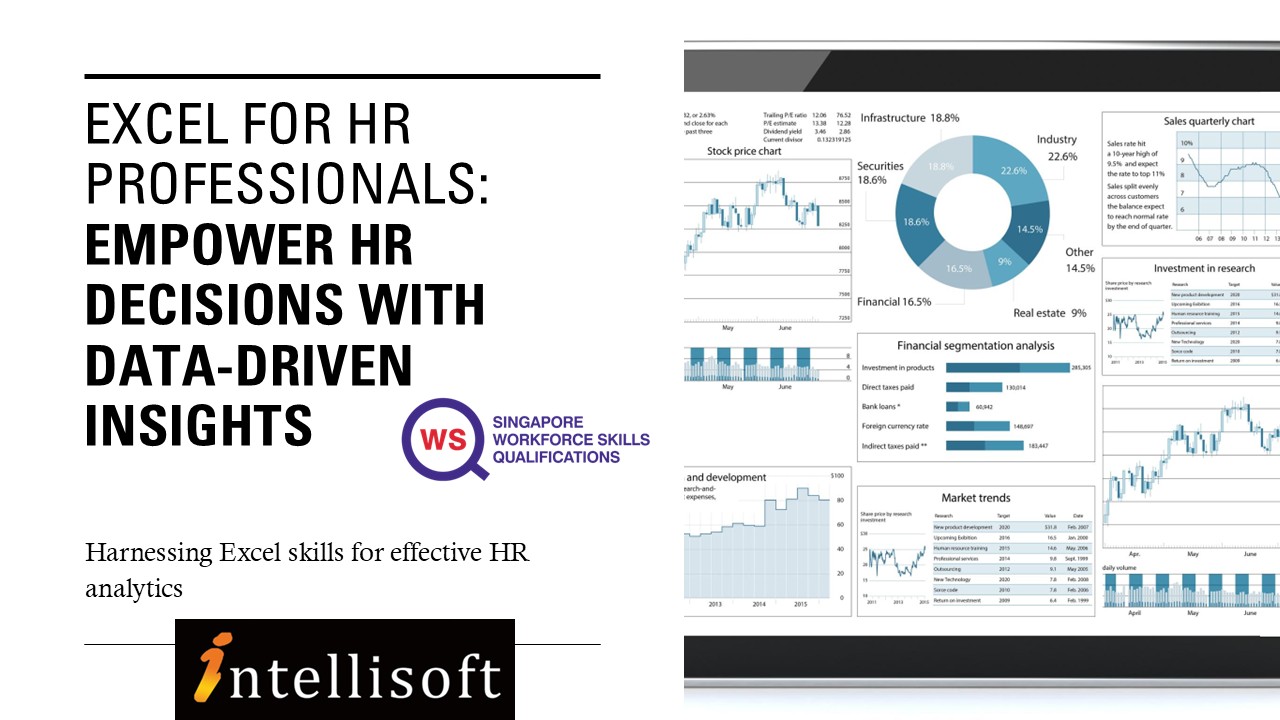
Excel for HR Professionals

Excel for HR course in Singapore at Intellisoft with SkillsFuture Credits Eligibility

Microsoft Excel training at Intellisoft

Up to 70% WSQ Funding & SkillsFuture Credits Eligible Course on Excel Analytics for HR Professionals in Singapore

Course Duration for Microsoft Excel for HR Training: 2 days

Where: Intellisoft Training Room @FortuneCentre
Using: Microsoft Excel 365.   Call +65 6250-3575 for Details.
Excel for HR course in Singapore at Intellisoft with SkillsFuture Credits Eligibility

Unlock the power of data-driven decision-making with Excel for HR Professionals, a comprehensive 2-day hands-on workshop designed specifically for Human Resource executives, managers, and analysts.

In today’s fast-paced, metrics-driven workplace, HR teams must go beyond spreadsheets and truly analyze their workforce data to provide strategic insights. This workshop equips you with the tools, techniques, and confidence to clean, manage, analyze, and visualize HR data using Microsoft Excel.

You’ll learn how to calculate HR metrics, build interactive dashboards, use PivotTables for workforce analysis, and even perform hypothesis testing to validate HR strategies. From understanding employee turnover trends to visualizing recruitment funnels, this course will help you deliver clear, data-backed insights to management.HR Analytics Course Singapore

Led by a senior HR analytics expert, this course blends real-world HR scenarios with Excel’s practical capabilities, making it an essential upskilling program for modern HR professionals.

Learn Excel at Intellisoft Singapore

By the end of this 2-day workshop, participants will be able to:

  • Understand key HR metrics and their role in data-driven decision-making

  • Clean and prepare HR data for analysis using Excel

  • Apply essential Excel formulas like IF, XLOOKUP, COUNTIF, and SUMIFS

  • Perform basic descriptive statistics to summarize HR data

  • Use PivotTables with grouping, binning, and slicers for HR reporting

  • Create charts and dashboards to visualize workforce trends

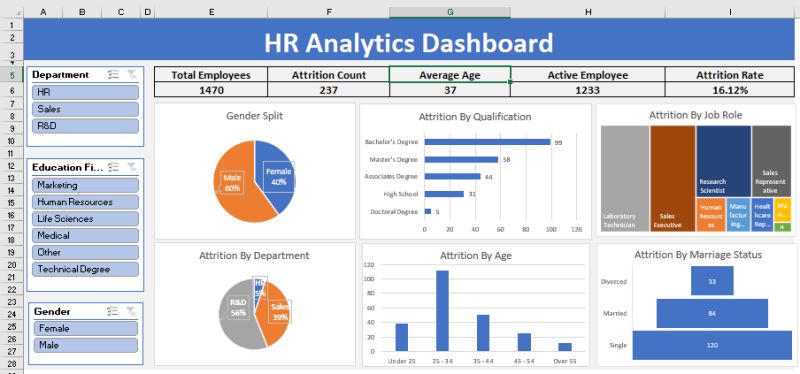
  • Build interactive HR dashboards with KPIs and slicers
  • Apply data validation and protection for secure HR reporting

  • Translate HR data into actionable insights for management

In just 2 days, HR Professionals will learn the tips that save hours to resolve the difficulties they face on a daily basis in doing employee compensations, salary, leave, benefits etc.

In this practical training, participants will learn formatting techniques to convert data from different sources,  and how to make the best use of most important formulas for HR.Using Excel for Beginners in HR Analytics - 2 Day classroom in Singapore

What will you get:

  • Quality training is delivered by Microsoft Certified Trainers from the industry.
  • Participants get the easy to read and understand manual specially designed for this course to take back for practice and future reference.
  • All formulas and functions from these files could be directly used at workplace.
  • Ability to ask questions on the spot and maximize your learning.

You can register online for the Advanced Excel for HR Training.

If you want to join our other Excel course in Singapore & improve your skills, we have multiple courses – Basic Excel for Analytics, Advanced Excel Courses in Singapore & VBA Macro Programming Courses.

Go To Top

This course is targeted towards HR Executives, HR Analysts, Talent Acquisition Specialists, and HR Business Partners who want to enhance their Excel skills for real-world HR use. If you have some HR background, or work in any function in HR, this practical and hands-on course on HR Analytics with Advanced Excel skills will be of great use to you and your organization.

After completion of the Advanced Excel for HR Analytics Training, you will be able to do the following easily:

  1. Calculate the tax deductible  amount based on the different salary range.
  2. Display first name, last name with prefix in one single column from three different columns.
  3. Find years of service of employees.
  4. Find the total salary expenses in different regions, different departments.
  5. Total  number of employees in the company  in different departments.
  6. Find the total salary given to employees of a particular department or designation in a particular month.
  7. Find number of employees joined on particular date/month in any department in any country.
  8. Calculate the bonus based on overall performance of an employee.
  9. Find the number of leaves taken by any employee, find the designation of an employee from his salary.
  10. Count number of directors or any designation in a company.
  11. Display the records according to department, by hire date, by salary etc.
  12. Calculate the total overtime hours for employees for any month.
  13. View summarized salary for all the different countries in different departments.
  14. Set the status, department of an employee through data validation.
  15. Validate the hire date upon data entry.
  16. Calculate salary based on overtime hours.
  17. Calculate the net pay of an employee from his/her daily pay and leaves taken.
  18. Consolidate overtime hours and rate for two employees
  19. Compare employee’s involvement in department from the working hours using charts.
  20. Find total number of employees working in specific department from specific dates, and much more in this 2 day HR focused Microsoft Excel 365 workshop.

Register today!

Go To Top

Excel Training @Intellisoft

Excel for HR Professionals: 2-Day Practical Workshop – Course Outline

Empower HR decisions with Data-Driven Insights Using Microsoft Excel

Excel for HR course in Singapore at Intellisoft with SkillsFuture Credits Eligibility

Day 1: Foundations of Excel for HR Analytics

Module 1: Introduction to HR Analytics with Excel

  • The role of HR analytics in modern workforce planning and decision-making.
  • Overview of key HR metrics: turnover, absenteeism, training ROI, cost per hire, etc.
  • How Excel supports people analytics in daily HR operations.

Module 2: Excel Basics Refresher for HR Teams

  • Navigating Excel’s interface and layout.
  • Best practices for entering, editing, and formatting HR data.
  • Time-saving shortcuts and tricks tailored for HR scenarios.

Module 3: Managing & Cleaning HR Data

  • Data formatting essentials: text, numbers, dates, currencies.
  • Cleaning messy HR data using Text Functions in Excel like TRIM, PROPER, UPPER/LOWER, and SUBSTITUTE.
  • Removing duplicates, fixing blank records, and using Flash Fill for smart entries.

Module 4: Sorting, Filtering & Conditional Formatting in HR

  • Sorting multi-column HR data (e.g. tenure within departments).
  • Advanced filters: finding employees with specific certifications or expiring contracts.
  • Highlighting absenteeism, birthdays, or contract expiry using conditional formatting.

Module 5: Key Statistics and Descriptive Analytics for HR

  • Understanding key statistical indicators: average, median, mode, min, max, standard deviation.
  • Using built-in functions for Analysis using Average, Median, Mode, Standard Deviation: AVERAGE(), MEDIAN(), MODE.SNGL(), STDEV.P().
  • Applying statistics to HR use cases: average age, training hours, salaries.

Module 6: Useful Formulas for HR Analysis

  • Using IF, COUNTIF, SUMIF, AVERAGEIF for common HR calculations.
  • XLOOKUP vs VLOOKUP: when and how to use each to fetch employee details.
  • Introduction to trend analysis & forecasting in HR Data

HR Dashboard for Analytics in Excel at Intellisoft Systems Singapore

Day 2: Advanced HR Analytics, Reporting & Dashboards

Module 7: Pivot Tables for HR Reporting & Analysis

  • Creating PivotTables to analyze headcount, turnover, attendance.
  • Grouping and binning by age, years of service, and salary ranges.
  • Calculating % of total, count of hires by department, and more.
  • Adding slicers for filtering by department, gender, or employment type.
  • Hypothesis Testing in HR data

Module 8: HR Data Visualization with Excel Charts

  • Choosing the right chart type for HR reports.
  • Creating trend charts for attrition, headcount growth, or training hours.
  • Combining multiple data series (e.g. budget vs actual training spend).

Module 9: Building HR Dashboards in Excel

  • Elements of a good HR dashboard: KPIs, interactivity, simplicity.
  • Creating interactive dashboards using slicers, PivotTables, and PivotCharts.
  • Designing dashboards for recruitment, employee engagement, or manpower planning.
  • Incorporating Excel form controls (drop-downs, checkboxes) to enhance dashboards.

Module 10: Working with Protected & Shared HR Data

  • Locking specific cells, sheets, or workbooks to protect sensitive data.
  • Using data validation for dropdowns in HR forms (e.g. job roles, departments).

Module 11: Real-World Case Studies & Practice

  • Case 1: Employee turnover analysis and exit trend identification.
  • Case 2: Performance appraisal summary using VLOOKUP & PivotTables.
  • Case 3: Recruitment dashboard using slicers to filter by job level or location.


Target Audience

HR Executives, HR Analysts, Talent Acquisition Specialists, and HR Business Partners who want to enhance their Excel skills for real-world HR use.

Learning Outcomes

By the end of the course, participants will be able to:

  • Organize, clean, and analyze HR data using Excel formulas and tools.
  • Create PivotTables with binning and slicers to gain deeper insights.
  • Apply descriptive statistics to identify patterns in workforce data.
  • Build dashboards to communicate HR metrics and support strategic decisions.

Full of  Practical, Hands on Exercises based on HR work. A Laptop for doing the exercises is provided in the class room for all participants. What are you waiting for? Register for Excel for HR Executives.

Go To Top

This course is designed for: New and Experienced HR professionals from:

  •     Admin Professionals
  •     Compensation and Benefits Professionals
  •     HR Reward and Payroll Professionals
  •     HR Managers
  •     Anyone who perform HR functions in their organizations on daily basis

This course is extremely practical with multitude of hands on exercises that HR Executives will learn to apply in routine HR work and present meaningful information to the management. You can attend the HR workshop on Excel at Intellisoft Systems.

You must know the basics of using computer, and using elementary usage of Microsoft Excel.

Go To Top

Post-Course Support

  • We provide free consultation related to the subject matter after the course.
  • Please email your queries to training@intellisoft.com.sg and we will forward your queries to the subject matter experts.
Microsoft Training at Intellisoft

Learn Practical Skills

Companies sponsoring their staff for this Excel training will benefit from increased employee productivity.

Your team will learn the most useful formulas, shortcuts, tips & tricks to become good at using Excel at a Expert level.

Excel Dashboard Training Participants

2 Days Workshop

Enhance your team's efficiency and effectiveness with key Excel Skills

Contact us for advise on how to go about how to get started in learning Key Excel Skills for HR.

Get Started Today!

Learn By Doing

You learn best when you Do It Yourself.

We teach you, step by step, how you can learn new skills, build your knowledge and enhance your career prospects quickly & easily, with Practical Tips & Tricks!

Do You Have Any Questions or Need a Quotation?

Simple. Just tell us what you need. We’ll be glad to help you!

Some of the companies that experienced our trainings

How To Register

Register for the 2 Days of Excel for HR training today by simply clicking on the chosen course date available at the top of this page. Need Help?

  1. Call us at +65 6250-3575, SMS / WhatsApp: +65 9066 – 9991
  2. Send an email  to  training@intellisoft.com.sg  OR
  3. Submit an online enquiry if you have  any questions regarding Excel for HR training.

We also offer Corporate Trainings for Advanced Excel 365 version. If you have a group of people, we can arrange to conduct the Advanced  Excel for HR   training at your office location too. Just contact us for details.

Master Excel
&
Enhance Your Productivity

Training Course Fees & Funding

Full course fee: S$1,000.00 (before GST & government funding) TGS: TGS-2025055079

Highest Funding
70% Grant

70% SSG Grant

Baseline + Enhanced Training Support

  • SG Citizens aged 40+ (Individual, SME or MNC)
  • SME-sponsored SG Citizens (21+)
  • SME-sponsored PRs (21+)
Course Fee S$1,000.00
SSG Funding (70%) − S$700.00
Nett Fee S$300.00
GST (9%) S$90.00
You Pay S$390.00
SSG Funded
50% Grant

50% SSG Grant

Baseline WSQ Funding

  • SG Citizens aged 21–39 (Individual or MNC)
  • MNC company-sponsored PRs (21+)
  • Individual PRs (21+)
Course Fee S$1,000.00
SSG Funding (50%) − S$500.00
Nett Fee S$500.00
GST (9%) S$90.00
You Pay S$590.00
Foreigners & other pass holders: Government grants are not applicable. Full course fee of S$1,000.00 + 9% GST = S$1,090.00 applies. Contact us for more details.

Need help with funding applications? We'll guide you through the process.

* Terms & conditions apply. Funding subject to eligibility and approval by respective agencies. GST applies on full course fee before subsidy. Fee information is accurate as of Apr 2026.

Best Web Design Course: Build Your Own WordPress Website

Wordpress training at Intellisoft, Singapore

Up To 70% Funding Grant From SSG*

Learn how to build beautiful websites using WordPress. You will learn how to set up and start building websites with WordPress; quickly and effectively. In our Best WordPress Web Design Training, we’ll be focusing on the self-hosted version of WordPress available at WordPress.org.

2 days practical hands-on WordPress training in Singapore
3 days practical hands-on WordPress training in Singapore

This version offers the most flexibility and customization options. However, many of the WordPress Skills you will acquire are applicable to both self-hosted WordPress installations and WordPress.com blogs.

Our Best Web Design Course in Singapore

This bestselling WordPress web design course is a three day, practical training where you start from scratch and come out with a complete website in just three days.

Testimonials for the Web Design Course With WordPress:

  1. The WordPress Trainer is extremely knowledgeable and easy to connect with. Shares his experience and able to connect and link the topic and his experience in a very systematic flow. – Azmi, SUTD
  2. The trainer is very knowledgeable and patience; he makes the class lively and always takes extra time to answer every student’s question. – Jaye, Concept Culture
  3. A very patient and helpful trainer. Was able to add social media link, many software application to link for free, the website can be changed as and when easily – Aik Chen, Emerges
  4. Thorough and clear materials are covered in the e-book. Step-by-step explanation of how to create a WordPress website, followed by asking the participants to try it our on their own. Mr. Prakash was very patient to answer all questions, to share his knowledge and teach beyond what was covered in the class. – Janice

WordPress Training in Singapore includes:

  • Hands-on and practical classroom training delivered by specialist WordPress trainers
  • Printed course manual; an excellent reference guide for well after the training.
  • Courses conducted in fully set-up computer labs. No need to bring your own Laptop.
  • Certificate of Course Completion; to recognize your WordPress skills.
  • Small Class sizes; for more personalized learning experience.

Recommended Reading: Creating Your Own WordPress Website in Just 3 Days

WordPress software has come a long way. It started as a Blogging software, but now more and more websites are using WordPress as a Content Management System (CMS).

In fact, WordPress is ideal to be used as a CMS, and it is extremely easy to install, configure and set up WordPress driven website.

To know more about available government funding, please visit WordPress Training With WSQ Grant

Learn WordPress at Intellisoft Singapore
Learn WordPress @Intellisoft Singapore

WordPress is Best Way to Get Started. Join our 3 days practical, Hands-on Workshop and walk out with the Complete Website!

Web Design Training Course: Course Objectives

  • Install WordPress in any website
  • Setup a Theme, Customize a Theme
  • Required Plug-ins and Widgets to get started
  • Setup a Contact Form for Your Customers to contact you
  • Redesign a unique website for you and your clients
  • Use FTP to upload any file to your web host
  • Build content in the blog using Pages, Post and Images
  • Embed audio and video with free plugins into your WordPress Blog.

You will have a complete website in just 3 days, and it comes with up to a 70% WSQ grant from the Singapore government (if eligible)

Once your website is ready, you begin the important work of promoting it on Facebook & other social media. Make sure to learn Digital Marketing Training in Singapore.

Go To Top

This is a beginner to intermediate level web design course, using WordPress Web Design software.

We will teach you how to use the worlds most popular CMS and blogging software WordPress to create dynamic website in a short time.

You will learn how to install, useful plugins, themes and settings that will make your website shine in no time.

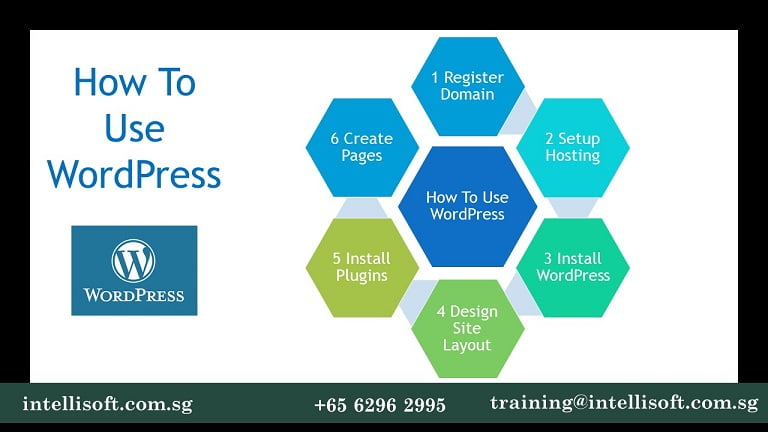
How To Use WordPress Training in Singapore
How To Use WordPress: Step by Step Web Design Training in Singapore

Go To Top

How To Design & Promote Your Own Website With WordPress
What is CMS. What is WordPress

  • Describe the features & functions of WordPress CMS
  • Advantages & disadvantages of hosting options
  • Keyword Research For Website & Individual Pages

Domain Hosting & Templates

  • Register a Domain & Setup Hosting
  • Choose an Appropriate Template
  • Plan the content & layout for each web page

Laws, Guidelines, Constraints

  • Understand the laws, guidelines & constraints on the content & use of websites
  • Different file types for saving content

Plan Content & Layout

  • Customise the website template as per plan
  • Populate Website With Planned Content
  • Add features & enhance the site
SEO, Keywords, Blog Setup

  • Perform On-Page SEO for each page
  • Setup & configure a blog on the website
  • storare & retrieval of files on site
  • Link to Social Networking Sites as per plan
  • Include buttons to share content

Testing, SEO & Launch

  • Use testing methods to check that all elements & features are working
  • Register with search engines.
  • Importance of measuring traffic

Measuring  Traffic & ROI

  • Methods of measuring the ROI
  • Use Google Analytic to monitor traffic
  • Understand the term bounce rate & its impact on the site
  • Identify improvements based on analytical information

Go Live

  • Launch of a Responsive, Search Engine Optimized Website

Training Course Fees

The full course fees for this training is S$750, before any Government funding.
For Singaporean/PR above 21 years, Training Grants are available.
For Foreigners, no government grants are available.

Grant Information

WSQ funding from SkillsFuture Singapore (SSG) is available to Singaporeans/PRs above 21.
(Both Individuals & Company Sponsored ).

Individual Singaporeans, 25 years & above can also use their SkillsFuture Credits for this training at Intellisoft.

Companies sending Locals & Foreign staff for training can avail SFEC Funding
Use it to improve the skills of your entire department!

NTUC Members can utilize UTAP Funds to offset 50% of the remaining fees*.

Contact us for more information on How to apply for this SkillsFuture Grant.
Call +65-6252-5033 for Details or WhatsApp Now at +65-9066-9991

70% Grant

$525 Funding by SSG
Pay $225
  • Singaporeans Above 40 Years
  • Individuals
  • SME Companies
  • Individuals Can Use SkillsFuture
  • UTAP Funding*

50% Grant

$375 Funding by SSG
Pay $375
  • Below 40 Years
  • Individuals
  • SG / PR / MNC Companies
  • SkillsFuture (Singaporeans only)
  • UTAP Funding*

Go To Top

Those who are interested in creating dynamic websites, Basic experience with HTML is assumed.

This WordPress training course assumes you are a beginner, And will help you to build your WordPress Driven Website from Scratch. 

This web design course Singapore is the Best!


Go To Top

Post-Course Support

  • We provide free consultation related to the subject matter after the course.
  • Please email your queries to training@intellisoft.com.sg and we will forward your queries to the subject matter experts.
Microsoft Training at Intellisoft

Claim SDF Grant

Companies sponsoring their staff for training can Claim SDF Funding, subject to SSG Eligibility Criteria.

Applicable for Company Sponsored Singaporeans & PRs.

SkillsFuture Ready

Singaporeans can use $500 SkillsFuture Credits for this training to offset the course fees.

Contact us for advise on how to go about claiming your SkillsFuture.

Get Started Today!

Learn By Doing

You learn best when you Do It Yourself.

We teach you, step by step, how you can learn new skills, build your knowledge and enhance your career prospects quickly & easily, with Practical Tips & Tricks!

Do You Have Any Questions or Need a Quotation?

Simple. Just tell us what you need. We’ll be glad to help you!

Some of the companies that experienced our trainings

How To Register

Register for the 3 Day WordPress Class Today to Learn Website creation using WordPress. Simply fill the form on the top, and book your seat today. Or send an online enquiry for any questions. You can call us at +65 6252-5033 or What’s app at +65 9066-9991

Call or email to info@trainingint.com for any questions, or to register for the upcoming class and begin learning WordPress. We have regular public classes each month, and Custom Corporate Trainings can be arranged at your office too!

Build Your Own WordPress Site/Blog/Shop
&
Advance Your Career

Adobe Illustrator Training

WSQ Adobe Illustrator Course in Singapore at Intellisoft

This 2-days hands-on training in for anyone beginning to learn Illustrator, this course will be their ideal starting point. Best suitable for working professionals and students who would like to learn latest digital editing and Adobe Illustrator concepts.

This course imparts participants with knowledge to plan, design, build and maintain their graphical designs with Adobe Illustrator.

Intellisoft offers WSQ funded, UTAP supported SkillsFuture Credits Ready Courses in Singapore

You can enhance your design skills by enrolling in the Illustrator course offered by Intellisoft Training in Singapore. You can also explore further learning opportunities by considering the photoshop Adobe SkillsFuture course, and can conveniently locate Adobe training near you to advance your graphic design capabilities.

Course Duration :  2 Days

WSQ Grant: WSQ Funding of 50-70%* from SkillsFuture Singapore (SSG) is available to Singaporeans/PRs above 21 (Both Individual & Company Sponsored).

SkillsFuture: Individual Singaporeans, aged 25 and above can use their SkillsFuture Credits for this training.

UTAP: In addition, NTUC members can utilize UTAP to offset 50% of remaining fees

Adobe Illustrator Training in Singapore

Training Course Fees & Funding

Full course fee: S$695.00 (before GST & government funding) TGS: TGS-2023017920

Highest Funding
70% Grant

70% SSG Grant

Baseline + Enhanced Training Support

  • SG Citizens aged 40+ (Individual, SME or MNC)
  • SME-sponsored SG Citizens (21+)
  • SME-sponsored PRs (21+)
Course Fee S$695.00
SSG Funding (70%) − S$486.50
Nett Fee S$208.50
GST (9%) S$62.55
You Pay S$271.05
SSG Funded
50% Grant

50% SSG Grant

Baseline WSQ Funding

  • SG Citizens aged 21–39 (Individual or MNC)
  • MNC company-sponsored PRs (21+)
  • Individual PRs (21+)
Course Fee S$695.00
SSG Funding (50%) − S$347.50
Nett Fee S$347.50
GST (9%) S$62.55
You Pay S$410.05
Foreigners & other pass holders: Government grants are not applicable. Full course fee of S$695.00 + 9% GST = S$757.55 applies. Contact us for more details.

Need help with funding applications? We'll guide you through the process.

* Terms & conditions apply. Funding subject to eligibility and approval by respective agencies. GST applies on full course fee before subsidy. Fee information is accurate as of Apr 2026.

Adobe Illustrator is a powerful and versatile tool for creating illustrations, logos, and graphics for print and the Web. You can learn to produce detailed and scalable art in this Illustrator course.

Working with an expert, certified Adobe Illustrator instructor, you’ll build a strong foundation, exploring selection tools, drawing tools, layers, the Pen tool, as well as transformations/distortions, type tools, and modifying paths and shapes in Adobe Illustrator.

Multiple Hands-on illustration projects are included, like creating the illustrations of a robot, a CD cover, photo tracing, a postcard, a bus ad, and visual identity.

Actual illustrations may vary, based on the trainer and the their optimal selection of illustration projects for each class.

Go To Top

Learn beginner to intermediate level by joining the best SkillsFuture Illustrator course in Singapore. People in the creative industry, who use or intend to create graphics, art, photo editing, illustration creation will enjoy and benefit from this training.

Go To Top

Module 1: The Work Area

  • Vector Graphic concepts
  • Navigating the new Dark CS6 interface
  • Defining an Illustrator document
  • Managing artboards
  • Using Guides, Smart Guides & Grids

Module 2: Manipulating Artwork

  • Modifying object properties
  • Selection techniques
  • Aligning & distributing objects
  • Grouping & arranging objects

Module 3: Drawing in Adobe Illustrator

  • Creating basic shapes
  • Using the Drawing Modes
  • Drawing Paths
  • Using the Width tool
  • Complex Shapes: using Pathfinder & Shape Builder
  • Creating & modifying blends

Module 4: Working with Layers in Adobe Illustrator

  • Working with Layers & the Layers Panel
  • Creating layers & sublayers
  • Manipulating layers: selecting, moving, viewing, locking, merging, duplicating
  • Creating Clipping & Opacity masks
  • Isolation

Module 5: Handling Colour in Illustrator

  • Understanding Colour
  • Working with Colour
  • Patterns
  • Editor
  • Using Live Paint

Module 6: Master Typography in Adobe Illustrator

  • Creating Type
  • Formatting
  • OpenType
  • Type effects
  • Converting text to outlines

For me this was without doubt the most creative and fun training course I’ve ever been on. I not only discovered the tools and functions of the software but also had a wonderful trainer who led the course at Intellisoft Singapore. He was animated, funny and with years of industry knowledge – was extremely knowledgeable. Worth attending and learning Illustrator from an industry Pro” – Benny Tan

Interested individuals seeking to enhance their skills in Adobe Illustrator can visit the Intellisoft office for more information on Adobe Illustrator training in Singapore.

If you have questions  such as where to learn Adobe Illustrator and where to buy Adobe Illustrator, our experienced training coordinator and trainers will guide you with the knowledge to plan, design, build, and maintain their graphical illustrations with the amazing Adobe Illustrator software training.

Go To Top

Prerequisites : No prior knowledge of Adobe Illustrator is required to take this course. Some experience with the software would be advantageous, but not mandatory.

Go To Top

Post-Course Support

  • We provide free consultation related to the subject matter after the course.
  • Please email your queries to training@intellisoft.com.sg and we will forward your queries to the subject matter experts.
Microsoft Training at Intellisoft

Claim WSQ Grant

Companies sponsoring their staff for training can Claim up to 70% WSQ Funding, subject to SSG Eligibility Criteria.

Applicable for Individuals & Company Sponsored Singaporeans/PRs.

SkillsFuture Ready

Singaporeans can use $500 SkillsFuture Credits for this training to offset the course fees.

Contact us for advise on how to go about claiming your SkillsFuture.

Get Started Today!

Learn By Doing

You learn best when you Do It Yourself.

We teach you, step by step, how you can learn new skills, build your knowledge and enhance your career prospects quickly & easily, with Practical Tips & Tricks!

Do You Have Any Questions or Need a Quotation?

Simple. Just tell us what you need. We’ll be glad to help you!

Some of the companies that experienced our trainings

How To Register

Register for the 2 Days of Adobe Illustrator today by simply clicking on the chosen course date available at the top of this page.

Need Help?

  1. Call us at +65 6250-3575, SMS / WhatsApp: +65 9066 – 9991
  2. Send an email  to  training@intellisoft.com.sg  OR
  3. Submit an online enquiry if you have  any questions regarding Adobe Illustrator training.

We have regular public classes each month, and a Corporate Training can be arranged at your office too!

Get Creative With Illustrator
&
Accelerate Your Career

Microsoft Project Training (WSQ)

Microsoft Project Course in Singapore With WSQ Grants from SSG
Microsoft Project training at Intellisoft

Microsoft Project Professional  (upto 70% WSQ Funding) is available to Singapore Companies (For company sponsored candidates). Call +65 6250-3575 for Details.

SkillsFuture credits ready for Singaporeans Learn how to Begin, Plan, Execute, Monitor &  Control,  and Close a project – all using the latest Microsoft Project software in our hands – on classroom training.

UTAP: In addition, NTUC members can utilize UTAP to offset 50% of remaining fees (capped at $250 per year).

Learn to plan various tasks involved,  resources required to accomplish the tasks,  and the overall cost in order to plan a project properly. Course Length: 2 days.

Recommended Reading: Microsoft Project Training Crucial to Project Success Many project managers think Microsoft Project software (Microsoft Project 2016, MS Project 2013 ) to be just useful for creating a list of things to do… like a laundry list.

Some think that MS Project is more of a scheduling software, and it is useful only upto coming up with a Gantt Chart or a Network Diagram for their project.  Nothing could be further from the truth!

Microsoft Project 2016 is a sophisticated piece of software, which is capable of doing much more than mere scheduling. 

To read more, please visit Microsoft Project Training Crucial to Project Success

Microsoft® Office Project Professional 2016 has an extensive range of easy to use shortcuts, tips and tricks, that will enable you to use it as a tool that assists in managing your projects effectively and efficiently.

In this Microsoft Project 2016 training course, you will create and modify a project plan, and begin to manage variances in a project, bringing the project to a success!

PLUS, you will learn completely NEW FEATURES introduced in Microsoft Project 2016! You will create and manage a project schedule using Microsoft® Project 2016.

Upon successful completion of this course, students will be able to:

Identify the basic features and components of the Microsoft Project environment.

• Create a new project plan file and enter project information.

• Manage tasks by organizing tasks and setting task relationships.

• Manage resources for a project.

• Finalize a project plan.

• Exchange project plan data with other applications.

• Update a project plan.

• Manage project costs.

Report project data visually.

• Reuse project plan information.

Go To Top

This course is designed for project managers, team leads, who have a basic understanding of project management concepts, who is responsible for creating and modifying project plans, and who needs a tool to manage those project plans.

Format: Instructor led, highly interactive classroom setting with many practical exercises to do and learn from in this session.

Each student will be provided with a Laptop to use in the training room, to do the exercises. You can bring in your laptop notebook for your use in the class. It must be pre-installed with Microsoft Project 2016 software for your use.

Go To Top

Day 1 of Microsoft Project 2016

Lesson 1: Starting a Project

  • Project Management 101
  • Navigate and Customize the Project 2013 Interface
  • Add Tasks to a Project
  • Add Resources to a Project
  • Save a Project

Lesson 2: Working with Project Calendars

  • Manage Project Time Frames
  • Change Working Time

Lesson 3: Working with Project Tasks

  • Manage Project Tasks
  • Add Summary Tasks and Milestones

Lesson 4: Working with Project Resources

  • Manage Project Resources
  • Allocate and Level Work Resources

Lesson 5: Delivering a Project Plan

  • Print Project Views
  • Share Projects
  • Export Projects
Day 2 of Microsoft Project 2016

Lesson 6: Managing the Project Environment

  • Link Projects
  • Baseline a Project
  • Work with Custom Fields

Lesson 7: Managing Task Structures

  • Change a Task List
  • Create a Network Diagram
  • Manage the Critical Path
  • Use Lag and Lead

Lesson 8: Generating Project Views

  • Use View Command
  • Use Existing Views
  • Create Custom Views
  • Format and Share the Timeline View

Lesson 9: Producing Project Reports

  • Use Existing Reports
  • Create Custom Reports
  • Export Visual Reports

Go To Top

Students enrolling in this class should have the following:

  • A general introductory-level understanding of project management concepts.
  • Basic end-user skills with any current Windows operating system.

Go To Top

Post-Course Support

  • We provide free consultation related to the subject matter after the course.
  • Please email your queries to training@intellisoft.com.sg and we will forward your queries to the subject matter experts.
Microsoft Training at Intellisoft

Claim SDF Grant

Companies sponsoring their staff for training can Claim SDF Funding, subject to SSG Eligibility Criteria.

Applicable for Company Sponsored Singaporeans & PRs.

SkillsFuture Ready

Singaporeans can use $500 SkillsFuture Credits for this training to offset the course fees.

Contact us for advise on how to go about claiming your SkillsFuture.

Get Started Today!

Learn By Doing

You learn best when you Do It Yourself.

We teach you, step by step, how you can learn new skills, build your knowledge and enhance your career prospects quickly & easily, with Practical Tips & Tricks!

Training Course Fees & Funding

Full course fee: S$1,200.00 (before GST & government funding) TGS: TGS-2024043438

Highest Funding
70% Grant

70% SSG Grant

Baseline + Enhanced Training Support

  • SG Citizens aged 40+ (Individual, SME or MNC)
  • SME-sponsored SG Citizens (21+)
  • SME-sponsored PRs (21+)
Course Fee S$1,200.00
SSG Funding (70%) − S$840.00
Nett Fee S$360.00
GST (9%) S$108.00
You Pay S$468.00
SSG Funded
50% Grant

50% SSG Grant

Baseline WSQ Funding

  • SG Citizens aged 21–39 (Individual or MNC)
  • MNC company-sponsored PRs (21+)
  • Individual PRs (21+)
Course Fee S$1,200.00
SSG Funding (50%) − S$600.00
Nett Fee S$600.00
GST (9%) S$108.00
You Pay S$708.00
Foreigners & other pass holders: Government grants are not applicable. Full course fee of S$1,200.00 + 9% GST = S$1,308.00 applies. Contact us for more details.

Need help with funding applications? We'll guide you through the process.

* Terms & conditions apply. Funding subject to eligibility and approval by respective agencies. GST applies on full course fee before subsidy. Fee information is accurate as of Apr 2026.

Do You Have Any Questions or Need a Quotation?

Simple. Just tell us what you need. We’ll be glad to help you!

Some of the companies that experienced our trainings

How To Register

Register for the 2 Days Microsoft Project 2016 Training today by simply clicking on the chosen course date available at the top of this page. Need Help?

  1. Call us at +65 6250-3575, SMS / WhatsApp: +65 9066 -9991
  2. Send an email  to  training@intellisoft.com.sg  OR
  3. Submit an online enquiry if you have  any questions regarding Microsoft Project 2016 training.

We have regular public classes and Customized Corporate Training can be arranged at your office too. If you have a group of people, we can arrange to conduct the Microsoft Project 2016 training at your office location too. Just contact us for details.

Master Microsoft Project &
Be a Better
Project Manager

Free Tips, Tutorials & Training Grants Info

Learn from expert tips, tricks and resources for Excel, PowerPoint, Photoshop, Python, Power BI, Project Management, IT, Soft Skills & more with our Email Newsletter.
Plus get the latest news on Grants. Join Today!

Found What You Were
Looking For?

Just Tell us...

We're Here To Help You!