

Discover Lesser Known Features of Excel

Hidden features of Excel

Want to go beyond the common use of Excel and Explore its Extremely Useful but Lesser-Known Features of Microsoft Excel?

Microsoft Excel’s extensive features can help you to increases productivity and also saves time. Become proficient in Data Management & Business Analytics – Turn Data into Insights, Develop better tables & charts.

Lesser Known Features of Microsoft Excel

Conditional Formatting:

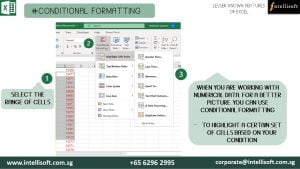
Apply formatting to cells automatically depending on the value of the cell. It is also a powerful feature, given that conditions can be based on any Excel formula. Conditional Formatting works by letting you set rules for how cells can be customized.

Conditional formatting makes it easy to highlight required cells or ranges of cells, emphasizing unusual values. In addition to that, it is used to visualize & analyze data in Excel by using data bars, color scales, and icon sets. Overall, it helps you to identify important data faster.
Learn Lesser Known Shortcuts of Excel at Intellisoft Singapore

Advanced Filters:

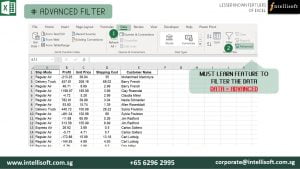
This Advanced command works differently from the Filter command in several ways. It displays the Advanced Filter dialogue box instead of the Auto Filter menu. You can filter the data in place, or to a different location. You can also specify that you want to see unique items only.

All the duplicates are removed from the filtered list, with Advanced filter. The Data tab contains all the features of Advanced Filters. The advantage of using advanced filter is that you can see the filtered criteria in Excel cells. You can also easily add new filters by typing the values directly in the cells. Thus, it is absolute must learn feature.
Learn Advanced Filter for more Productivity at Intellisoft Singapore

Database Functions:

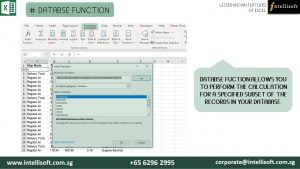
Database functions is a Seldom used Gem in Microsoft Excel. With this, you can not only perform basic calculations but also use complex criteria, that allow you to perform the calculation for a specified subset of the records in your database.

These functions treat the entire set as a Database, just like a SQL Database.
Learn the Database Function at Intellisoft Singapore

Consolidating Multiple Worksheet:

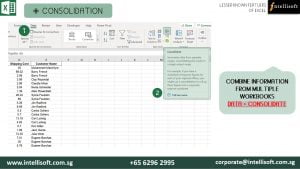
If you receive information in multiple sheets or workbooks that you want to summarize, the Consolidate command can help you pull data together onto one sheet. It allows you to combine information from multiple workbooks when you need them one place.

The Excel consolidate function lets you select data from its various locations and creates a table to summarize the information for you, automatically, painlessly.
Learn Consolidate Function at Intellisoft Singapore

Preventing others from Changing Master Data:

This feature allows you to prevent other users from accidentally or deliberately changing, moving, or deleting data in a worksheet. You can lock the cells on your Excel worksheet & then protect the sheet with a password.

With worksheet protection, you can make only certain parts of the sheet editable and users will not be able to modify data in any other region in the sheet.

You can lock the structure of your workbook by specifying a password.
Locking the workbook structure prevents other users from adding, moving, deleting, hiding, and renaming worksheets.

While Microsoft Excel is packed with gems, these are just a few advantages of learning Advanced Excel with us at Intellisoft. We’ll make you an expert in these lesser-known, but advanced features in Excel.

New Features in Excel

New Features of Excel

Do you know that Microsoft Excel comes with a plethora of new features. It is worth investing the time to learn exciting Excel features, and make the most of the latest and greatest spreadsheet software by Microsoft.

So what is so great about Microsoft Excel? Plenty. Our Master Trainer, Vinai Prakash take you to a tour of the new features in Excel.

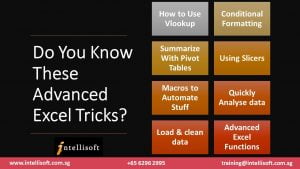
Do You Know These Advanced Excel Tricks?

1. Quick Analysis Tool: The new Quick Analysis tool allows you to convert your data into a chart or a table in just two steps. Preview your data with conditional formatting, spark lines, or charts, and make your choice stick in just one click.

2. Instant Flash Fill: Flash Fill enters the rest of your data in one fell swoop, following the pattern it recognizes in your data.

3. Chart Recommendations: With Chart recommendations, Excel recommends the most suitable charts for your data. Get a quick peek to see how your data looks in the different charts, and then simply pick the one that shows the insights you want to present.

4. New Functions: There’s a whole slew of  new functions in the math and trigonometry, statistical, engineering, date and time, lookup and reference, logical, and text function categories.

5. Smart Pivot Tables: In Excel, When you create a PivotTable, Excel recommends several ways to summarize your data, and shows you a quick preview of the field layouts so you can pick the one that gives you the insights you’re looking for.

In the new Excel Data Model, you’ll be able to navigate to different levels more easily. Use Drill Down into a Pivot Table or Pivot Chart hierarchy to see granular levels of detail, and Drill Up to go to a higher level for “big picture” insights.

6. Improved Collaboration Tools: Working with other people on shared files in real time is a double-edged sword. While it’s useful to do this, you will face problems when two people try to change the same item at the same time. In Excel you can share and work collaboratively on files with others via SkyDrive using the Excel WebApp, and multiple people can work on the same file at the same time.

7. Standalone Pivot Charts: A PivotChart no longer has to be associated with a PivotTable. A standalone or de-coupled PivotChart lets you experience new ways to navigate to data details by using the new Drill Down, and Drill Up features. It’s also much easier to copy or move a de-coupled PivotChart.

Learn Excel in 2-3 Short Day Training: With so many new features, it is important that you learn these features, to improve your efficiency, productivity, and make use of these new  features. After all, what is the point of using the latest software if you do not use its latest and greatest features.

Learn to use Excel features like Vlookup, Macros, Pivot Tables, Pivot Charts, Tables, Advanced Functions and Formulas, Sharing, Collaboration, Removing Duplicates, and much more…

Do contact us at Intellisoft to attend our Basic Excel, or Advanced Excel training courses at our training centre, or have a Customized Corporate Training on Excel at your office.

We also provide WSQ Funded courses for Excel, which means that up to 90% of the course fee is funded by the Singapore Government. Terms & Conditions apply, so contact us for more information on training fees, Grants and customized solutions for your company.

Free Tips, Tutorials & Training Grants Info

Learn from expert tips, tricks and resources for Excel, PowerPoint, Photoshop, Python, Power BI, Project Management, IT, Soft Skills & more with our Email Newsletter.
Plus get the latest news on Grants. Join Today!

Found What You Were
Looking For?

Just Tell us...

We're Here To Help You!